Installation Chart
Milo Series ML09
8
06
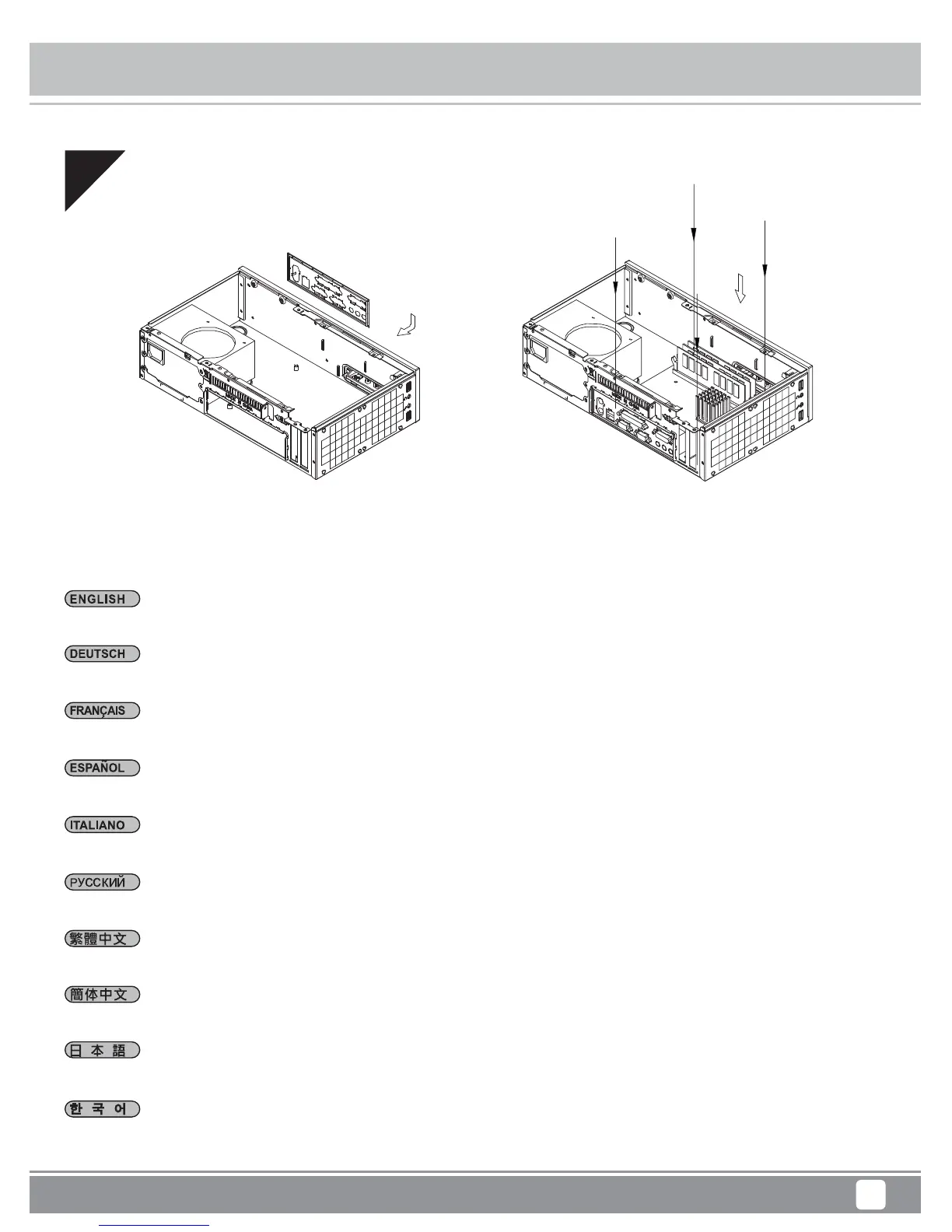
Bringen Sie die bei Ihrem Motherboard mitgelieferte Anschlussblende an, installieren Sie dann das Motherboard im Gehäuse.
Inserte el escudo de E/S incluido con su placa base, luego instale la placa base en la carcasa.
Installate il pannello I/O della scheda madre, quindi la scheda madre stessa.
Insert the I/O shield included with your motherboard then install the motherboard into the case.
Установите панель ввода/вывода материнской платы, затем установите материнскую плату в корпус.
메인보드와 동봉된 I/O 커버를 삽입한 후, 메인보드를 케이스에 설치합니다.
塞入I / O彈片,裝入主機板
塞入I/O弹片,装入主机板
マザーボードに付属のI/Oシールドを装着してから、ケース内にマザーボードを取り付けます。
Insérez la plaque des ports E/S inclus avec votre carte mère, puis mettez la carte mère dans le boîtier.





 To Next Page