Smart Machine Smart Decision
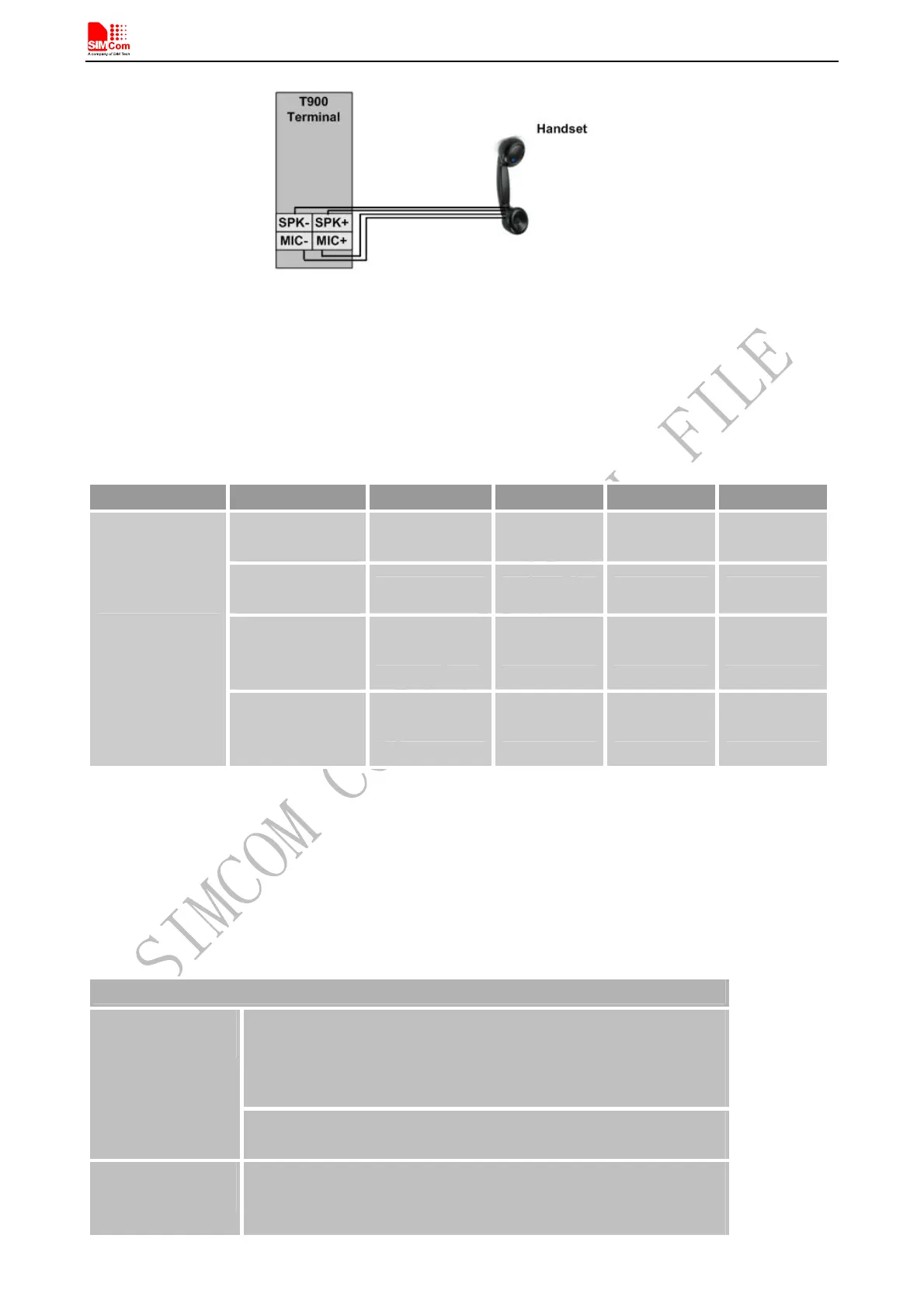
Figure 14: Audio reference circuit
Table 6: Audio Output Characteristics
Parameter Conditions Min Typ Max Unit
RL=32Ω
THD=0.1%
- 91 - mW
RL=32Ω
THD=1%
- 96 - mW
Output swing
Voltage
(single ended)
1.1 Vpp
Normal
Output(SPK)
Output swing
Voltage
(differential)
2.2 Vpp
Customer can set the terminal MIC gain level to make the sounds louder so that the listener can hear more clearly.
And if the sound a little lower on the terminal side, customer can use the “AT +CLVL” to make the sound higher
so that customer can hear clearly.
The AT commands should be send to the terminal by RS232 interface, and the following table shows the detail
commands.
Table 7: AT+CMIC Change the Microphone Gain Level
AT+CMIC Change the Microphone Gain Level
Response
+CMIC: (list of supported <channel>s),(list of supported <gainlevel>s)
OK
Test Command
AT+CMIC=?
Parameters
See Write Command
Read Command
AT+CMIC?
Response
+CMIC: (<channel0>,<gainlevel0>),…,(<channeln>,<gainleveln>)
OK
T900_User Guide_V1.02 18 2013-05-22



 To Next Page