33
EN
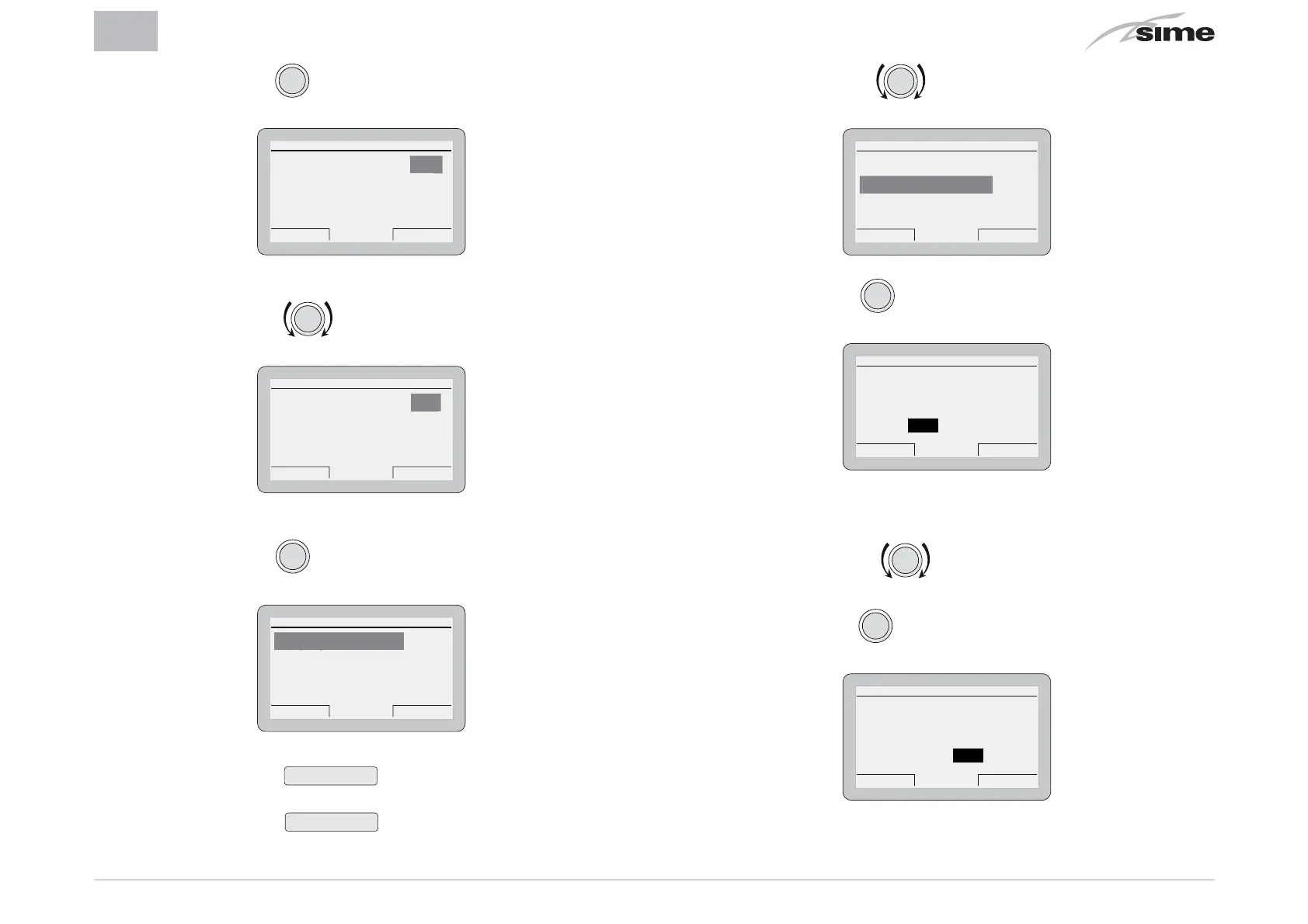
– Press the encoder
clic
to confirm the submenu highlight-
ed and select the modifiable area
GENERAL SETTINGS
Esc Back
Language ITA
Date and time [...]
Factory settings [...]
– Rotate the encoder and modify the
“data/value”
in the
field allowed (eg: from ITA to ENG)
GENERAL SETTINGS
Esc Back
Language ENG
Date and time [...]
Factory settings [...]
EN
– Press the encoder
clic
to confirm the modification and go
back to the submenu
GENERAL SETTINGS
Esc Back
Language ENG
Date and time [...]
Factory settings [...]
an
ua
e
NB.:
- pressing the button
Back
allows the user to go back by
one position
- pressing the button
Esc
allows the user to go back to
the
“main screen”
.
– Rotate the encoder to select another submenu (eg.
Date and time)
GENERAL SETTINGS
Esc Back
Language ENG
Date and time [...]
Factory settings [...]
ate an
t
me
– Press the encoder
clic
to confirm the submenu highlight-
ed and go into the modifiable area
SETTING DATE AND HOUR
DAY MONTH
HOUR MINUTE
YEAR
Cancel Confirm
Date 01 Jan 2014
Hour 06 : 36
– The first modifiable
“data/value”
is highlighted (eg. 06).
– Rotate the encoder
to modify the
“data/value”
(eg.
from 06 to 12)
– Press the encoder
clic
to confirm the modification and se-
lect the next
“data/value”
which will be highlighted (eg. 36)
SETTING DATE AND HOUR
DAY MONTH
HOUR MINUTE
YEAR
Cancel Confirm
Date 01 Jan 2014
Hour 12 : 36


 To Next Page
 Loading...