42
EN
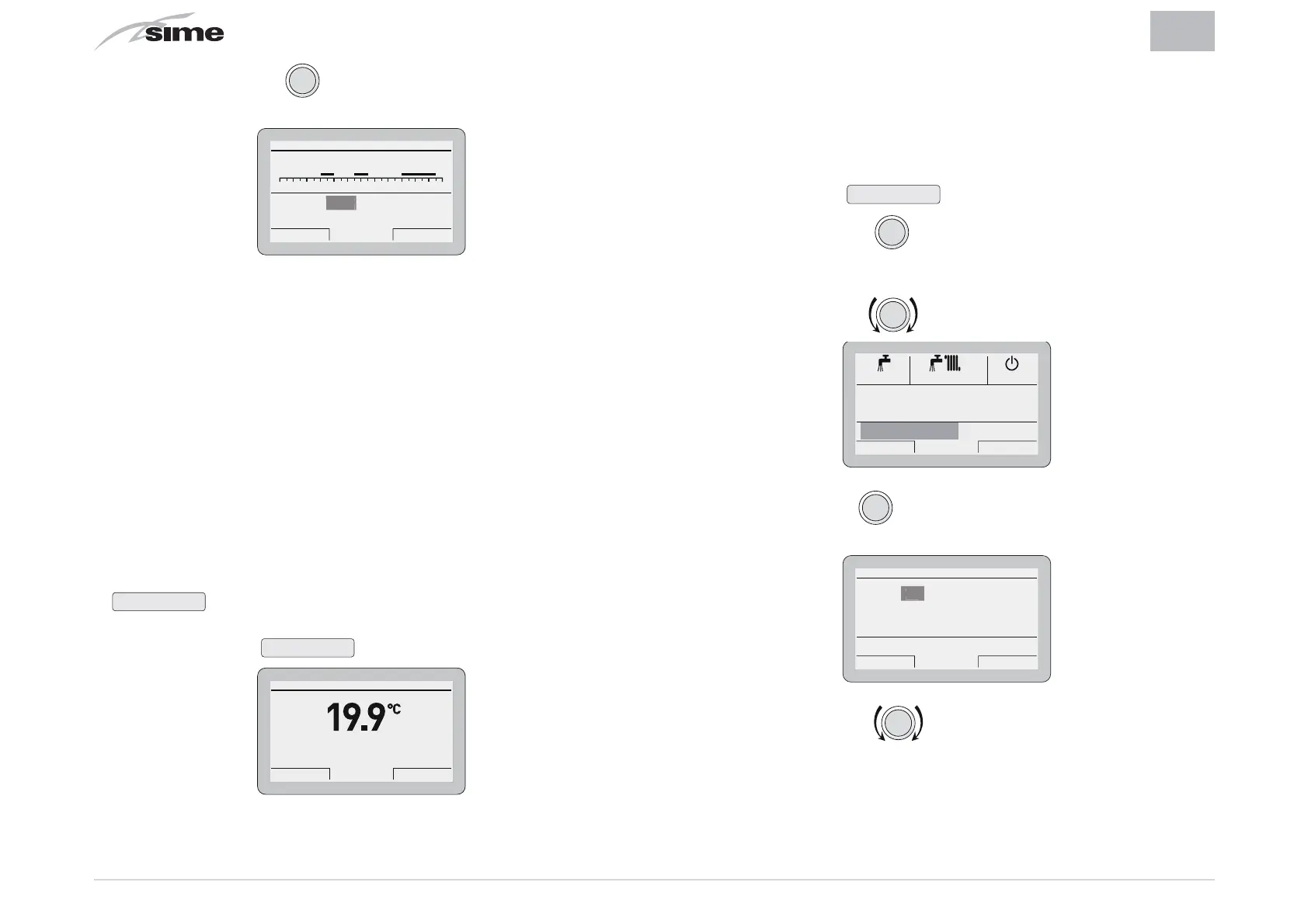
– Press the encoder
click
to confirm the modification and
move to the next
“data/value”
[2]
HEATING TIME PROGRAM
024681012141618202224
Day/s:
[1] 06:00 - 08:00
[2] 11:00 - 13:00
[3] -
[4] 18:00 - 23:00
MONDAY
Cancel Confirm
08:00
– Continue in this way until all the necessary modifications
have been made for each day of the week or group of days.
NB:
The user must work in a CIRCULAR manner ("rounda-
bout") therefore,
ALWAYS MOVING FORWARDS, even if a mis-
take has been made.
WARNING
If NO time band is required, the start and stop times
of that band must be set to the same value (eg. 3
14:00-14:00).
– Once the modification has been made, press the button
Confirm
to go back to
“Single days”
or
“Group of days”
– Press the button
Esc
to go back to the
“main screen”
.
Th 20 Mar 2014Zone 1 10:30
Winter manual - set 20.0°C
Menu Mode
4.3.2 Holiday function
This function allows the user to deactivate both heating and
hot water production during a
“set and activated”
holiday pe-
riod during which the antifreeze function can be active (if set).
To set the holiday function from the
“main screen”
:
– Press the button
Mode
.
– Press the encoder
click
to confirm one of the function
modes,
Summer
or
Winter
.
– Rotate the encoder
to select
“Holiday function”
Esc Back
Winter
Off
Summer
Hot water MAN 40°C
Holiday function OFF
– Press the encoder
clic
to confirm “
Holiday function”
and go
into the modifiable area
Cancel Confirm
HOLIDAY SCHEDULE
Hot water OFF - Heat. OFF (nofrost active)
DAY MONTH YEAR HOUR
Start: 05 02 2014 15 : 00
20 02 2014 15 : 00
Stop:
Enable holiday: NO
5
– Rotate the encoder to modify the
“data/value”
which
will be highlighted.


 To Next Page
 Loading...