43
EN
– Press the encoder
click
to confirm the modification and
move to the next
“data/value”
Cancel Confirm
HOLIDAY SCHEDULE
Hot water OFF - Heat. OFF (nofrost active)
DAY MONTH YEAR HOUR
Start: 05 02 2014 15 : 00
20 02 2014 15 : 00
Stop:
Enable holiday: NO
5
– Rotate the encoder to modify the
“data/value"
on the
basis of the holiday start date
– Press the encoder
click
to confirm the modification and
move to the next
“data/value”
– Continue in this way until all the necessary modifications
have been made
NB:
The user must work in a CIRCULAR manner ("rounda-
bout") therefore,
ALWAYS MOVING FORWARDS, even if a mis-
take has been made.
– When all modifications have been made, press the button
Confirm
to go back to the item
“Holiday function”
– Press the button
Esc
to go back to the
“main screen”
.
Th 20 Mar 2014Zone 1 10:30
Winter manual - set 20.0°C
Menu Mode
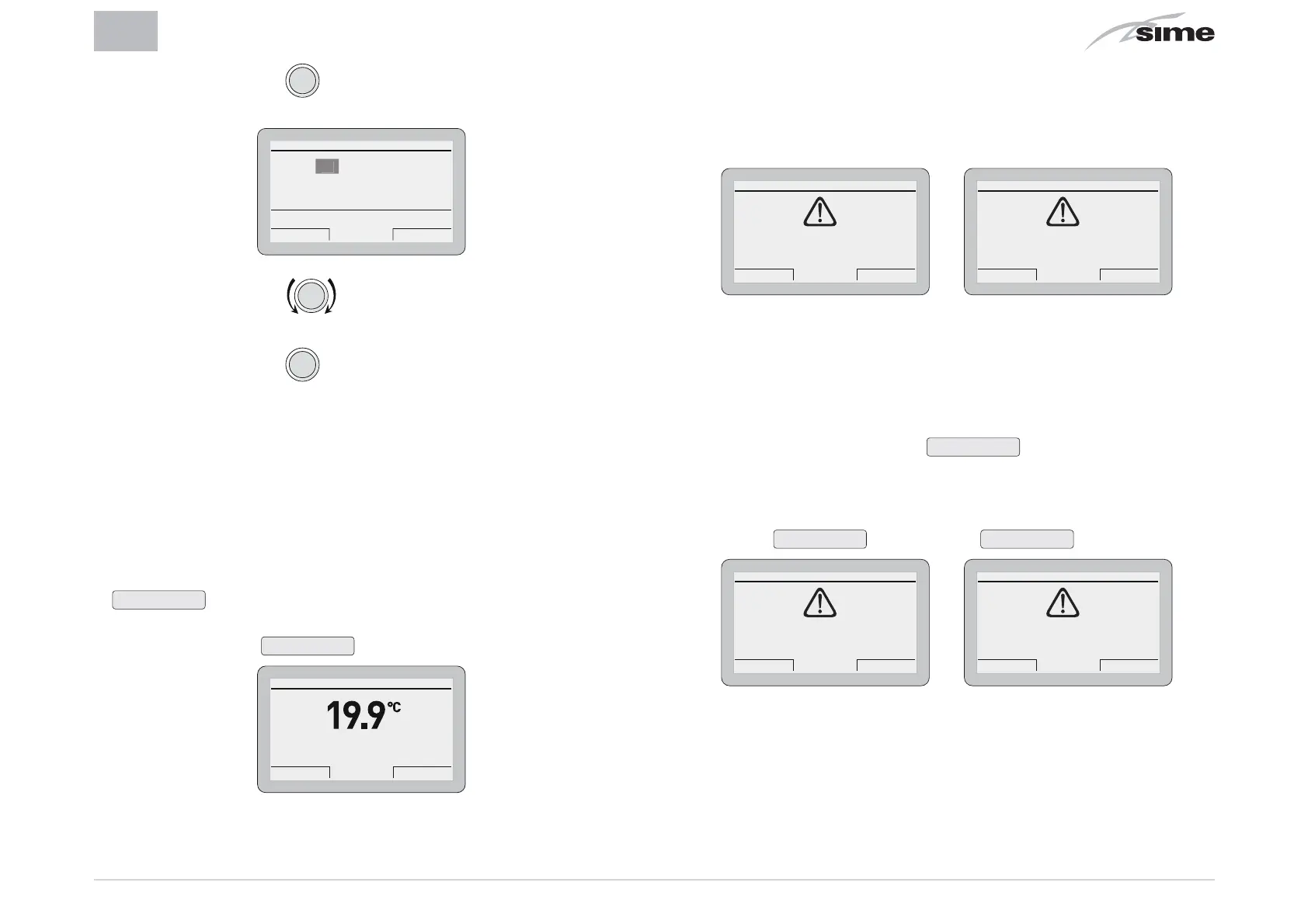
4.3.3 Fault warnings
If a fault occurs, the screen
“Anomaly in progress”
will appear
in place of the
“main screen”
. For the main fault codes, a brief
description will appear.
Esc Back
ANOMALY IN PROGRESS
2 - Low pressure
Esc Reset
ANOMALY IN PROGRESS
6 - Burner block
The fault maybe a
transient
(volatile) fault or a fault which
blocks
the appliance.
To restore normal operating conditions:
– if the fault is transient, eliminate the cause of the fault
– if the fault causes a block, eliminate the cause of the fault
and then press the button
Reset
.
If there is
no water in the system
or
low water pressure in the
system
there will be a request to fill the system and then press
the button
Confirm
rather than
Reset
.
Cancel Confirm
CONFIRM REQUEST
Confirm operation?
Esc Charge
ANOMALY IN PROGRESS
2 - Low pressure


 To Next Page
 Loading...