The SimPark Caravan Mover is a device designed to assist in maneuvering caravans. It consists of a left and right mover unit, a connection bar, mounting clamps, a remote control, and a controller. The system is designed for ease of use and includes several safety features.
Function Description:
The SimPark Caravan Mover allows users to remotely control the movement of their caravan. The drive-rollers, which are part of the mover units, press against the caravan tires to provide traction, enabling the caravan to be moved forwards, backwards, left, or right. The system is capable of simultaneous operation of commands, meaning users can change direction while driving without releasing the forward or backward button, and even perform a 360-degree turn by pressing the forwards/backwards buttons simultaneously.
A key safety feature, the Easymatic-E, ensures that if the drive-rollers are accidentally left pressed against the tires, they will automatically retract once the caravan connector is plugged into the towbar socket. This prevents driving away with the drive-rollers engaged, which could cause severe damage.
The system includes a controller that manages the operations and incorporates safety features such as temperature protection and low voltage protection. If the PCB reaches a temperature of +/- 75 degrees Celsius, the controller enters "safety" mode and returns to normal operation once the temperature decreases by 15 degrees Celsius. Similarly, if the voltage drops below 8.5 volts, the controller enters "safety" mode and resumes operation when the voltage rises above 8.5 volts. An emergency function is also provided to manually retract the drive-rollers in case of an electrical failure.
Important Technical Specifications:
- Motors: 12 volt DC with gear box
- Torque: 25-45 Nm
- Speed: 18 cm per second
- Weight: 35 kg
- Recommended Battery: 105 Ampere semi-traction or Enduro LI1230 Lithium Battery
- Maximum Caravan Weight: Up to 3300 kg on a paved underground
- Drive-roller to Tyre Distance: 20 mm
- Connection Bar Length: L. max = 2450 mm, L. min = 1870 mm
- Mounting Clamp Torque (Bolts A and B): 70 Nm
- Mounting Clamp Torque (Bolts C): 70 Nm
- Connection Bar Torque (Bolts D): 25 Nm
- Antenna Signal Wire: Black supplied copper wire or flying lead of maximum 52.5 cm.
- Towbar Socket Connections (Easymatic-E safety function):
- Brown cable: to pin 13 of the towbar socket (ground)
- Purple cable: to pin 9 of the towbar socket (safety function)
- Green cable: retract the drive-rollers from the tyres
- Red cable: to 12 volt + of battery
- Yellow cable: pressing the drive-rollers on the tyres
- Controller Automatic Shutdown: 60 seconds after the last given command.
Usage Features:
- Remote Control: The remote control allows for intuitive operation with buttons for forwards, right forwards, left backwards, left forwards, right backwards, backwards, enable drive-rollers, and retract drive-rollers. An On/Off button is also included.
- Drive-rollers Enable/Disable: To enable, switch on the remote control (red light blinks), press the "arrow up" button, and after 3 warning beeps, the drive-rollers will press onto the tires. To disable, press the "arrow down" button, and after 3 warning beeps, the drive-rollers will retract.
- Controller Activation: The controller activates once the remote control is recognized. After one beep, cooling fans start, and the system is ready for use.
- Installation: The installation process involves measuring the connection bar length and caravan track width, connecting the mover units with the connection bar, setting the mover units on the measured track width, and placing mounting clamps on the sub-frame. The distance between the drive-rollers and caravan tires must be 20 mm. Specific torque values are provided for tightening bolts.
- Chassis Compatibility: SimPark offers various mounting plates for different types of chassis. Chassis profiles and dimensions, including Vario III, Vario IV, Hobby I, U-profile, and L-profile, are detailed to ensure proper fitment.
- Electrical Connections: Detailed instructions are provided for connecting the controller, motors, battery, and main switch. It is crucial to ensure the battery is not connected during installation to prevent short circuits. Motor cable lengths should be equal, and their colors should not be changed. Incorrect main power cable connection will destroy the controller.
- Safety Precautions:
- Practice in an obstacle-free area.
- Ensure no children are playing near the caravan during operation.
- Check for small stones or sharp objects between drive-rollers and tires before enabling.
- Maintain a safe distance (e.g., 4 meters) from the caravan to intervene if necessary.
- In case of malfunction, immediately switch off the system via the remote or main power switch and apply the hand brake.
- When parking downhill, ensure the drawbar points down to enhance stability.
- Always pull the handbrake before retracting drive-rollers after parking.
- Store the remote control safely and out of reach of children.
- Never tow the caravan with drive-rollers pressed on tires.
- Avoid storing personal electronic equipment near the electronic receiver or electric cables due to potential magnetic field interference.
- Remove AA batteries from the remote control and turn off the main power switch during long-term storage to prevent damage from leaking batteries.
- Dispose of discharged or leaking batteries properly.
- Remove and charge the caravan battery every 2-3 months during long-term storage to prevent deep discharge.
- Ensure the battery is fully charged before use.
- Check caravan tire pressure regularly.
Maintenance Features:
- Drive-roller Cleaning: Keep the drive-rollers clean and free of grit, sharp objects, wood, grease, mud, and other contaminants. Use water and a brush for cleaning. Avoid high-pressure water cleaners to prevent damage to the bearings.
- Warranty: The warranty period for caravan application is 4 years and for professional applications is 2 years. The warranty covers parts as long as the claim comes with a guaranteed warranty form issued and signed by the caravan dealer. The warranty does not cover normal wear parts, damage from misuse, improper installation, or unauthorized repairs. It is important to note that SimPark is not liable for any damage resulting from a partial or complete malfunction of the parking assistance device.

 Need help?
 General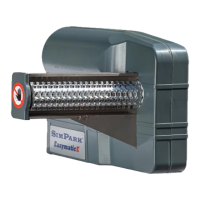

 To Next Page