IMPORTANT!
• To prevent short circuits during installation, make sure that the battery is not connected.
•
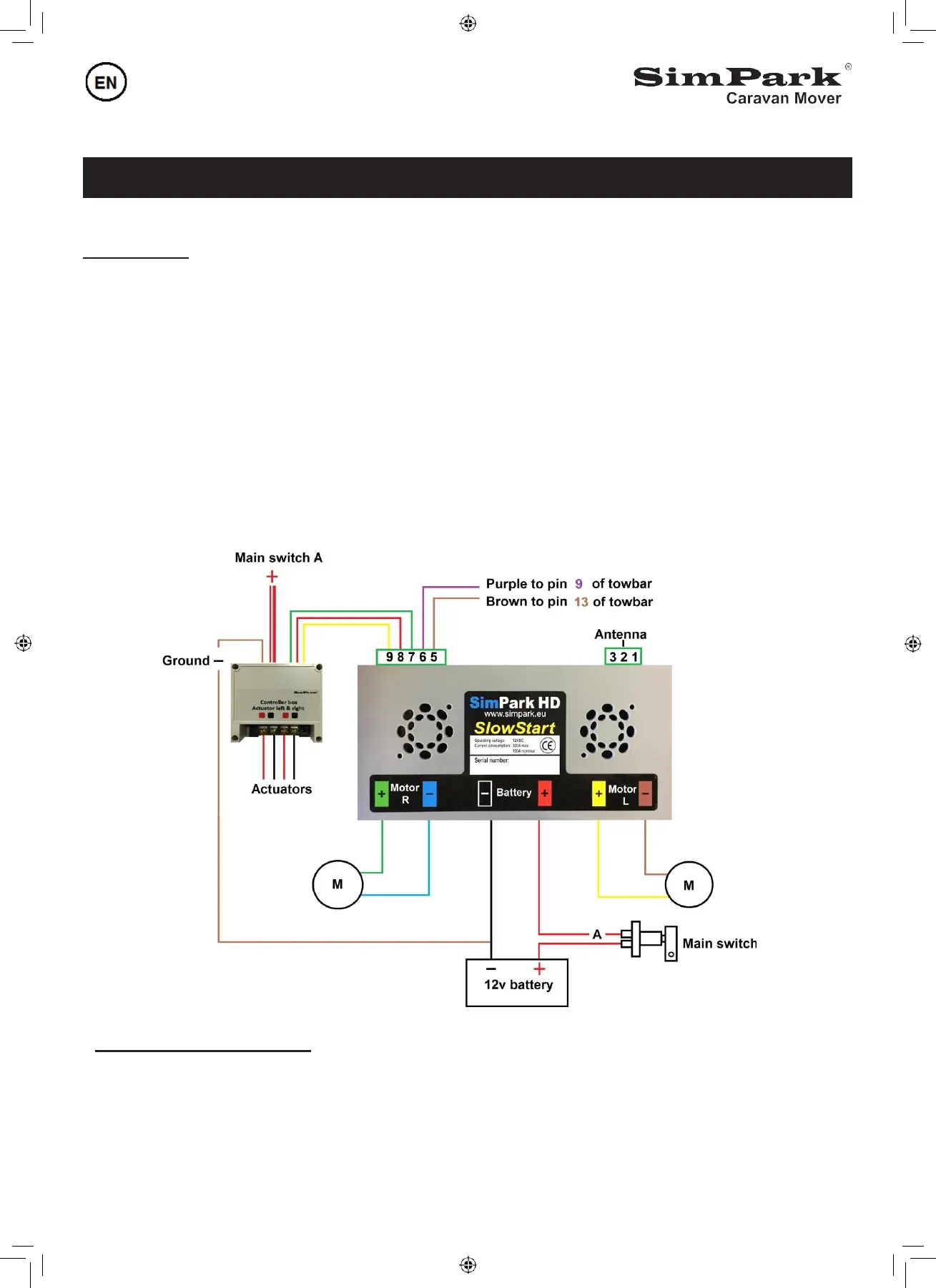
Place the Controller in the caravan as close as possible near the battery. Place the antenna in a vertical
position. The connection points on the Controller are clearly marked, (see fg.13)
The Battery positive cable is RED and the negative cable is BLACK. The green and yellow cables are
the positive connections of the motors, brown and blue cables are the negative connections of the motors.
• Lead the cables through the supplied black flexible protective tube and tie them up firmly against the
chassis, use the supplied Tie wraps
• The 12 volt main power cables for the Controller are clearly marked with RED + and BLACK -
Attention, shorten the motor cables is only allowed, if the length of both cables are the same.
The colors of the motor cables are paired, do not change them.
If the main power cables are wrongly connected, the Controller will be destroyed immediately
Fi
g.
7
Easymatic-E safety function
• The brown and purple cable goes to the Caravan plug no.13 (brown) & no.9 (purple) of the towbar socket
•This safety function prevents driving away with the drive-rollers pressed on the tires


 To Next Page