If you use a caravan mover for the first time, we recommend you to read the following
instructions carefully to ensure an optimal and safely use of the caravan mover.
Fig.10
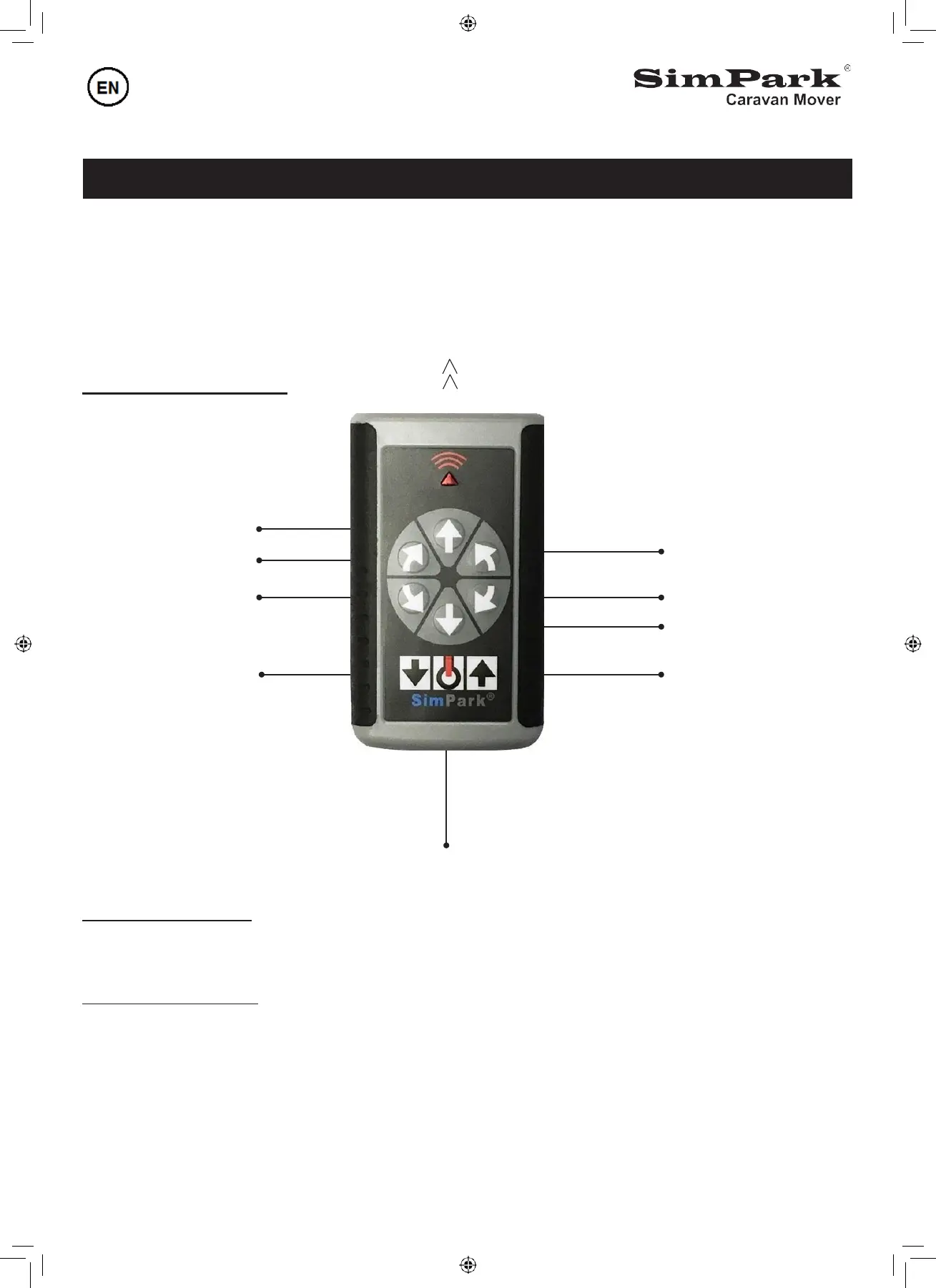
Functions remote control
Direction of travel
Forwards
Right forwards
Left backwards
Left forwards
Right backwards
Backwards
Enable drive-rollers Retract drive-rollers
On/Off
Drive-rollers enable
Switch on the remote control, the red light starts to blink. Press the button "arrow up" and after 3 warning
beeps the drive-rollers will be pressed on the tires.
Drive-rollers disabled
Press the button "arrow down" and after 3 warning beeps the drive-rollers will be retracted of the tires.
Simultaneously operation of the commands
Simultaneously operation is possible with the SimPark mover.
While driving forwards it is possible to change the direction by pressing the button left or right without
releasing the forward or backward button.
It is also possible to make a 360 degree turn by pressing the buttons forwards/backwards simultaneously.


 To Next Page