EasyManua.ls Logo

Simple CallCassette - User Manual

Simple CallCassette
8 pages
Print Icon
To Next Page IconTo Next Page
Loading...
CallCassette
User Manual
CAU380
Question and Answer IconNeed help?

Do you have a question about the Simple CallCassette and is the answer not in the manual?

Summary

About This Product

Box Contents

Installation Setup

Installation Guide

Step 1: Insert Cassette

Insert CallCassette into your car radio, noting the correct orientation.

Step 2: Connect Control Button

Plug the control button/mic into your phone's headphone jack.

How to Play Your Phones Audio

Step 1: Select Tape Source

Set your car radio to the 'TAPE' source to hear audio from your phone.

Step 2: Access Media Player

Open your preferred music or media player app on your device.

Step 3: Use Control Button

Utilize the control button for playback functions like play, pause, and track skipping.

Calling Instructions

Make Calls

Use the 'TAPE' source for calls. Dial via keypad or activate Voice Recognition with button press.

Accept;End Calls

Press the (B) Control Button once to accept or end calls.

Technical Support

Overview

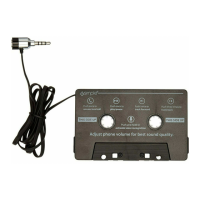
The iSimple CallCassette (model CAU380) is a simple cassette adapter designed to bring modern audio and communication capabilities to vehicles equipped with a cassette player. This device allows users to take calls, stream music, and more, effectively transforming an older car audio system into a hands-free and media-streaming hub.

Function Description:

The CallCassette operates by converting audio signals from a connected smartphone into a format that can be played through a car's cassette player. It features a built-in microphone and a control button, enabling users to manage calls and audio playback directly from the device. When inserted into the car's cassette player, the adapter allows the vehicle's audio system to act as an output for smartphone audio, while the integrated microphone captures the user's voice for calls or voice recognition.

Important Technical Specifications:

  • Compatibility: Compatible with any vehicle cassette player.
  • Connectivity: Connects to a smartphone via its headphone jack.
  • Control Interface: Features a single control button with an integrated microphone.
  • Cable Design: Flat, tangle-free cable construction.
  • Durability: Designed to withstand harsh environments, including high temperatures inside a car.

Usage Features:

The CallCassette offers a range of convenient features for audio playback and call management:

  • Audio Streaming: Users can stream music and other audio from their smartphone through the car's speakers by selecting the "TAPE" source on their car radio.
  • Call Management:
    • Answering/Ending Calls: A single press of the control button (B) allows users to accept or end phone calls.
    • Making Calls: To dial a phone number, users can either use their phone's keypad or activate voice recognition by pressing and holding the control button (B).
  • Audio Playback Control: The control button (B) provides intuitive control over media playback:
    • Play/Pause: Pressing the button once initiates play or pause.
    • Forward Track: Pressing the button twice skips to the next track.
    • Reverse Track: Pressing the button three times reverses to the previous track.
  • Voice Recognition Activation: Pressing and holding the control button (B) activates the smartphone's voice recognition feature, allowing for hands-free commands.
  • Volume Control: Audio volume is adjusted using both the connected device's volume controls and the car radio's volume controls.
  • Flexible Insertion: If the cassette adapter cannot be loaded in the "This Side Up" orientation, it can be inserted upside down. In this case, users should ensure they press the A/B button on their car radio to ensure proper functionality.

Installation Guide:

  1. Insert CallCassette: Insert the CallCassette into the car radio's cassette player, noting the "THIS SIDE UP" indicator. If the adapter doesn't fit in this orientation, it can be inserted upside down, and the A/B button on the car radio should be pressed.
  2. Connect Control Button/Mic: Insert the control button/microphone into the phone's headphone jack.

Important Installation Note: Users are advised to make sure they are parked in a safe spot before installation and never attempt installation while driving.

Maintenance Features:

While the manual does not explicitly detail maintenance features, the design considerations suggest a focus on durability and ease of use:

  • Durable Construction: The CallCassette is built to withstand "sweltering summer heat inside your car," indicating robust materials and design choices that minimize the need for frequent maintenance related to environmental damage.
  • Tangle-Free Cable: The "flat, tangle-free cable construction" reduces wear and tear on the cable, preventing knots and potential damage that could lead to malfunctions, thus contributing to the longevity of the device.
  • Careful Handling: The instruction to "Be careful when removing all items from the packaging tray. Take care not to tug or pull on cables" implies that gentle handling during initial setup and subsequent use will help preserve the device's integrity and prevent damage to the cables and connectors.

Overall, the iSimple CallCassette CAU380 offers a practical and cost-effective solution for integrating modern smartphone audio and communication into older vehicles, emphasizing user convenience, durability, and straightforward operation.

Simple CallCassette Specifications

General IconGeneral
BrandSimple
ModelCallCassette
CategoryAutomobile Accessories
LanguageEnglish

Related product manuals