This vacuum is equipped with on-board cleaning
tools, including a metal telescopic wand, stretch
hose, dusting brush and crevice tool�
1� To use the cleaning tools, lift the hose handle
straight up from the vacuum (Fig� 1)�
2� Extend the wand by pulling the button back
and pulling the smaller wand out of the larger
wand (Fig� 2)�
3� Attach any of the tools to the end of the
wand, or directly onto the hosehandle�
Fig� 1
Fig� 2
Fig� 3
Fig� 1
Fig� 2
HOW TO CHANGE THE FILTERS
CLEANING WITH ON-BOARD TOOLS
This vacuum is equipped with a HEPA media filter and a
secondary filter� These filters capture fine dust particles
and protect the motor from dirt� Accumulated dirt in the
bag compartment will be collected on the filters and may
restrict motor performance� It is important to change the
filters regularly�
How to Change the HEPA Media Filter
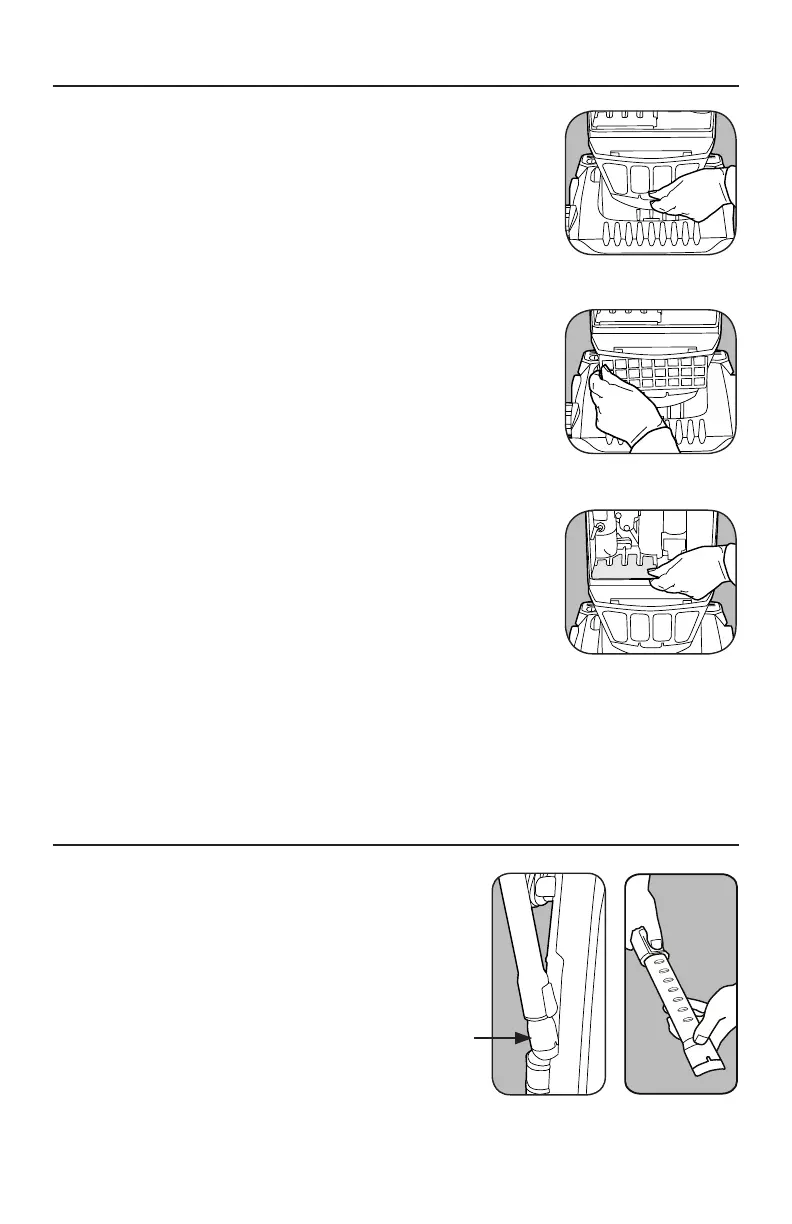
1� Unplug the vacuum� Remove the filter cover below the
dust compartment cover (Fig� 1)�
2� Remove the HEPA media filter by pushing in the tab
on the left and rotating out (Fig� 2)�
3� Insert a new filter and replace the filter cover�
How to Change the Secondary Filter
1� Unplug the vacuum� Remove the bag compartment
cover and remove the vacuum bag�
2� Remove the secondary filter by sliding it out from
under the bag supporter (Fig� 3)�
3� Insert a new filter, replace the bag and bag
compartment cover�
Note: Filters cannot be washed or re-used�
7





 To Next Page