25
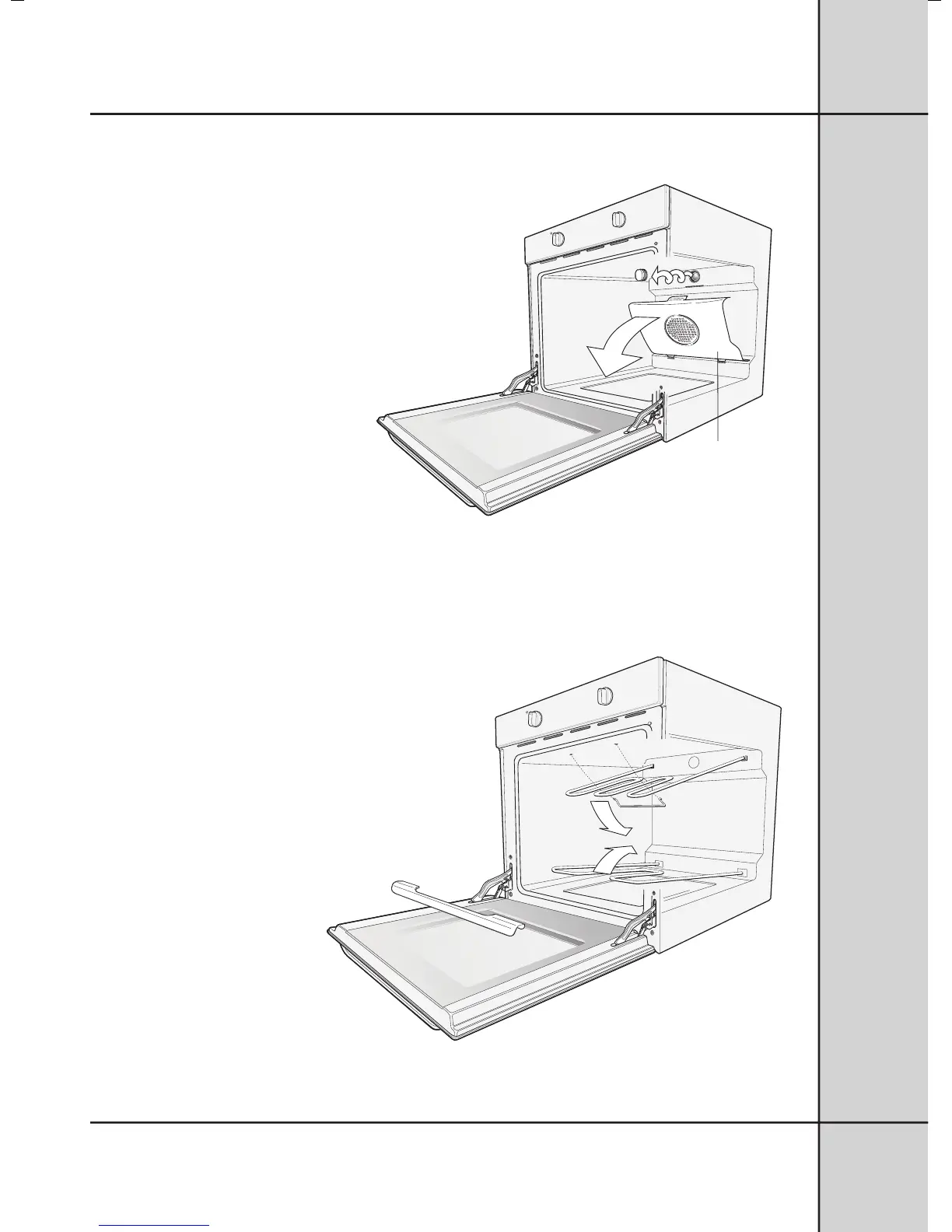
Removing the Fan Cover and Oven
Light Glass.
• Hold fan cover by the two sides.
• Pull towards you.
To replace the fan cover
after cleaning.
• Insert the two tabs at the bottom of the
fan into their corresponding holes.
• Push the top home.
• Turn oven light glass anticlockwise to
remove it for globe replacement.
IMPORTANT: Make sure your oven
is turned off before you remove or
replace parts, to avoid the possibility
of electric shock.
Releasing the elements -
Conventional Ovens
We have also designed the upper element
of conventional ovens with a hanger clip
to help you reach your oven roof for
cleaning.
• Push the sides of hanger clip inwards to
release.
• The element will drop down freely.
• To clean lower element, roll element
shield out from underneath element and
gently swivel element upwards.
Fan Forced
Ovens only
3



 To Next Page