6
Removing the screen frame
(4
x5"
/9
x 12 cm back)
To
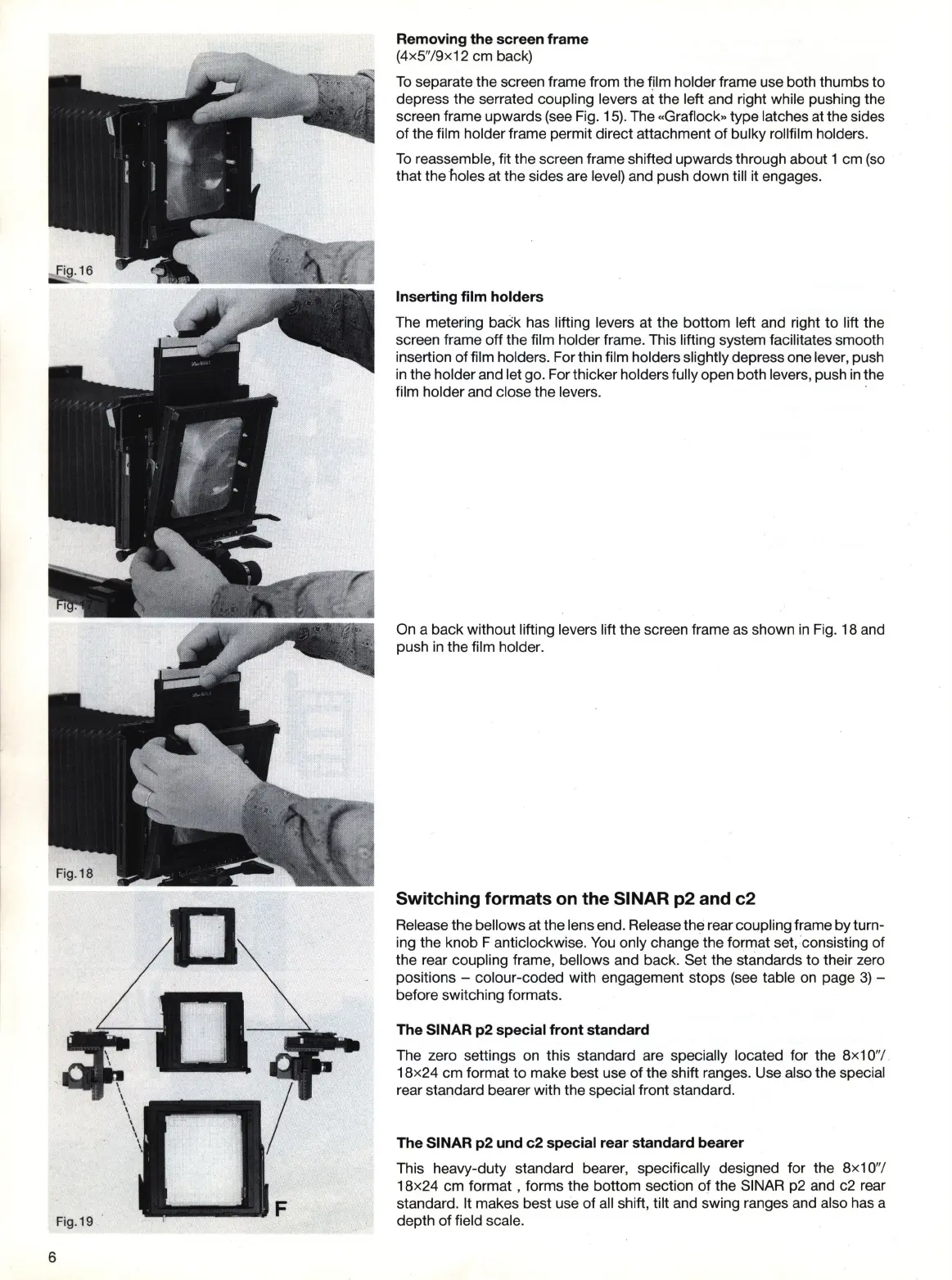
separate the screen frame from the f,ilm holder frame use both thumbs to
depress the serrated coupling levers at the left and right while pushing the
screen frame upwards
(see
Fig.
15).
The «Graflock» type latches at the sides
of
the film holder frame permit direct attachment of bulky rollfilm holders.
To
reassemble, fit the screen frame shifted upwards through about 1 cm
(so
that the holes at the sides are level) and push down till it engages.
Inserting film holders
The metering back has lifting levers at the bottom left and right to lift the
screen frame off the film holder frame. This lifting system facilitates smooth
insertion of film holders. For thin film holders slightly depress one lever, push
in
the holder and let go. For thicker holders fully open both levers, push
in
the
film holder and close the levers.
On
a back without lifting levers lift the screen frame as shown
in
Fi
g.
18 and
push
in
the film holder.
Switching formats on the SINAR p2 and c2
Release the bellows at the lens end. Release the rear coupling frame by turn-
ing the knob F anti clockwise.
You
only change the format set,consisting of
the rear coupling frame, bellows and back. Set the standards to their zero
positions - colour-coded with engagement stops
(see
table
on
page
3)
-
before switching formats.
The SINAR p2 special front standard
The zero settings on this standard are specially located for the 8x1 0
"1
.
18x24 cm format to make best use
of
the shift ranges. Use also the special
rear standard bearer with the special front standard.
The SINAR p2 und c2 special rear standard bearer
This heavy-duty standard bearer, specifically designed for the 8x
10
"1
18x24 cm format , forms the bottom section
of
the SINAR
p2
and c2 rear
standard. It makes best use
of
all shift, tilt and swing ranges and also has a
depth of field scale.


 To Next Page