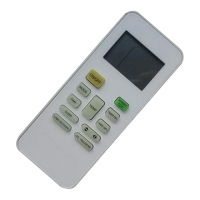
● T-ON button
“T-ON” button can set the time for timer on. After pressing this button, " " icon
disappears and the word “ON" on remote controller blinks. Press “+” or “-”button
to adjust T-ON setting. After each pressing “+” or “-”button, T-ON setting will
increase or decrease 1min. Hold “+” or “-”button, 2s later, the time will change
will stop blinking. " " icon resumes displaying.Cancel TIMER ON: Under the
quickly until reaching your required time. Press“T-ON”to confirm it. The word “ON”
until reaching your required time. Press“T-OFF”to confirm it. The word “ON”will
condition that T-ON is started up, press “T-ON” button to cancel it.
● T-OFF button
“T-OFF” button can set the time for timer off. After pressing this button, " " icon
disappears and the word "OFF" on remote controller blinks. Press "+" or "-" button
to adjust T-OFF setting. After each pressing "+" or "-" button, T-OFF setting
will increase or decrease 1min. Hold "+" or "-" button, 2s later, the time will change
"OFF" will stop blinking. " " icon resumes displaying. Cancel T-OFF.Under the
condition that T-OFF is started up, press “T-OFF” button to cancel it.
Note:
● Under on and off status, you can set T-OFF or T-ON simultaneously.
● Before setting T-ON or T-OFF, please adjust the clock time.
● After starting up T-ON or T-OFF, set the constant circulating valid. After that,
air conditioner will be turned on or turned off according to setting time. ON/OFF
button has no effect on setting. If you don’t need this function, please use remote
controller to cancel it.
10
T-ON/T-OFF button
Introduction for buttons on remote controller
Press this button to set clock time. " " icon on remote controller will blink.
Press "+" or "-" button within 5s to set clock time. Each pressing of "+" or "-"
button, clock time will increase or decrease 1 minute. Hold "+" or "-" button, 2s
later, time will change quickly. Release this button when reaching your required
time. Press “CLOCK”button to confirm the time. " " icon stops blinking.
Note:
● Clock time adopts 24-hour mode.
● The interval between two operations can’t exceeds 5s. Otherwise, remote
controller will quit setting status. Operation for TIMER ON/TIMER OFF is
the same.
11
CLOCK button



 To Next Page