Prior to initial use
17
7. Press the ON/OFF button. The grinding mechanism standby
indicator lights up.
Initially ignore the buttons lighting up.
8. Turn the degree of grinding pre-selection to the right to level
15 (the setting mark is above the scale from 1 to 15).
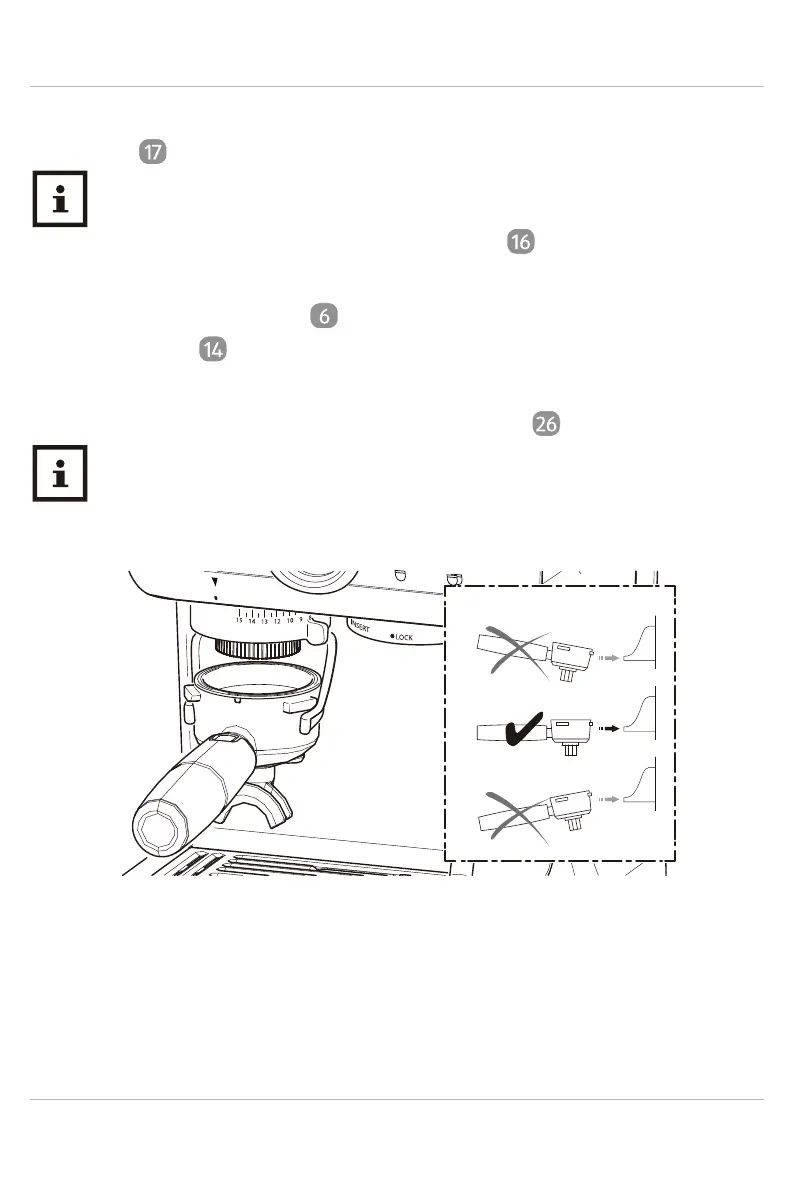
9. Pick up the filter holder and push it straight into the filter
holder bracket .
The grinding process is activated with filter holder. For this, push it
slightly forward horizontally against the switch .
The grinding process can be interrupted at any time. For this,
this, pull the filter holder back slightly in the filter holder
bracket.
SINGLE
DOUBLE
10. Let the grinding process run through until all of the beans are
ground and then pull the filter holder out of the bracket. Please
dispose of the coffee grounds.
11. Press the ON/OFF button and remove the power plug from the
socket.


 To Next Page