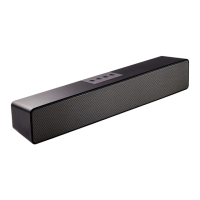
Before using the TV sound bar system, please read the following important notes.
Please read this user manual carefully and save it for future reference.
For optical and coaxial cable connection, change your source device’s audio output
setting to “PCM” format . Refer to your source device’s user manual for more
For the better sound quality, please set the volume of the sound bar to 75 percent of
maximum(Note: the maximum volume drop 3 levels is 75 percent) and set the volume
of your source device to a suitable level.
To get a better sound effect, press the movie, music or news button on the remote
control to select a suitable sound mode.
The recommended sound mode selections as below:
The sound mode selection and the volume settings are saved in the memory even after
the sound bar is powered off, and the volume settings from 75 percent to maximum will
For audio cable connection, you can boost / restore the volume by double clicking the
boost button on the remote control.
The audio output of the sound bar is affected by the settings of the connected source.If
necessary, adjust the settings of the source to improve the audio output.
Not all remote control functions can be found on the sound bar. Please keep the
Disconnect the power adapter from the electrical outlet to power off your sound bar
The lightning flash with arrowhead symbol within an equilateral triangle
alerts the user to the presence of uninsulated, dangerous voltage within the
system enclosure that may be of sufficient magnitude to constitute a risk of
The exclamation point within an equilateral triangle, as marked on the
system, is intended to alert the user to the presence of important operating
and maintenance instructions in this user manual.


 To Next Page
 Loading...