User Manual of A90 Series Inverter
53
modification, press the ENTER key ENTER to confirm and save the parameters and enable
next user-defined parameter. Function code modifications in the Level 3 menus under
different menu modes have equivalent effects.
4.2.3
Non-default mode (--C--)
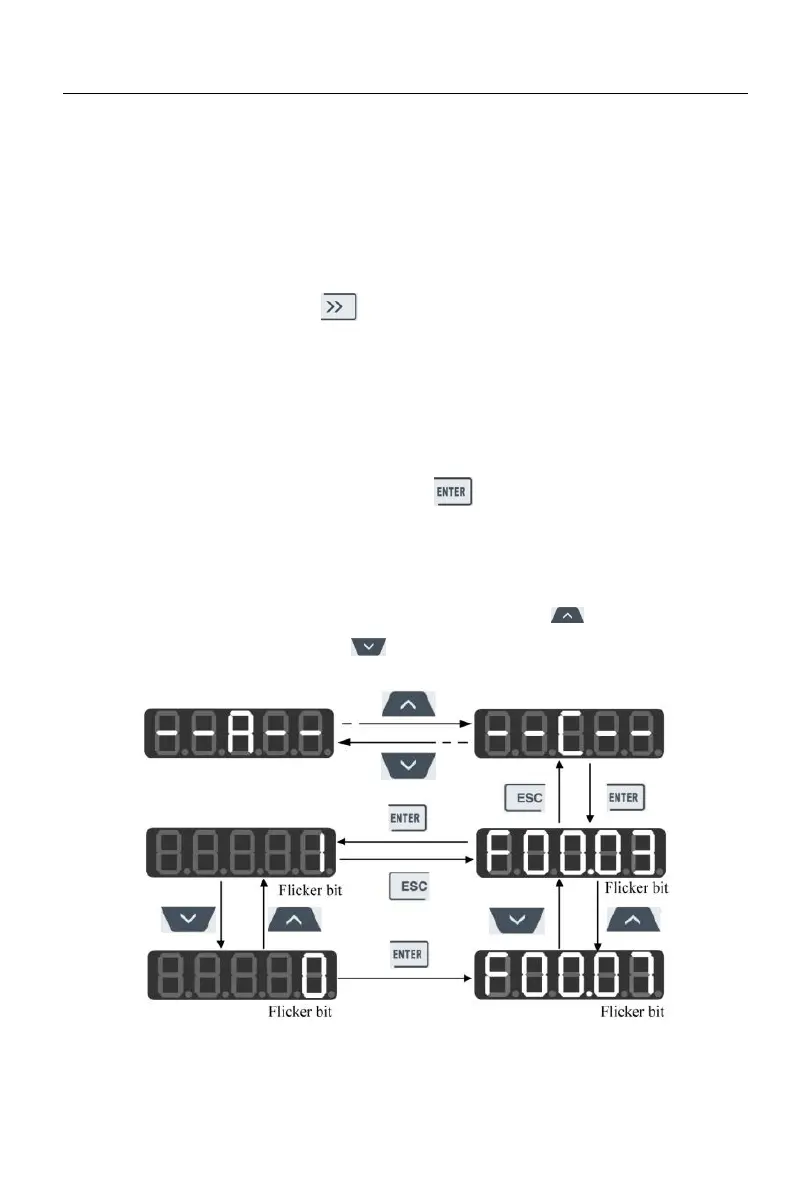
In the non-default mode, press the ENTER key to enter the Level 2 menu. The first
parameter different from the default settings of the inverter will be displayed, starting from
F00.00. When the right shift key is pressed in the Level 2 menu, the cursor will not
shift. If the increment or decrement key on the keyboard is pressed, the function group and
function code will not be modified, and the non-default function code following and in
front of the current function code will be displayed respectively. If the displayed function
code is modifiable currently in the Level 3 menu, the lowest bit indicated by the cursor will
flicker. In this case, parameters can be modified in the Level 3 menu under the full menu
mode. After modification, press the ENTER key to confirm and save the parameters
and enable next non-default parameter.
For example, first change F00.03 to 1 and F00.07 to 40.00 in the full menu mode,
which are different from default settings. When the first parameter in the non-default mode
is enabled, F00.03 will be displayed. Press the increment key on the keyboard to
enable F00.07 and the decrement key to return to F00.03, as shown below:
Fig. 4-5 Function Code Modification in Non-default Mode





 To Next Page