EasyManua.ls Logo

Singer 457 - Zig-Zag Stitching; Setting Pattern Selector; Setting Stitch Width and Needle Position

Singer 457
66 pages
Print Icon
To Next Page IconTo Next Page
To Previous Page IconTo Previous Page
Loading...
Zig
Zag
stitching
Needle
Position
:
C
Stitch
Width
:
1-5
Presser
Foot
:
General
Purpose
or
Special
Purpose
Feed
Height
:
R
or
F
With
your
Stylist
sewing
machine
youcan
do
two
kinds
of
zig-zag
stitching
:
plain
zig-zag
and
blind-
stitching
.
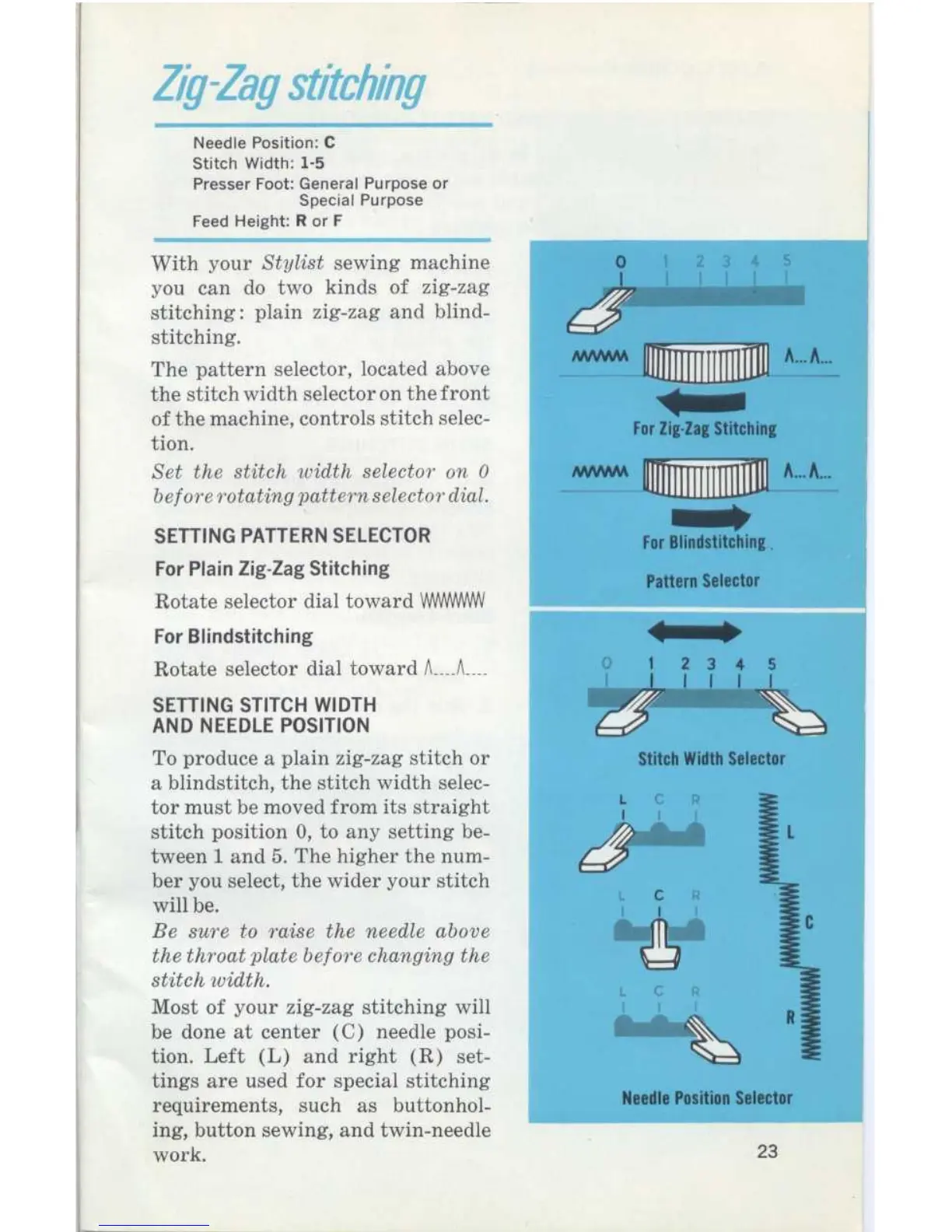
The
pattern
selector,
located
above
the
stitch
width
selector
on
the
front
of
the
machine,
controls
stitch
selec-
tion
.
Set
the
stitch
width
selector
on
0
beforerotating
pattern
selector
dial
.
SETTING
PATTERN
SELECTOR
For
Plain
Zig-Zag
Stitching
Rotate
selector
dial
toward
For
Blindstitching
Rotate
selector
dial
toward
~--_
SETTING
STITCH
WIDTH
AND
NEEDLE
POSITION
To
produce
a
plain
zig-zag
stitch
or
a
blindstitch,
the
stitch
width
selec-
tor
must
be
moved
from
its
straight
stitch
position
0,
to
any
setting
be-
tween
1
and
5
.
The
higher
the
num-
ber
you
select,
the
wider
your
stitch
will
be
.
Be
sure
to
raise
the needle
above
thethroat
plate
before
changing
the
stitch
ividth
.
Most
of
your
zig-zag
stitching
will
be
done
at
center
(C)
needle
posi-
tion
.
Left
(L)
and
right
(R)
set-
tings
are
used
for
special
stitching
requirements,
such
as
buttonhol-
ing,
button
sewing,
and
twin-needle
work
.
For
Zig-Zag
Stitching
For
Blindstitching
.
Pattern
Selector
Stitch
Width
Selector
Needle
Position
Selector
23

Related product manuals