EasyManua.ls Logo

Singer 457 - Buttons

Singer 457
66 pages
Print Icon
To Next Page IconTo Next Page
To Previous Page IconTo Previous Page
Loading...
BUTTONS
Pattern
Selector
:
Needle
Position
:
L
Stitch
Width
:
0
and
4
Presser
Foot
:
General
Purpose
Feed
Height
:
D
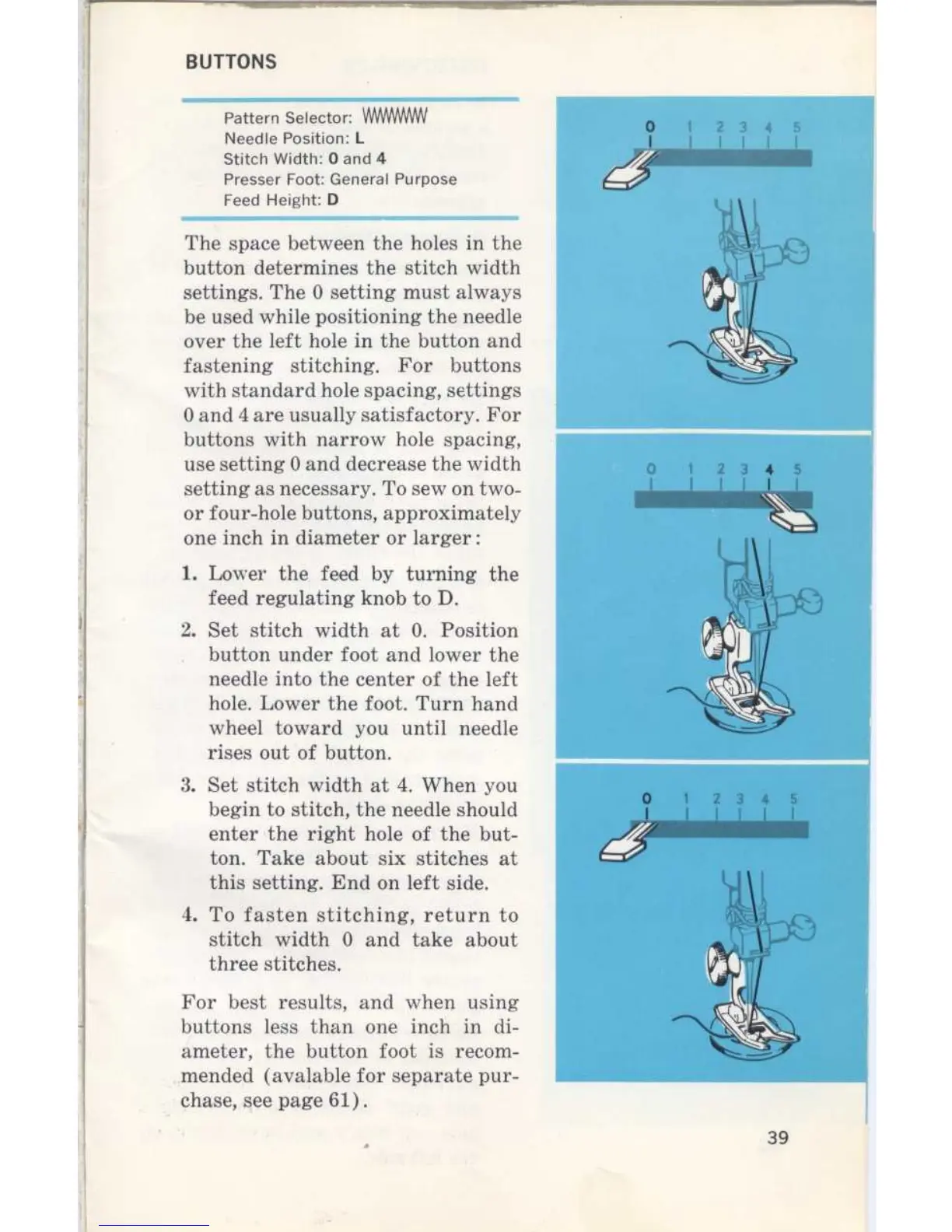
1
.
Lower
the
feed
by
turning
the
feed
regulating
knob
to
D
.
2
.
Set
stitch
width
at
0
.
Position
button
under
foot
and
lower
the
needle
into
the
center
of
the
left
hole
.
Lower
the
foot
.
Turn
hand
wheel
toward
you
until
needle
rises
out
of
button
.
3
.
Set
stitch
width
at
4
.
When
you
begin
to
stitch,
theneedle
should
enter
the
right
hole of
thebut
ton
.
Take
about
six
stitches
at
this
setting
.
End
on
left
side
.
4
.
To
fasten
stitching,
return
to
stitch
width
0
and
take
about
three
stitches
.
For
best
results,
and
when
using
buttons
less
than
one
inch
in
di-
ameter,
the
button
foot
is
recom-
mended
(avalable
for
separate
pur-
chase,
see
page
61)
.
The
space
between
the
holes
in
the
button
determines
the
stitch
width
settings
.
The
0
setting
must
always
be
used
while
positioning
the
needle
over
the
left
hole
in
the
button
and
fastening
stitching
.
For
buttons
with
standard
hole spacing,
settings
0
and
4
are
usually
satisfactory
.
For
buttons
with
narrow
hole spacing,
use
setting
0
and
decrease
the
width
o
1
2
3
4
s
setting
as
necessary
.
To
sew
on
two-
I
I
I
I
I
I
or
four-hole
buttons,
approximately
one
inch
in
diameter
or
larger
3
9

Related product manuals