28
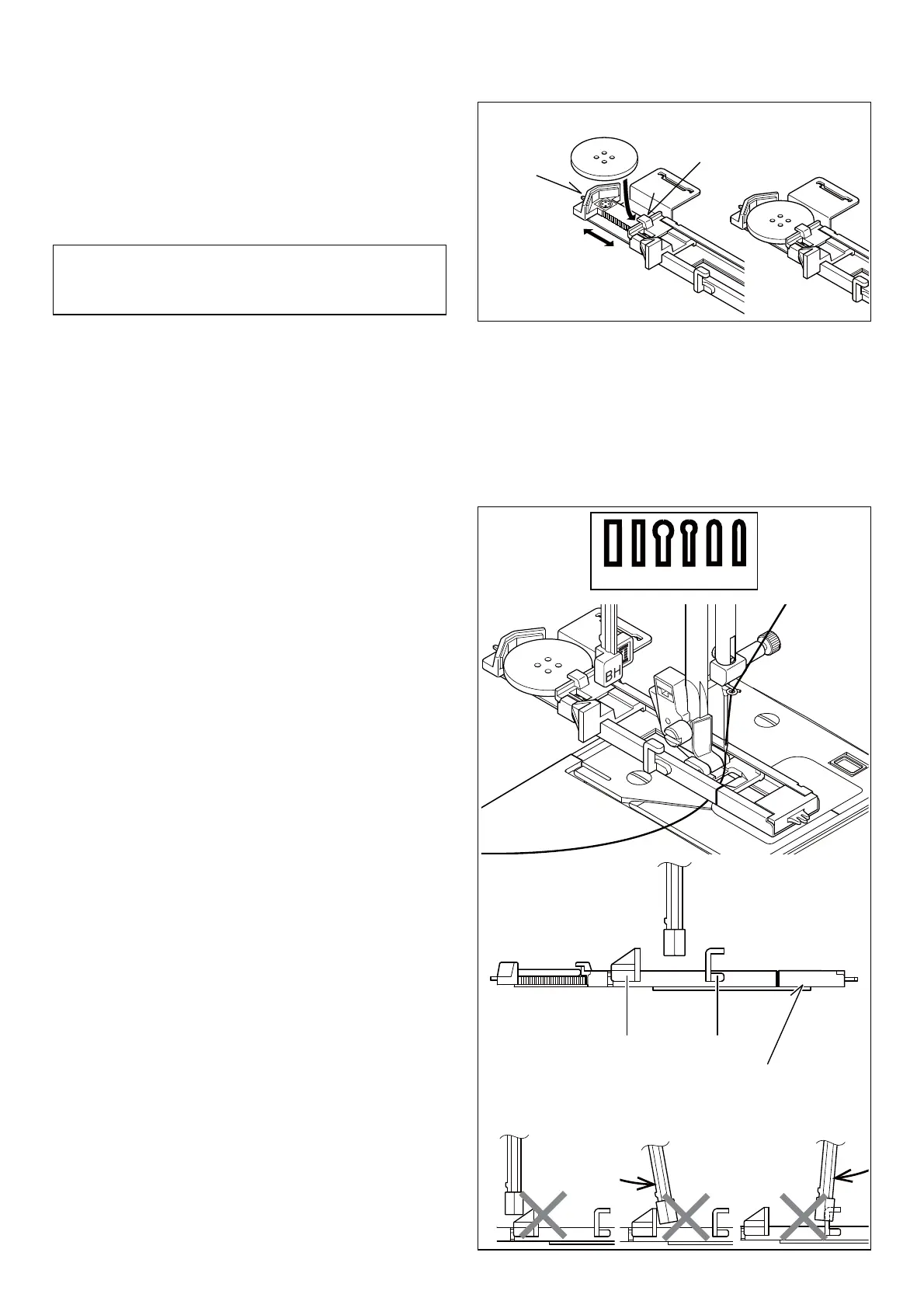
(A) (B)
(C)
(C)
(C)
(C)
Tab A
Tab B
Buttonhole foot
BUTTONHOLES
USING BUTTONHOLE FOOT
1. Insert a button in between tab A and tab B.
2. Buttonholes can be sewn to match the size of the button.
PROCEDURE
* Use an interfacing in the area of the garment where
buttonholes are placed. Stabilizer or regular interfacing can
be used.
* Make a practice buttonhole on a scrap of the fabric with the
selected button.
1. Select one buttonhole pattern.
2. Replace the presser foot with the buttonhole foot. (Refer to
“Changing presser foot” on page 11.)
3. Insert the button into the buttonhole foot. (Refer to “Using
buttonhole foot” above.)
4. Set the buttonhole lever (C) so that it drops down vertically
between the stoppers (A) and (B).
It is helpful to remove the extension table when sewing a
buttonhole, to keep the foot from vibrating when moving
across the table.
94 96 9895 97 99








 To Next Page