7
ENGLISH
Note: When the water level reaches a low level or empty, the pump will provide sound to indi-
cate refi lling. You must stop the use of the appliance immediately and refi ll the water tank as
mentioned above.
STEAM FUNCTION SETTING
After turning on the appliance, if steam is necessary, set the temperature control dial to the
steam ironing position according to the fabric setting chart. When temperature is set at MAX, the
steam adjustable knob should be set at MIN range. If the temperature control dial is set at
COTTON/LINEN position, the steam adjustable knob should be set at the MIN position. If water
leakage happens during use, set the temperature control dial at a higher temperature position
or the steam adjustable knob to lower position. When temperature control dial is set at WOOL/
SILK or SYNTHETIC, do not use steam ironing, otherwise, water leakage will occur from the
soleplate. Steam ironing cannot be activated until the heating indicator light turns off.
STEAM IRONING
NOTES:
a. For every fi rst use, it is normal that a slight vibration occurs from the electrical pump inside the
base unit for a few seconds when steam ironing is started. It is because the water is just pumped
into the heating chamber. If this abnormal condition continuously happens for more than 30 sec-
onds, please check whether the water tank and fi lter are assembled correctly or not.
b. For every fi rst use, set the adjustable steam knob to MAX position to allow the steam to
escape quickly.
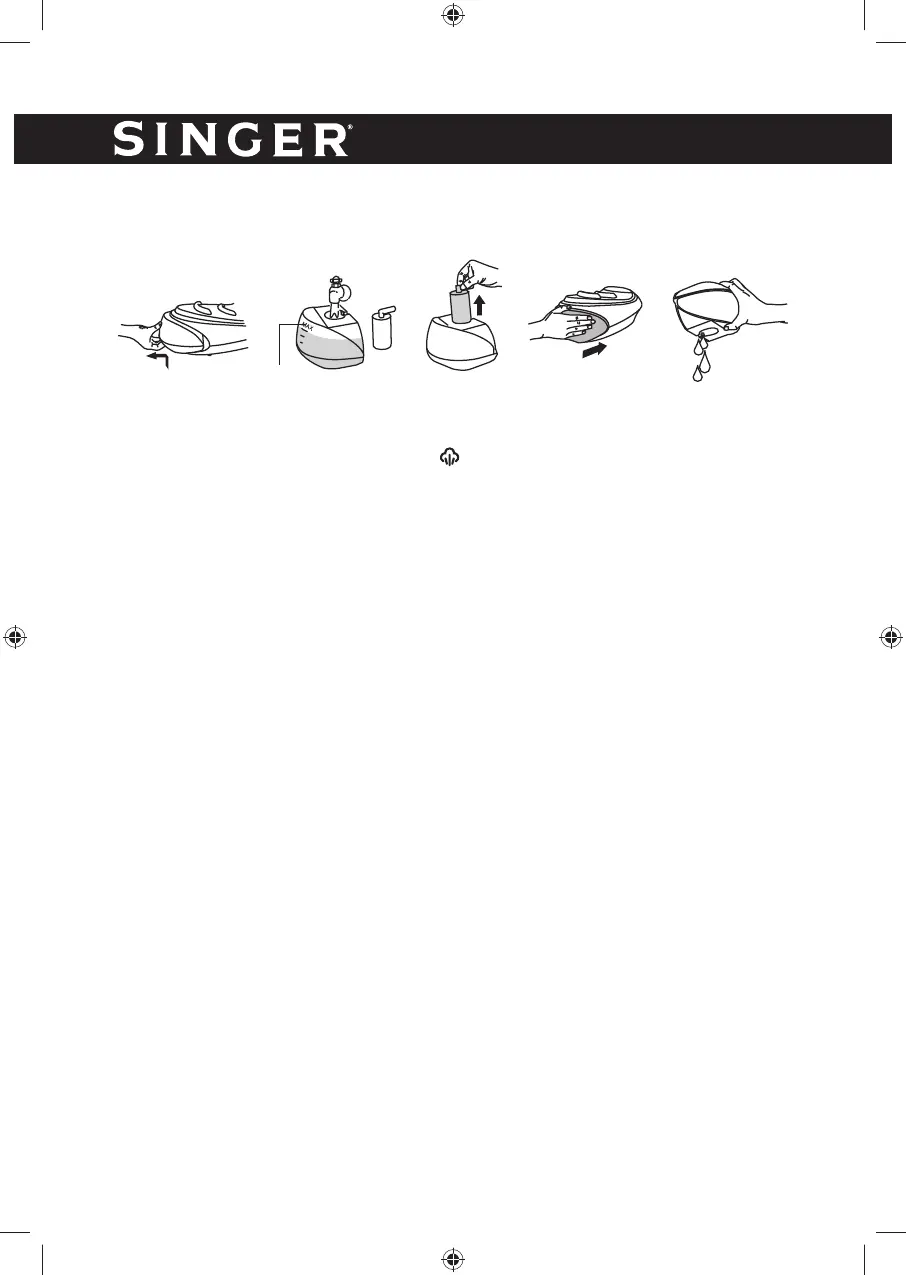
1. Fill the water tank with clean tap water. Refer to the above fi lling instructions.
(Note: For every fi rst use of the fi lter, immerse it in water for 5 minutes, for better performance).
2. Connect the appliance into a suitable socket outlet. Press the power switch at the base con-
trol panel. The Power indicator light will turn on to show the connection of the power supply.
Heating indicator light ON, indicates the steam chamber is being heated up. During use, the
heating indicator light will cycle from ON to OFF and then from OFF to ON. This shows that
the steam chamber automatically keeps temperature constant.
3. Set the Temperature Control Dial at the steam ironing setting according to the fabric setting
chart. The heating indicator light will blink to indicate the iron is being heated up. It will stop
blinking when the required temperature is reached. It also indicates that the unit is ready for
use. During use, it is normal that the temperature indicator light will cycle from ON to OFF
and then OFF to ON automatically.
4. During steam ironing, adjust the steam rate according to the requirements based on the
above steam function setting.
5. After use, set the Temperature control dial to the MIN position and place the iron back on
the iron rest. Switch off the unit by pressing the power switch and then unplug the appliance
from the outlet.
6. Slide out the water tank and pour out the remaining water.
Fig.1
Fig.3
Fig.5
Fig.4
Click
Fig.2
MAX



 To Next Page