46
BeatBuddy Manual
Changelogs
• Stability improvement (That were done while looking for the memory
corruption problem)
o Stopped using malloc / free for i2c packets.
o Limited the number of settings that can be saved in one setting Task call
o Add load sanity checks to limit the chance of trying to play a corrupt song
• Midi Time signature
o Made sure the values sent are valid by applying mask on the payload
value (0x7F)
3.4.0
• Fixed count-in color style
• Fixed Headphone volume random display
3.3.0
• Prevent Song Manager from setting default song tempo / drumset if those
were set by MIDI 500ms before.
3.2.0 "A New Look"
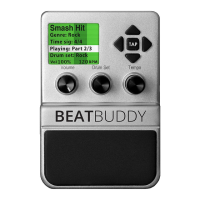
New Visual Interface
One of the main focuses of this update was to improve the visibility of key
information at a glance. We really wanted to increase the pedal’s visual feedback
during a live performance. With this in mind, we performed a complete visual
overhaul of the BeatBuddy’s graphical interface. Here’s what’s changed:
1. Added measure marker: Useful for knowing when a fill or transition is
more than one measure long, as well as seeing where you are in long
song parts. This is the dark box on the bottom of the screen that is
moving left to right.
2. Made fonts larger and centered (when not longer than the screen).
There’s now a focus on the current part playing, which is the most
important information you need while performing.
3. Updated the pause, tempo and volume screen with new looks as well
as an always active visual metronome, so you never lose track of the
beat.


 To Next Page