Snifter mA+ EX RF User Manual 18
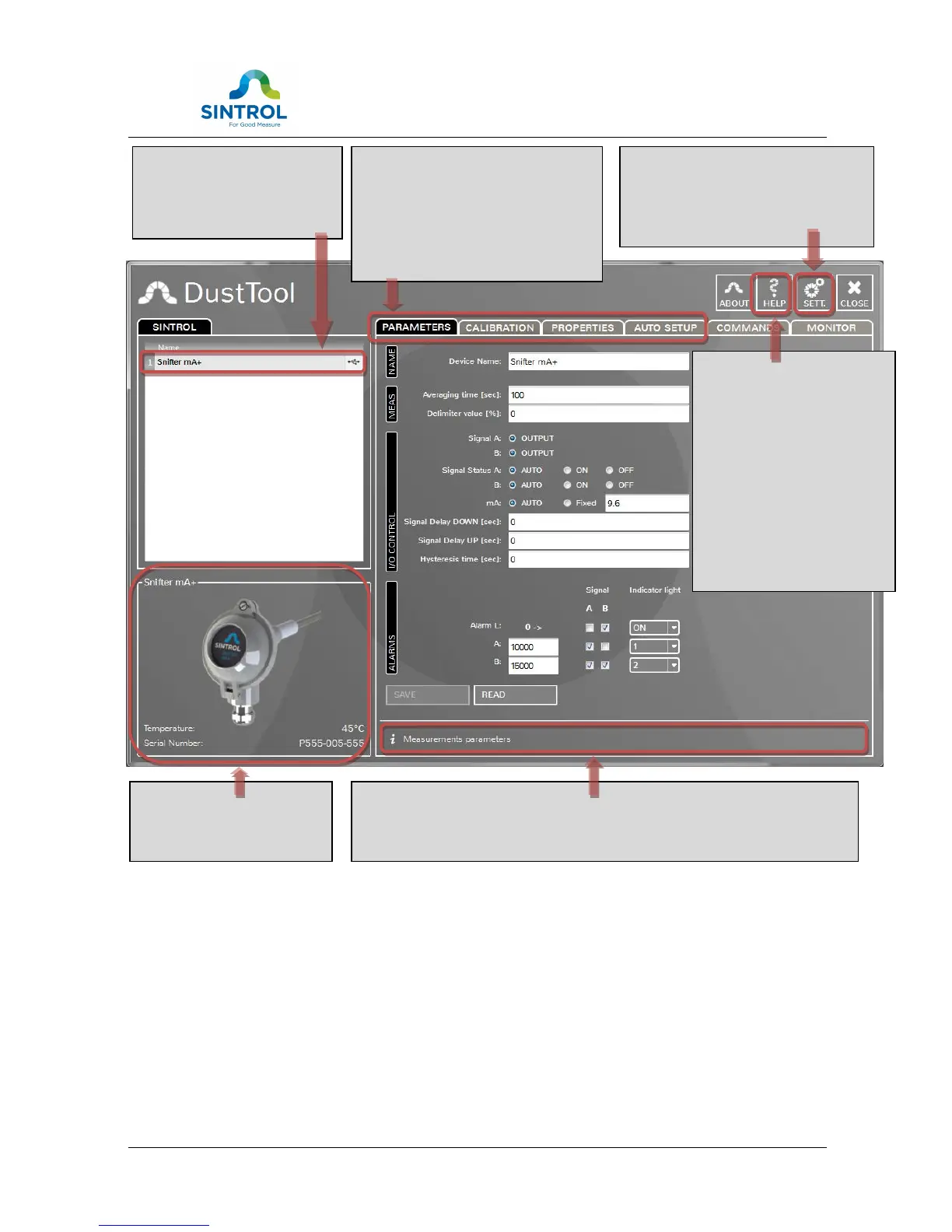
Figure 6 DustTool main window
On the parameters page, user can modify the operating parameters of the
connected Dust meter. The basic operating principle to change parameters is:
1. Change parameter to the desired value
2. Press “Save” button to save the changes into the memory of the instrument. If
the “Save” button is not pressed, the changes will not be sent to the device
and the values will be lost at program shut down or when device is detached.
3. By pressing “Read”, the parameters which are currently saved in the
instrument will be loaded from the device.
Description of the product
with the default type name,
serial number and picture.
The list of connected products
and the connection type icon,
lets you easily select the device
you need to control.
Tab area to manage product related
features, like device parameters,
auto-setup controls and of course the
monitor view to quickly provide you a
clear visualization of the current
process condition..
Info area on the bottom helps you all the time by giving actively information
about a number of fields and items on screen. All you need to do is to move
mouse over the item, parameter or title you wish to know more about.
Help view will give you direct
access to the manuals and
documentation related to
devices currently connected.
In case you should allow the
internetwork connections,
DustTool will automatically
provide you with the latest
and printable documentation
for your convenience.
No more missing manuals.
From the settings view you can have
full control over software parameters,
like network access and language
selection.


 To Next Page