PRESET
CUT SPEED VS
FORCE FS
40
560
CUT SETTINGS
SETTINGS
GENERAL
SETTINGS
WIFI CAMERA USB SYSTEM
INFO
CUT SETTINGS
1.
2.
3.
4.
5.
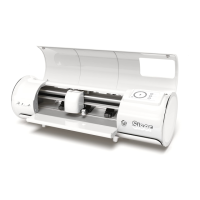
SETTINGS
Access the various settings and functions of the cutter
1. General Settings - Opens general cutter settings menu
2. WiFi - Opens WiFi settings menu
3. Camera - Opens camera settings menu
4. USB - Opens USB menu for opening files from a USB flash drive
5. System Info - Displays system information
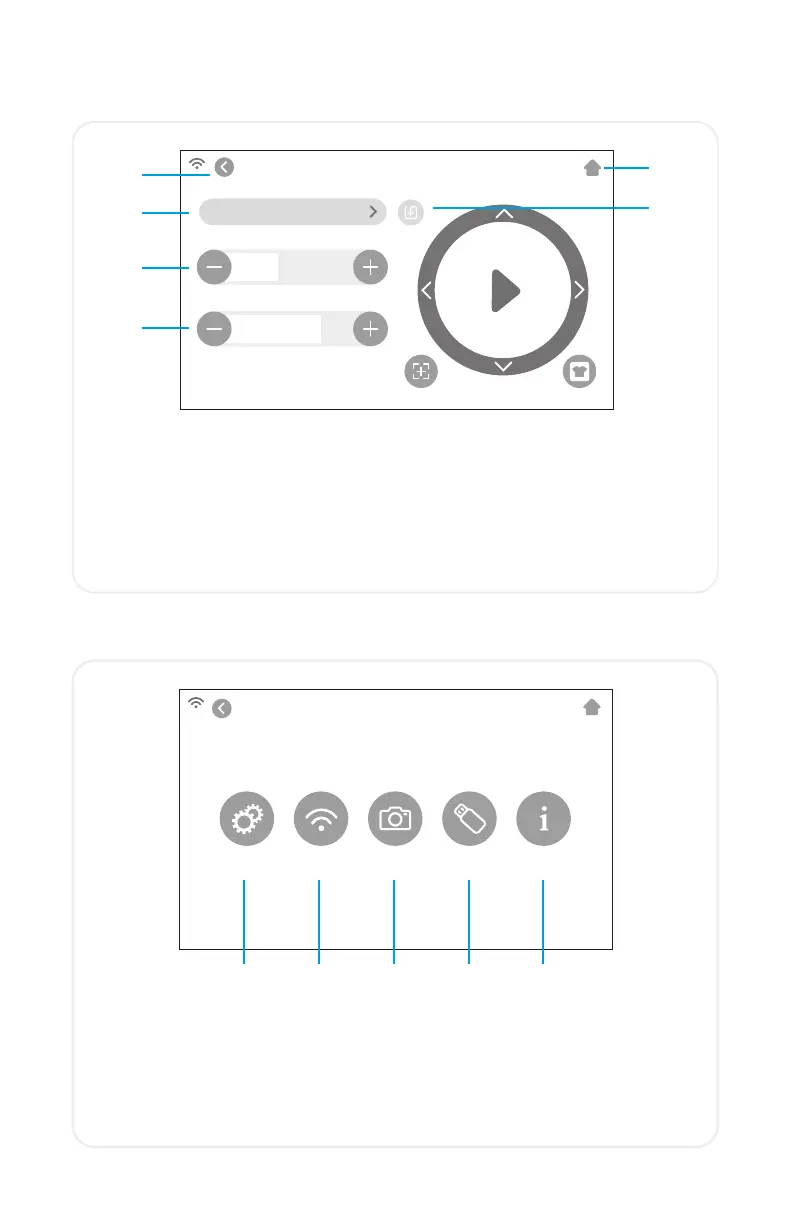
Adjust the cut settings of the cutter
1. Back Button - Returns to previous screen
2. Home Button - Returns to the Home Screen
3. Cutting Presets - Opens preset cutting menu
4. Cut Speed - Adjusts how fast the machine head moves
5. Force - Adjusts how much pressure the machine head exerts
6. Update Preset - Overwrites preset with the current settings
1. 2. 3. 4. 5.
6.
10


 To Next Page