The SJCAM C100 Series Action Camera is a compact and versatile device designed for capturing video and photos in various environments. Its small size and magnetic back allow for easy attachment to metal surfaces, making it convenient for a wide range of activities. The camera is operated primarily through a single button and can be further controlled and configured via a dedicated mobile application, "SJCAM Zone," available for both Android and iOS devices.
Function Description
The core function of the SJCAM C100 Series is to record video and capture still images. It offers multiple operational modes to suit different recording needs.
- Power On/Off: The camera is turned on by a long press of the OK button, indicated by a single shake and a steady blue light. To power off, a long press of the OK button results in two shakes and two blue light flashes before shutdown.
- Video Mode: After powering on, a single press of the OK button initiates video recording. The camera shakes once, and the blue light flashes during recording. A short press of the OK button while recording stops the recording, accompanied by a single shake. In standby mode for recording, the blue light remains on.
- Photo Mode: This mode is exclusively accessible through the SJCAM Zone App. When switched to photo mode via the app, the indicator light turns red, and it flashes once per shot.
- Time-lapse Mode: Similar to photo mode, time-lapse functionality is controlled within the SJCAM Zone App. When the app is set to time-lapse, the red indicator light is continuously on, and both red and blue lights flash alternately during recording.
- WiFi Connectivity: The camera features built-in WiFi for remote control and media management. By default, WiFi is off when the camera is powered on. It can be activated by pressing the OK button twice. A quickly flashing green light indicates that WiFi is not connected, while a steady green light signifies a successful connection. To turn off WiFi, press the OK button twice again, and the green light will shut down.
- Car Mode: This mode is also managed through the SJCAM Zone App. When connected to a car charger, the camera automatically begins loop-recording. If the charger is disconnected, the video is automatically saved, and the camera powers off after 10 seconds. Users should remember to switch modes from the app after using Car Mode.
- Webcam Functionality: The camera can serve as a webcam when connected to a computer via USB. To enable this, the memory card should be removed from the camera. Upon connection, the camera automatically turns on, and the blue light illuminates. It operates as a Plug & Play device, requiring no additional drivers. If multiple cameras are connected to the computer, the user will need to select the SJCAM C100.
Usage Features
The SJCAM C100 Series is designed for ease of use and adaptability across various scenarios, from everyday activities to more adventurous pursuits.
- Compact and Magnetic Design: With a weight of 42g and dimensions of 60mm x 20mm x 26mm, the camera is highly portable. Its magnetic property allows it to be easily attached to metal surfaces without additional mounts, enhancing its versatility for different uses like running, housing (e.g., on a refrigerator), or as a dashcam.
- Mobile App Integration (SJCAM Zone): The "SJCAM Zone" app is central to unlocking the camera's full potential. It enables users to:
- Connect to the Camera: After turning on the camera and its WiFi, users connect their smartphone or laptop to the camera's WiFi network (e.g., "C100+_XXXXX" or "C100_XXXXX" with password "12345678"). Once connected, the app's "connect camera" button establishes the link.
- Live View and Control: The app provides a live view from the camera, allowing users to monitor the scene being recorded.
- Start/Stop Recording: Users can initiate and stop video recording directly from the app.
- Switch Camera Modes: The app allows seamless switching between different modes, including video, photo, and time-lapse. For C100+ models, a "Vertical Screen mode" is also available.
- Access Media Library: The app features a media library where users can watch, share, clip, download, and delete captured pictures and videos.
- Camera Settings: Comprehensive camera settings can be adjusted through the app, including resolution, loop recording duration, audio settings, exposure value (EV), movie codec, white balance, color, sharpness, WDR (Wide Dynamic Range), and time stamp.
- Accessories for Diverse Applications: The camera comes with a range of accessories to support various mounting and usage scenarios:
- Waterproof Case: For underwater activities like diving.
- Back Clip and Frame Mount: For attaching the camera to clothing or other objects.
- Base Mount, Screw, Curved and Flat Mounts: For securing the camera to helmets, dashboards, or other surfaces.
- Lanyard: For carrying the camera securely.
- 2 x 3M Adhesive Stickers: For semi-permanent mounting.
- USB Cable: For charging and data transfer.
- Vibration Feedback: The camera provides tactile feedback through vibrations for key operations such as power on/off, starting/stopping recording, and when the memory card is full or the battery is low.
Maintenance Features
The SJCAM C100 Series incorporates several indicators and features to help users maintain the device and ensure optimal performance.
- Indicator Lights: The camera uses a combination of red, green, and blue lights to communicate its status:
- Red Light (Abnormal Indicator): Typically off, but flashes rapidly for "No card or card error" and is a long light or blinks once when taking photos (in photo mode).
- Green Light (WiFi Indicator): Off when WiFi is off, flashes rapidly when WiFi is not connected, and is a long light when WiFi is connected. It is also on when turning off/on WiFi for certain operations.
- Blue Light (Work Indicator): A long light in standby mode, flashes during video recording, and flashes twice for power off. It also flashes quickly for 10 seconds when the memory card is full.
- Charging Indicator (Red): This light is located next to the card holder. It is always on during charging and turns off when the battery is fully charged.
- Low Power Warning: When the battery is critically low, the camera shakes three times, and the red light flashes ten times quickly before automatically shutting down, prompting the user to charge the device.
- Full Storage Card Warning: If the memory card becomes full, the camera shakes once, and the blue light flashes ten times quickly before automatically shutting down, indicating that the user needs to offload or replace the memory card.
- No Card/Card Error Warning: In the absence of a memory card or if there's a card error, the red light flashes rapidly, and the device vibrates every two seconds. After 10 minutes, the device automatically shuts down to prevent data loss or further issues.
- Charging: The camera is charged via its USB cable. The red charging indicator light remains on during charging and turns off once fully charged.
- Firmware Updates (Implied): While not explicitly detailed in the provided text, action cameras typically support firmware updates to improve performance, add features, and fix bugs. Users should check the SJCAM website or app for available updates.
- Storage Management: The SJCAM Zone app allows users to manage their media files, including downloading and deleting, which helps in freeing up storage space on the camera's memory card. Loop recording in Car Mode also helps manage storage by overwriting older footage when the card is full.
By understanding these functions, usage features, and maintenance indicators, users can effectively operate and care for their SJCAM C100 Series Action Camera, ensuring a reliable recording experience.

 Need help?
 General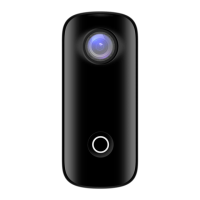

 To Next Page









