Once your Remote is paired,
you will never need to pair
it again. Everytime the M20
is turned on, your Remote
can send instructions to
your camera.
The Remote is tested to work
at a maximum distance of
30 feet (10 meters).
The battery on your Remote
will last you a long time as
it only uses power when
you press any of the buttons.
If you need to replace the
battery, you will need a coin
to open the battery door and
a Lithium CR2032 button-cell
to replace the old one.
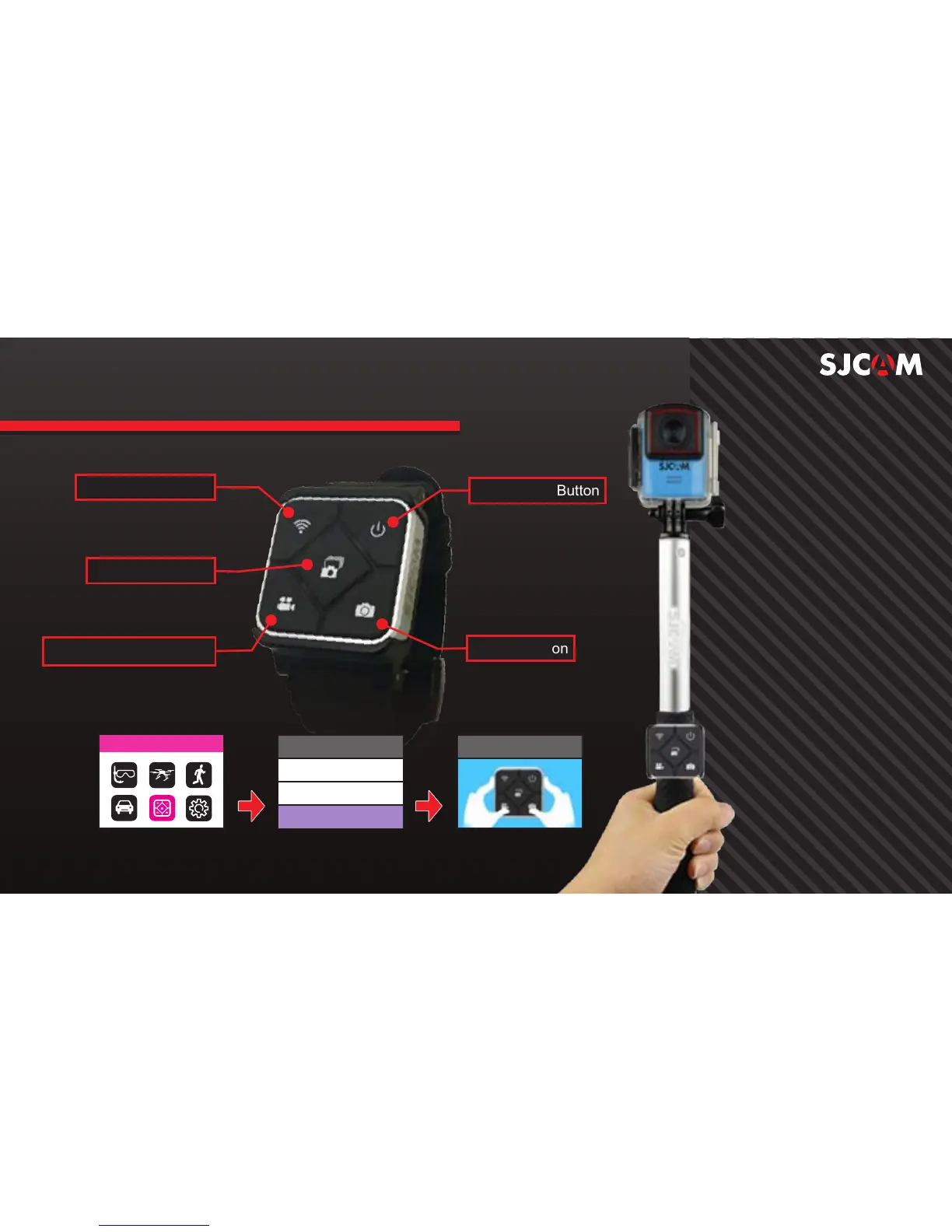
WIFI On/Off Switch
Record Video Start/Stop
Camera-Off Button
Shutter Button
Burst Shot Button
Remote Control
Remote Control
Off
On
Remote Control Pairing
To pair your remote to your M20: Go to Main Menu > Remote Control. Select On then
choose Remote Control Pairing. A picture instruction will appear. Press the Video
and the Photo buttons on the Remote simultaneously. Pairing Completion ID will show.
SJ SMART REMOTE (Optional)
Press the two buttons



 To Next Page