Product description
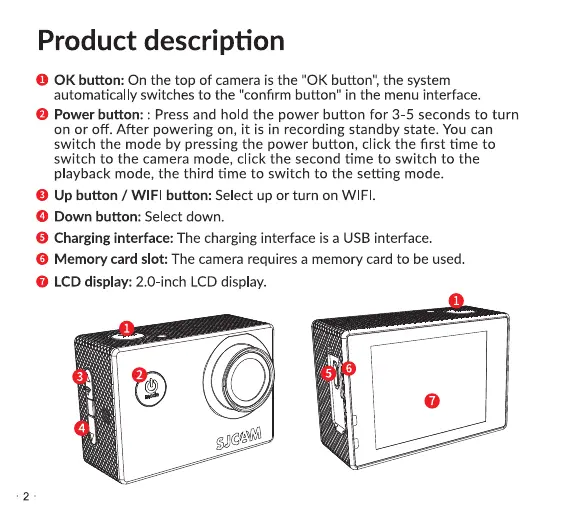
0 0K button: On the top of camera is the "0K button", the system
automatically switches to the "confirm button" in the menu interface.
O Power button: : Press and hold the power button for 3-5 seconds to turn
on or off. After powering on, it is in recording standby state. You can
switch the mode by pressing the power button, click the first time to
switch to the camera mode, click the second time to switch to the
playback mode, the third time to switch to the setting mode.
O Up button / WIFI button: Select up or turn on WIFI.
O Down button: Select down.
O Charging interface: The charging interface is a USB interface.
O Memory card slot: The camera requires a memory card to be used.
O LCD display: 2.0-inch LCD display.
SJC'*
O


 To Next Page
 Loading...