Operation instruction of waterproof case
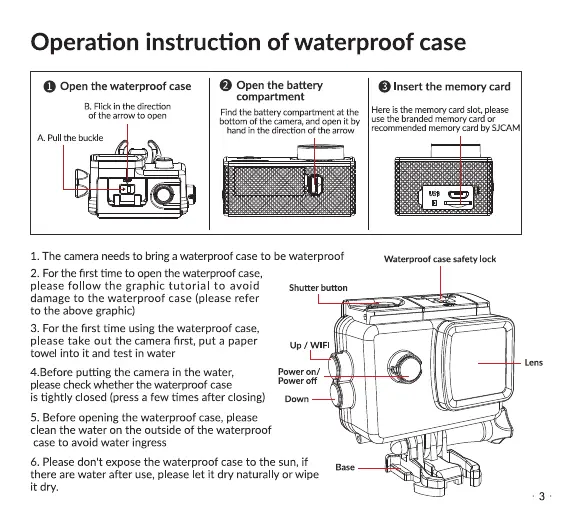
O Open the waterproofcase
B. Flick in the direction
of the arrow to open
A Pull the buckle
Open the battery
compartment
Find the battery compartment at the
bottom Ofthe camera, and open it by
hand in the direction Of the arrow
Insert the memory card
Here is the memory card slot, please
use the branded memory card or
recommended rnemory card by SJCAM
Waterproof case safety lock
l. The camera needs to bring a waterproof case to be waterproof
2. For the first time to open the waterproof case,
please follow the graphic tutorial to avoid shutterbutton
damage to the waterproof case (please refer
to the above graphic)
3. For the first time using the waterproof case,
please take out the camera first, put a paper
towel into it and test in water
4.Before putting the camera in the water,
pleasecheck whether the waterproof case
up / WIFI
power on /
power Off
is tightly closed (press a few times after closing) Down
5. Before opening the waterproof case,please
clean the water on the outside Of the waterproof
caseto avoid water ingress
6. Please don't expose the waterproof case to the sun, if
there are water after use, please let it dry naturally or wipe
it dry.
Lens
•3


 To Next Page
 Loading...