22
Resetting Pump to Manufacturer Default
Settings
1. Press the security code and then press the CAL
bu on. The pump software version number will display
briefl y.
2. Press
repeatedly to scroll through until the LED
displays dEFt.
3. Press [
]. The word no will appear on the display.
To reset to factory default se ings: Press
. YES
will appear on the display. Press [
].
To retain existing se ings: Press
to scroll to
no and press [
].
The number 30 will appear briefl y, then the display will return
to run time presets.
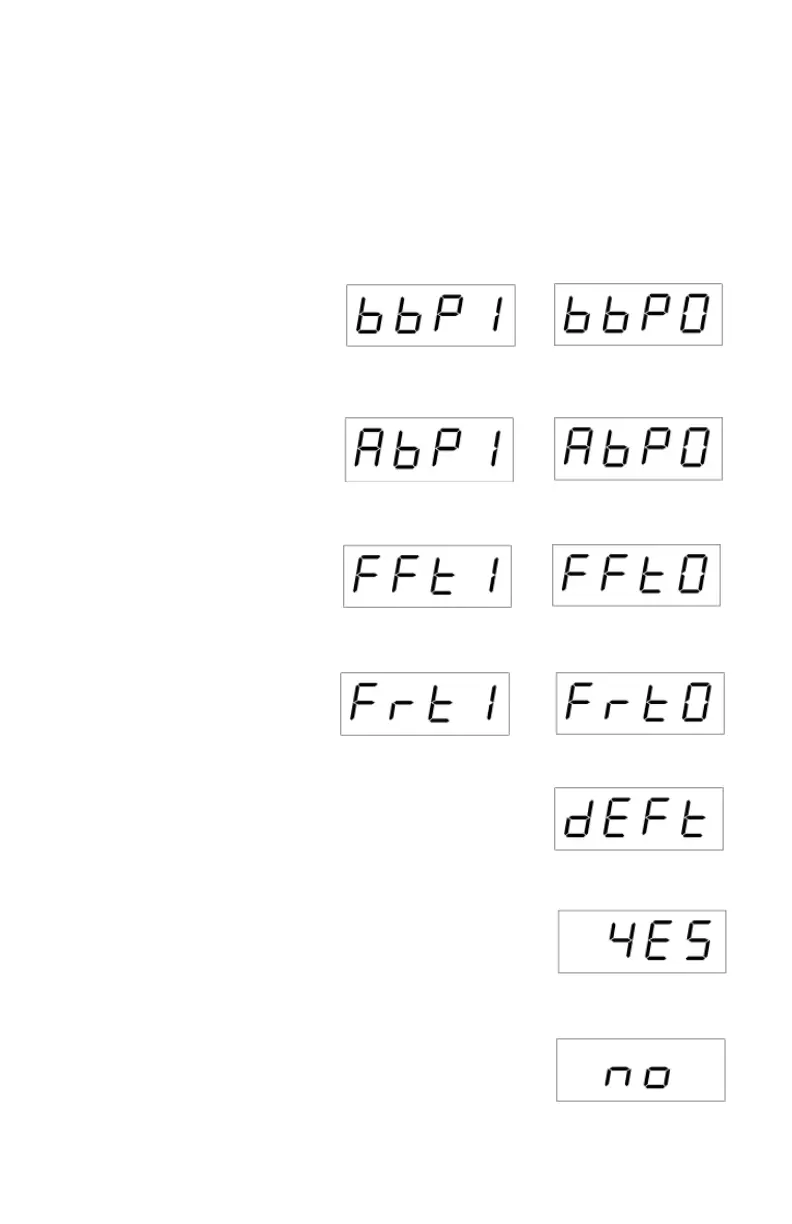
Digital display:
Yes, reset to pump default
Digital display:
Pump default
Digital display:
No, do not reset to pump
default
Enabling/Disabling Alarm and Fault Features
1. Press the security code to enter setup mode.
2. Press CAL. The pump software version number will display briefl y.
3. Press or to turn feature on or off (see below). Press
to advance to next
feature.
4. Press [
] to exit feature setup. Press [] again to return to run time
presets.
Feature ON OFF
Button Beeper: On/Off
Alarm Beeper: On/Off
Flow Fault: On/Off
Flow Fault Restart: On/Off
Digital display:
Button beep on
Digital display:
Button beep off
Digital display:
Alarm beep on
Digital display:
Alarm beep off
Digital display:
Flow fault on
Digital display:
Flow fault off
Digital display:
Flow restart on
Digital display:
Flow restart off


 To Next Page