11. System configuration
Pump settings => Pump settings => Lube Control=> Remote Manual Lube
Step Key Display Description
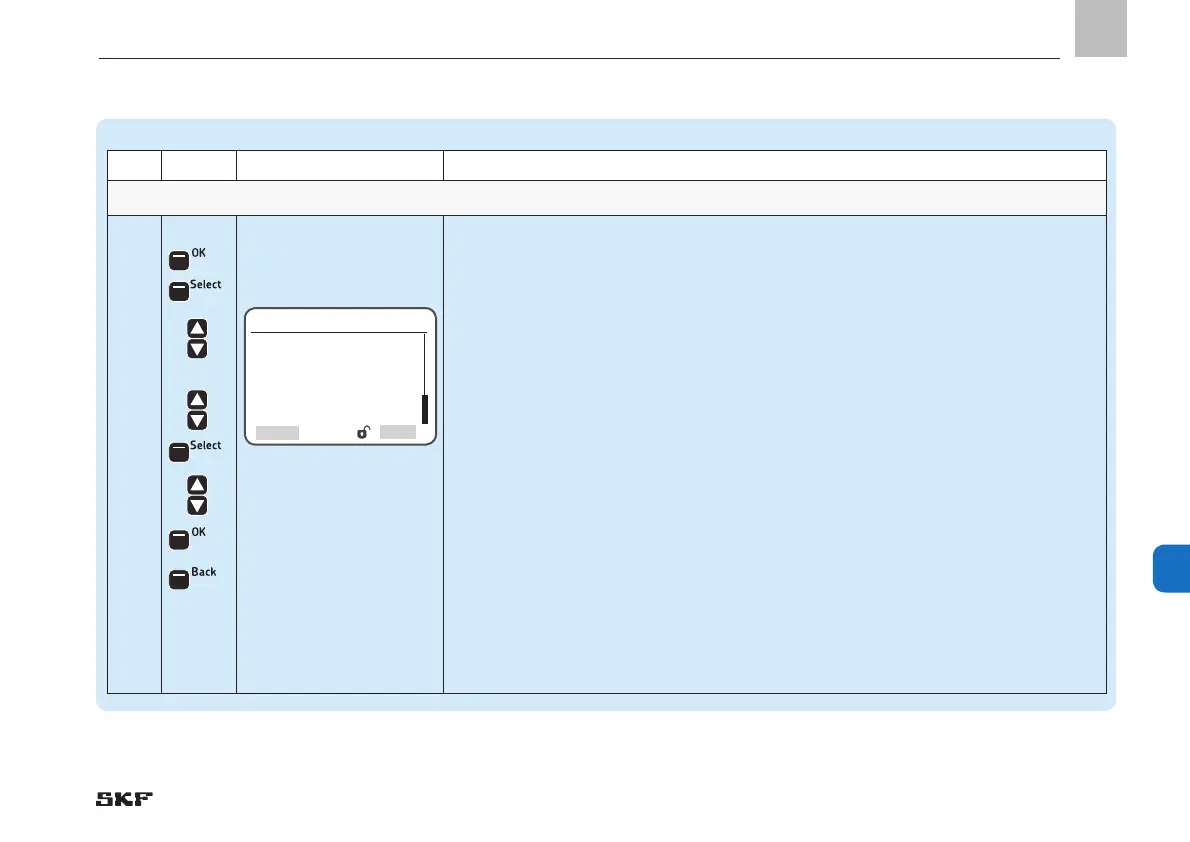
Remote Manual Lube Settings for the Remote Manual Lube system input
3.4
• Press <OK control key>
)You will enter the Remote Manual Lube menu
The following settings are available:
Input Type
o normally closed
o normally open
o disabled - no remote control connected
Input number
o Input number of normally closed/normally open contact (DI = digital input)
• Press <Select control key>
• Use <down/up arrow key> to select Input Type normally closed, normally open, or
disabled
With normally closed or normally open input type:
• Use <down/up arrow key> to select Input Number (normally closed/normally open)
• Press <Select control key>
• Use <down/up arrow key> to specify the input number
• Press <OK control key>
• Press <Back control key>
Remote Manual Lube
Input Type
[normally closed]
Input No.
[0.00 ] DI
SelectBack
EN
111
11


 To Next Page