Page 82
EN
10. KFGS display mode
10.1 KFGS series
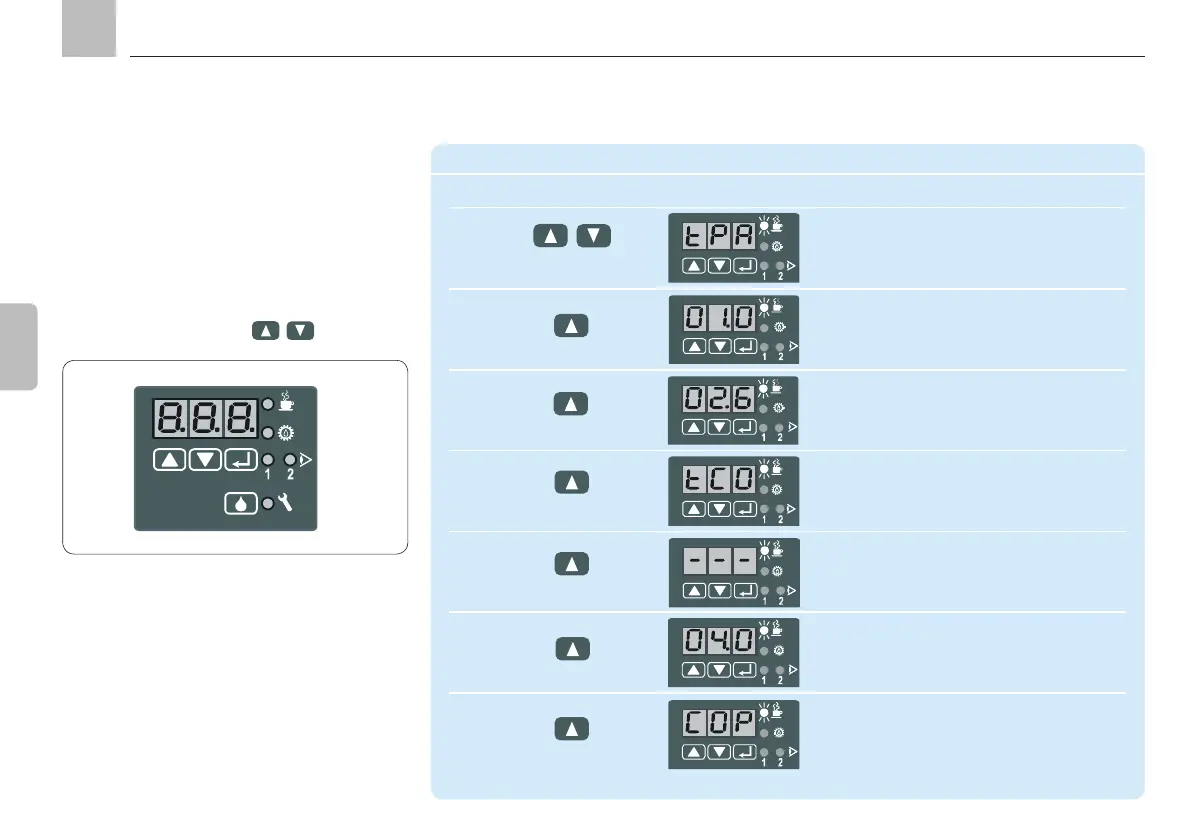
LED displays. It is
used to query the current settings and operat-
ing parameters.
pressing one of the two
keys.
Display mode
Step Key Display
1 The current operating status is shown
Example: Timer operation pause
Press briefly
2 Display remaining interval time for current
lubrication cycle. Example: 1 h
3 Display pre-set total interval time
Example: 2.6 h (factory setting)
Display is in hours
4 Display pump cycle
Example: Timer operation
5 Example: System is currently in operating
status Pause, current tCO display
(timer COntact) not possible
6 Display the pre-set value
Example: 4 min (factory setting)
Display is in minutes
7 Display system monitoring
KFGS display
10. KFGS display mode
KFGS



 To Next Page