EasyManua.ls Logo

SkillKorp M20S - De Muis Aansluiten

Default Icon
Print Icon
To Next Page IconTo Next Page
To Previous Page IconTo Previous Page
Loading...
Bekabelde installatie
1
MODEL: M600(PAW3395)
DPI
Indicator Light
2.4G/Red
Mode
Indicator Light
2.4G OFF BT
M60023F000001
IPS:650
ACC:50G
DPI:26000
KYSONA
M600
2.4G
OFF
MODEL: M600(PAW3395)
DPI
Indicator Light
2.4G/Red
Mode
Indicator Light
2.4G OFF BT
M60023F000001
IPS:650
ACC:50G
DPI:26000
KYSONA
M600
2.4G
OFF
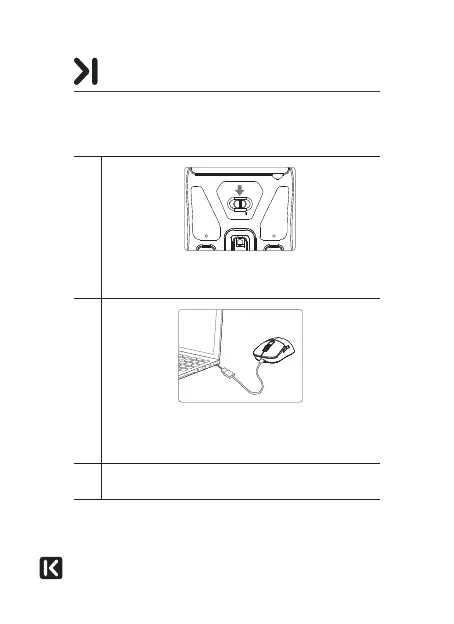
Schuif de keuzeknop naar de stand OFF. Het lampje
gaat uit.
2
Sluit de muis met de meegeleverde kabel aan op een vrije
poort van uw computer. Het besturingssysteem detecteert
de muis automatisch.
3
De melding ‘Nieuw apparaat gevonden’ verschijnt rechts
onderaan uw scherm. Uw muis is klaar voor gebruik.
DE MUIS AANSLUITEN

Related product manuals