Wired installation
1
MODEL: M600(PAW3395)
DPI
Indicator Light
2.4G/Red
Mode
Indicator Light
2.4G OFF BT
M60023F000001
IPS:650
ACC:50G
DPI:26000
KYSONA
M600
2.4G
OFF
MODEL: M600(PAW3395)
DPI
Indicator Light
2.4G/Red
Mode
Indicator Light
2.4G OFF BT
M60023F000001
IPS:650
ACC:50G
DPI:26000
KYSONA
M600
2.4G
OFF
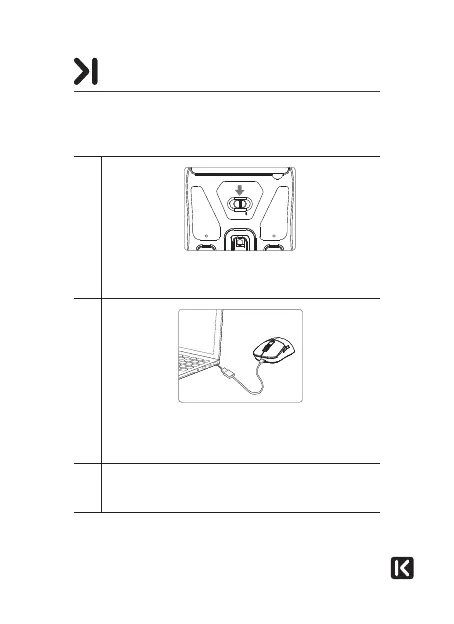
Slide the mode selector switch to the OFF position. The
indicator light goes off.
2
Connect the mouse to a free port on your computer using
the cable supplied. The operating system automatically
detects the mouse.
3
An information bubble stating “New device detected”
appears on the bottom right of your screen. Your mouse
is ready for use.
CONNECTING THE MOUSE



 To Next Page