Page 11 of 40
CU-M001 User manual
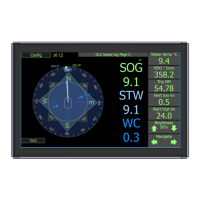
Colour code:
Speed Through Water (STW) is in light blue
Speed Over Ground (SOG) is in green/yellow
Water Current (WC) is in dark blue
If the speed value is not available it will show -.- (dashed line).
SOG will be available only when the bottom is within range.(depth <150m)
If GPS and Rate of turn is connected from an external source, the speed will be shown with a
symbol, when the depth >150m, bt this will n ot be sent out of the system as this system is not the
source of the data.
Press this value (kn) to change
to other units
Informations can be set to the following: Water temperature / Trip / Total / Alert Hi / Alert lo / Pitch /
Roll / SOG from GPS / ROT from gyro / Heading from gyro / STW (DL1) Items that can be changed
or reset, will do so by pressing and holding the information panel (Trip/ Alert)


 To Next Page