EasyManua.ls Logo

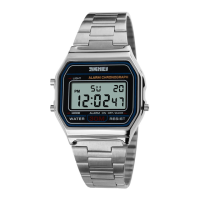
SKMEI 1343 - User Manual

SKMEI 1343
2 pages
Print Icon
To Next Page IconTo Next Page
Loading...
1343 digits Operation instruction
A. Features
Time, Alarm, Stopwatch, Dual time, Countdown.
Date, Month, Day, Hour, Minute, Second.
Daily Alarm.
Chime hourly.
Stopwatch: the maximum display range of stopwatch is 99 hours, 59 minutes, 59 seconds 99.
Timer: the maximum display range of countdown timer is 24 hours.
12 / 24H format.
EL backlight for 3 seconds.
B. Operation Manual
1. At normal mode, press B key to select operation mode. Press A key EL illuminates for 3 seconds.
2. Timing Function
At normal mode, press and hold C key for 2 seconds to time setting, and Second flashing, press D
key to zero. Press B key to select item as following sequence:
Second-Minute-Hour-12H/24H-Month-Day-Week
Press D key to select the flashing item,press and hold on D key to increase the flashing item quickly .
Press C key to exit.
When setting the
seconds
, the seconds are in the range of 30 to 59, resetting them to 00 and adding 1
to the minutes. While the seconds are in the range of 00 to 29, the minutes wont be changed.
3. Daily Alarm
At alarm mode, press and hold C key for 3 seconds and Hour flashing into time setting. Press B key
to select item as following sequence: Hour-Minute
Press D key to adjust the flashing item,press and hold on D key to increase the flashing item
quickly .Press C key to exit.
At the alarm mode, press D Key to open or close the alarm
ALM
and the hourly chime
CHI
.
When the Alarm function chiming, the symbol will flashing and chiming for 20 seconds, press any key to
stop.
Hourly chiming for once when on time alarm.
Question and Answer IconNeed help?

Do you have a question about the SKMEI 1343 and is the answer not in the manual?

Summary

Watch Operation Manual

Timing Function

Set time by holding C key for 2s, "Second" flashes. Press D to zero seconds. Press B to cycle through Second, Minute, Hour, 12/24H, Month, Day, Week.

Daily Alarm

In alarm mode, hold C for 3s to set hour. Press B to select Hour/Minute. Press D to adjust. Press D to toggle alarm/chime. Alarm flashes/chimes for 20s.

Stopwatch Function

Max 23h 59m 59s. Press D to start/stop. Press C to zero. Press C to split/record first timing. Press D to record second timing.

Dual Time Function

Press D to enter dual time. Hold C to set Minute, then Hour. Press D to adjust. Press C to finish. No second setting.

Countdown Function

Max 24h. When count reaches 0:00:00, it chimes for 12s. Hold C to set Hour/Minute. Press D to adjust. Press C to exit, D to start.

SKMEI 1343 Specifications

General IconGeneral
BrandSKMEI
Model1343
CategoryWatch
TypeDigital
Water ResistanceYes
Water Resistance Depth30 meters
Case MaterialPlastic
Battery TypeCR2032
Battery Life2 years
Case Thickness12 mm
Band Width22 mm
MovementQuartz
FeaturesAlarm, Stopwatch, Backlight
FunctionsTime, Date, Alarm

Related product manuals