Model Name / NAME
Turning the transmitter off:
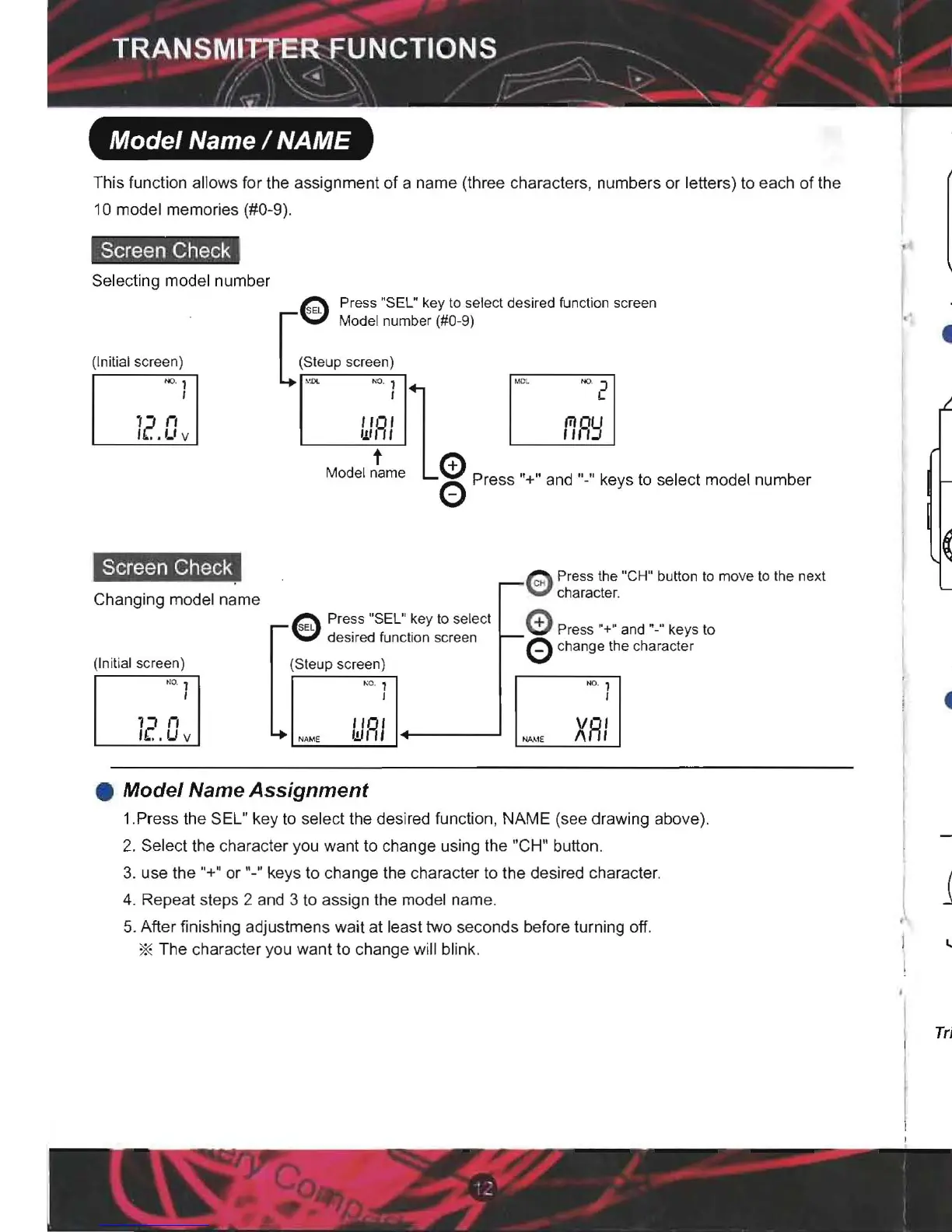
This function allows for the assignment of a name (three characters, numbers or letters) to each of the
Wait at least two seconds before turning off the transmitter if any adjustments
were
made using
10 model memories (#0-9).
the trim switches or edit keys. If power is turned off less than two seconds after any adjustments
Screen Check
e
were made , they will not be stored in memory.
Selecting model number
Press"SEL"key to select desired function
screen
SEL
l.
Model number (#0-9)
• Steering wheel tension adjustment
(Initial screen)
(Steup screen)
[
This adjustment can be made to change the tension of the steering mechanism.
NO. 1
I
12
il
'_
"
"'--'_~;..,..~-;~1
eo, f,
;:
c
Adjusting the tension
Using a small phillips head screw-driver, turn the adjusting screw
Model
~me
0 Press "+" and "_" keys to select model numb er
I
..
Lt
v
o
Turning the adjustment screw clockwise
Will
increase the tension, while turning
counterclockwise will decreasethe
tension.
'.T
....
~.,.1i
Screen Check
.--
Q
Press
the "CH" button to moveto the next
Q character.
Changing model name
e Press "SEL" key to select 0 Press "+" and
"_
" ke s to
Caution I Turning the adjustment screw too far counterclocwise may cause the screw to fall out.
desired function screen
f--
0 change the charac
t:
r
(Initial screen)
(Steup screen)
, NO.
~
1
~
1
1
,
I I
• Digital Trim Switch Operation (Throttle Trim
and
Steering Trim)
[
nn
(Initial settings: DT1-Steering Trim; DT2-Throttle Trim)
f(.
U v
NAM' NAM'
WRI
XRI
TRM
TRM
Move the switch left or right to adjust the setting.
CH 2
• Model Name Assignment
1
1.Press the SEL" key to select the desired function , NAME (see drawing above).
4 F 9
1
SteeringTrim Position Throttle TrimPosition
2. Select the character you want to change using the "CH" button.
3. use the
"+" or "-" keys to change the character to the desired character.
4. Repeat steps 2 and 3 to assign the model name.
-A
tone will sound to indicate each step.
I
5. After finishing adjustmen s wait at least two seconds before turnin g off.
"
- Once the minimum or maximum value is reached the
* The character you want to change will blink.
tone will still sound but no changes are being made.
Trim Operation I When using the digital trim, adjustments have no influence on maximum servo travel in order
to prevent linkage binding.
Wh en
D/R Steering or Throttle ATL value is less 100% , the digital trim adjustments may affect servo
travel end point.


 To Next Page
 Loading...