I
TRANSMI
"B
TER
~E:~
.NCTIONS
~
"
"
LS
E"
F
U
P
~
""'"
,.-'""-
~
INITIA
.:
~,
\.
~
~;\
I -
..
j;
//
'.
..."
--
-
......
:;..-'
'
....
- -
-
~\
.
I.
/ '/ ,
--..
:.
:/~
","
:1
I,
'}
J ...
,
~
:;..-
v .
'I
(;
.,
J
I~
_'
~
'
• EPA
Throttle
Adjustment
1. Set the ATL switch (initial DT4) to its maximum rate (100%).
2. Press the "SEL" key to select the desired function, EPA (see drawing on page 9).
3. Select channel 2 using the "CH" key.
4. Forward throttle adjustment
. make sure the display shows "CH2". Pull the throttle trigger all the way back and then use the
"+" and "."
keys to adjust maximum forward throttle amount.
!fu
sing an ESC(Electranic Speed Controller), set to 100%.
5. Brake/reverse Throttle Adjustment
. make sure the display shows "CH2". Push the throttle trigger all the way forward and then use the
"+" and
"." keys to adjust maximum brake/throttle amount. If using an ESC(Electranic Speed Controller), set to 100%.
6. After finishing adjustments, press the "SEL" key to return to the initial screen.
EXP
adjustment
EXP is used to adjust the central servo travel value for each channel (Chi or Ch2 )
Screen
Check
~
Pr
ess
"S
E L " k
ey
to
sel
e
ct
~
Pr
ess
lO
CH"
key
to
se
lec
t th e
~
~
d
esir
ed
fun
ction
sc
re e n
r----~
c ha nne l to
be
c
ha
n
ged
LJ£QJ
(S et
up
scre en) !
[
c" 7
~
2
EX? EXP
0'/'
0"
L......-
__
---'=---'
EXP
range
O
-(t)
1
00
% f
or
ea ch cha nnel
Adju
stm
ent
butt
ons-u
se
"+" or "." ke ys
for
cha ngin g v
alues
EXP
Steering
Adjustment
1. Pr
ess
the "
SEt."
ke y to se lect
the
de
sired
fun
ct i
on.
EXP
(se e
dr
awing
abo
ve)
2.
Se
lec
t c
ha
n
ne
l 1 u
sin
g t
he
"
CH"
key.
3.
Us
e the
"+"
and ". "
key
s to
adjust
th e E
XP
valu
e.
4 .
Aft
er
fin i
shing
adju
stm
ent
s,
pr
ess
the "
SEt."
ke y to r
etu
rn to th e
initi
al scre
en
.
*'
St
ee
ring E XP will
wo
rk in b
oth
left and rig ht di re
cti
ons
.
EXP
Steering
Adjustment
1. Pres s the "
SEt."
key to s
elec
t
the
d
esired
fun
ction.
EXP
(see
dr
awin
g
ab
o
ve)
2.
Se
l
ec
t c
ha
nne l 2 u
sing
the "
CH"
key.
3 . Use
the
"+ "
and
"." ke ys to adjust th e E
XP
va
lue.
4 . A fter fini
shin
g
adju
stm
e
nts,
pre ss
the
"
SEt."
ke y to r
eturn
to the
initi
al
scr
een.
*'
Thr
ottl
e
EX
P
onl
y
wo
rks
in fo
rw
ard
dir
e
ction
s .
Positive Thron e EXP
Faster servo movement
Negative Throttle EXP
Negative Steering EXP Positive Steering EXP
Slower servo movement
in center , slower after
Faster servo movement
Slower servo movement
in center , (aster after
EXP percentage
in center . slower after
in center , faster after
EXP percentag e
R 100
EXP pe rcentage
EXP percent age
8 100
810
0
~
I
O~
O
/ /
~
L-100 /
!I0
100
II
~
100
a 0
'
'
.:
o 0
II
~"
0
0
II
lID.
~I
0 / , -
~
,/
"I
~
/
R· 1QQ
"I
~
.-
'
o '
R· 100
o '
~
,
"
G
-'
U) ,
ct
"'
c-: U) •
U) /
~
"
L1 00 - - 0 - -
L1iiO
- - 0
--
FiCo
--
0 - - FiCo - - 0 - -
Trigger movement
Wheel Movement Wheel Movement Trigger movement
EXP
Steering
EXP
Throttle
Transmitter Setup
•
Slide
the
on/off
swich
to
the
ON
position.
I
j,
NO.
~
I~
Model Number
Displa y when power is turned ON
"
,-,
I
c:
.LI
V-+-
Battery Voltage
•
Transmitter
Crystal
Use AM and signal convension crystal sets for this transmitter. The transmitter crystal must be paired
with the receiver crystal.
•
Model
Number
Check
When the power is turned on the currently selected model number is displayed. To setup a different
model number, please use the Model Setup Function found on page 12.
•
Digital
Trim
Setup
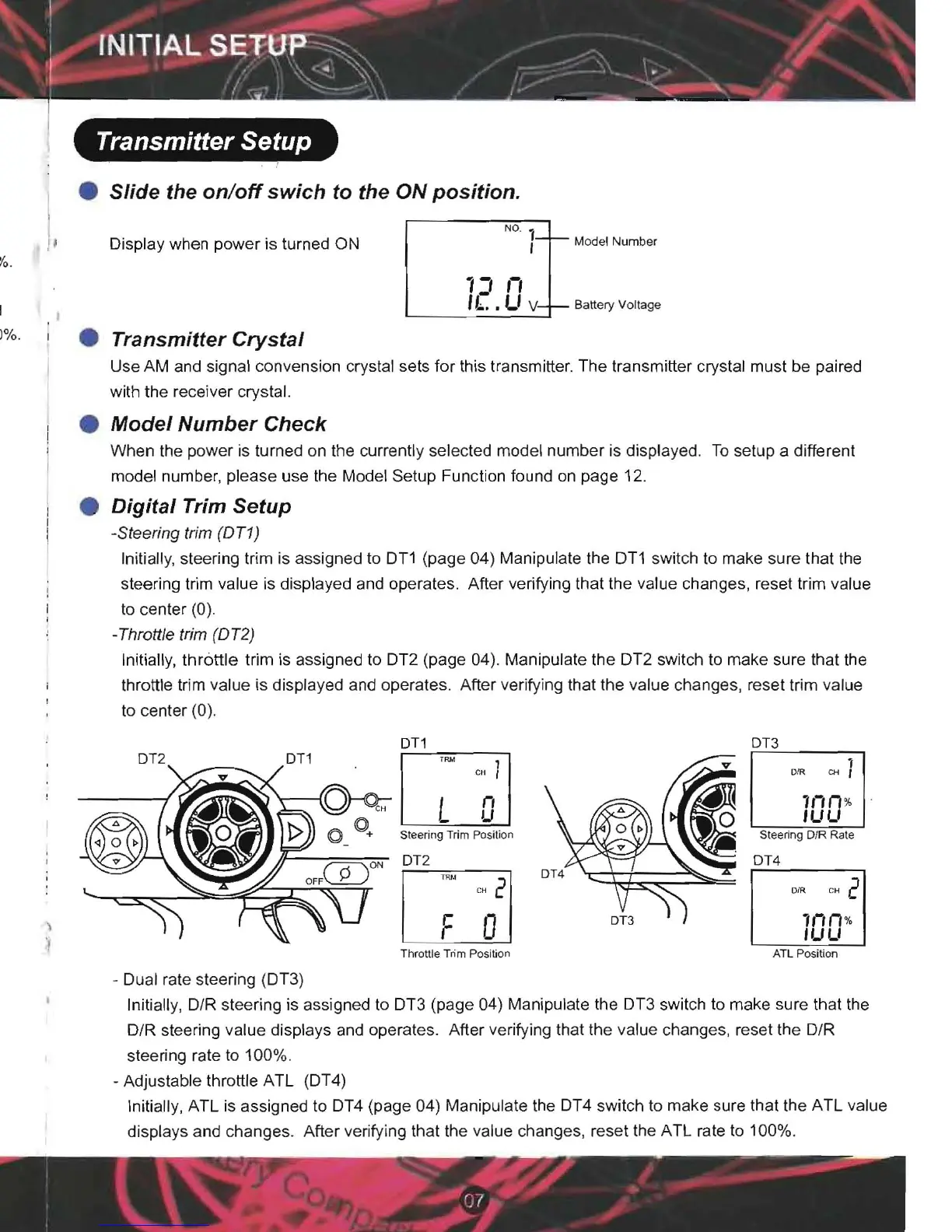
-Steering trim (OTt)
Initially, steering trim is assigned to D'Tl (page 04) Manipulate the DT1 switch to make sure that the
steering trim value is displayed and operates. After verifying that the value changes, reset trim value
to center (0).
.Throttle trim (OT2)
Initially,
throttle
trim is assigned to DT2 (page 04). Manipulate the DT2 switch to make sure that the
throttle trim value is displayed and operates. After verifying that the value changes, reset trim value
to center (0).
OTl
013
OT2
OTl
cu ) DIR
1II II %
ILILI
L
U
"
Steering Trim Position
Sleering DIR Rale
OT2
OT4
OrR CH 2
c"
2
1II
11
%
F 0
"-'LI
Throttre Trim position ATL Position
- Dual rate steering (DT3)
Initially, D/R steering is assigned to
Dn
(page 04) Manipulate the DT3 switch to make sure that the
D/R steering value displays and operates. After verifying that the value changes , reset the D/R
steering rate to 100%.
- Adjustable throttle ATL (DT4)
Initially, ATL is assigned to DT4 (page 04) Manipulate the DT4 switch to make sure that the ATL value
displays and changes. After verifying that the value changes, reset the ATL rate to 100%.


 To Next Page
 Loading...