I
Servo Reverse /
REV
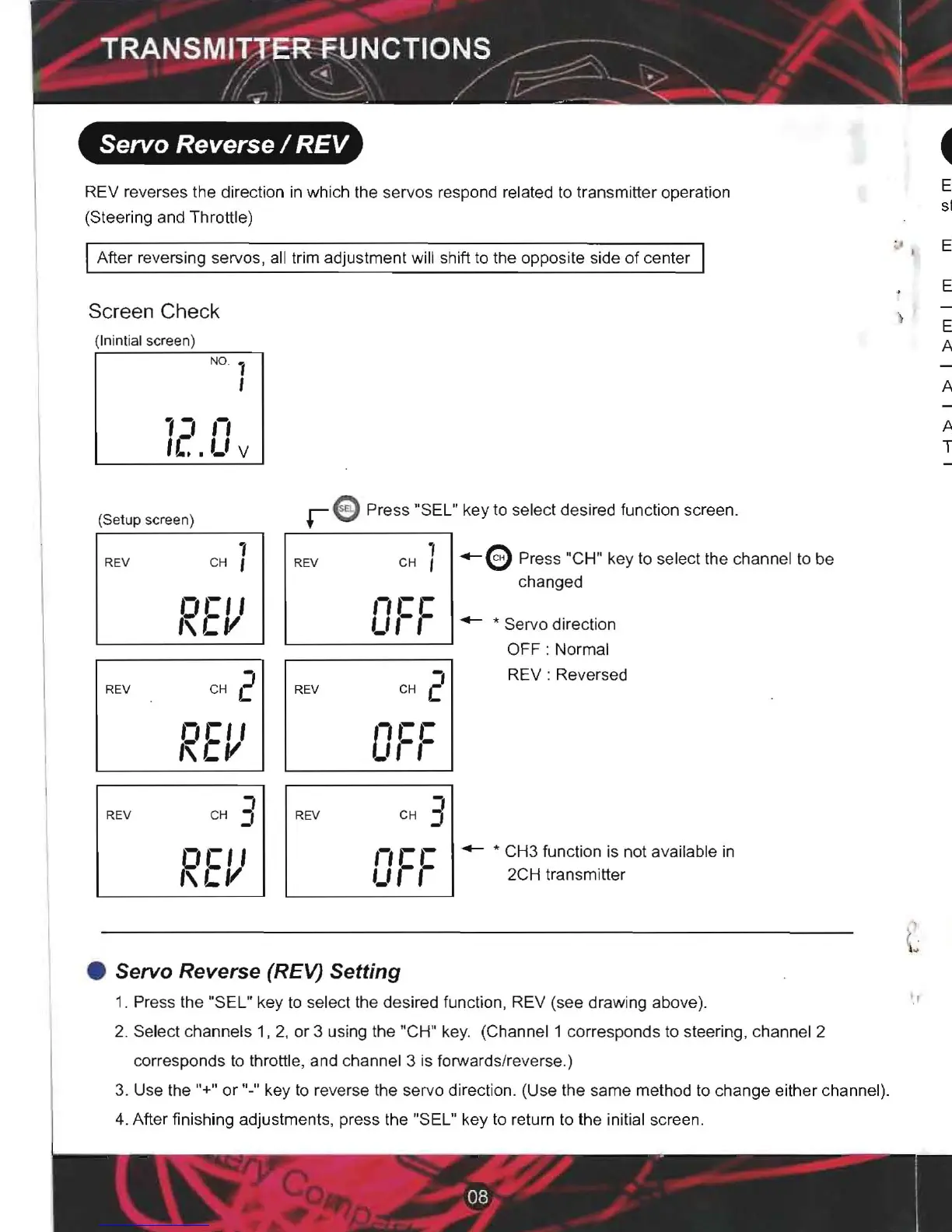
REV reverses the direction in which the servos respond related to transm itter operation
(Steering and Throttle)
After reversing servos, all trim adjustment will shift to the opposite side of center
Screen Check
(Inintial scree n)
N°
' 1
I
'1
11
,
c:
.
,_,
V
(Se tup sc
reen)
1
REV CH I
n,-,
,
"LV
I
I
I
REV
REV
:l
CH J
CH 2
DCII
'\
1..11
01='
,
'\'-v
I
r
ePress
"SEL" key to select desired function screen.
1
I
-e
Press "CH" key to select the channel to be
changed
REV
CH I
1,-r
I
L,
,-,-
1- * Servo direction
2
OFF : Normal
REV:
Reversed
REV
CH
I
-'
' F
,-
'-
1
REV
CH J
,-,
L'-
'-''-
,-
- * CH3 function is not available in
2CH transm itter
• Servo Reverse (REV)
Setting
1. Press the "SEL" key to select the desired function , REV (see draw ing above).
2. Select channels 1, 2, or 3 using the "CH" key. (Channel 1 corresponds to steering, channel 2
corresponds to throttle, and channel 3 is forwards/reverse.)
3. Use the
"+" or "-" key to reverse the servo direct ion. (Use the same method to change either channel).
4. After finishing adjustments, press the "SEL" key to return to the initial screen.
End Point Adjustment / EPA
EPA should be used when adjustments are being made to left/right
steering angle and throttle high/brake side during linkage setup.
EPA adjusts the maximum angle causing a different turning radius.
End Point Adjustment
EPA is used to adjust the maximum servo travel for each channel.
Always check linkages while adjusting EPA.
Adjustable Throttle Limiter
ALT trim adjusts the amount of overall brake throw the model will have.
Thus when adjusting throttle using EPA , the ALT must be considered.
.&. Warning
Warning!
Do not over apply EPAas this will cause binding
to occur and will result in servo failure.
I .....
Maximum EPA value at the conta ct point
The servo may malfunction and the model may lose control if unreasonable force is applied to the servo
horn during steering operation .
Screen
Check
~
LxQJ
EPA
range
e
Pre
ss "S EL" k
ey
to
select
SE L
desir
ed
fun
ction
scree n
1
(Se
tup
sc
reen)
[
CHI
CH
]
E
M
~
EAA
~
1'-'0
"
100
"
IUL
Left side steering Right Side steering.
- 0 - 120% for each channel and direction
Adjustment
buttons
- Use "+" and no" keys for changing values
Pressing and holding the
"+" or "-" key for more than 1 second
will increase the speed of value change
•
EPA
Steering
Adjustment
'.
e
Pr
ess
"CH"
key
to sel e ct
the
H
chan ne l to
be
chang
ed
CH
2
cH
2
E
AA
~
E
~
~
100
%
-1,,('11
%
_, I
L't.
Forward side throttle Brake side throttle
1.
Set
th e D/R st
ee
ring sw itch (Ini tial
DT
3) to its
ma
x
imum
r
ate
(1
00%)
.
2 .
Pre
ss
the
"SEL"
k
ey
to se
lec
t
the
de
sir
ed
fun
ction
,
EPA
(see
dr
a
win
g a
bo
ve
).
3.
Sel
ect ch annel 1
using
the
"
CH'
ke y
4 .
Left
si
de
ste ering
- M a ke sure
the
display
s
ho
w s
"CH1"
.
Turn
the
steering
w hee l a ll th e w a y to
the
left
and
then
use
th e
"+" and
"-"
keys
to
adju
st the s
tee
ring
angle.
5 . R i
ght
sid e
steering
-
Mak
e s ure
the
display
sh
ows
"C H 1".
Turn
the
steering
whe
el
all
th e
way
to
the
right
and th
en
use
th e
"+"
a nd
"-"
keys
to
adju
st
the
s
tee
ring
angle.
6 . A fter fin is hing
adjustments
, pre ss the "S E L "
key
to
return
to the initial
sc
re en.
I



 To Next Page
 Loading...