EasyManua.ls Logo

Skyrc D100NEO - User Manual

Skyrc D100NEO
26 pages
Print Icon
To Next Page IconTo Next Page
Loading...
SKYRC D100neo Instruction Manual
1. SKYRC D100neo
AC/DC Multi-Function Smart Charger
Instruction Manual
SK-100199
V1.0
Question and Answer IconNeed help?

Do you have a question about the Skyrc D100NEO and is the answer not in the manual?

Summary

Introduction to SkyRC D100 neo

Package Contents

Meet the D100 neo Charger

Charger Overview and Controls

Visual identification of the charger's key ports, display, and controls.

D100 neo Specification Details

General and Input Specifications

Details model, input voltage, current, and charge/discharge power.

Battery Types and Operating Modes

Details supported battery types, charge currents, and working modes.

DC Power and USB Specifications

Environmental Operating Conditions

Outlines the operating and storage temperature and humidity ranges.

Essential Safety Warnings

Critical Usage Precautions

Lists essential safety guidelines to prevent hazards during charger operation.

Standard Battery Parameter Guide

Voltage and Current Limits by Type

Provides nominal, max charge, and min discharge voltages for battery types.

D100 neo Button Functions

Port Switch and Scroll Wheel Usage

Details the functions of the port switch button and the scroll wheel.

Program Flow Chart Examples

Setting Up Charging Programs

Illustrates the steps to set up charging programs for different battery types.

System and DC Power Settings Navigation

Shows navigation paths for system settings and DC power.

Power and Battery Connection Guide

Connecting to Power Sources

Instructions for connecting AC and DC power inputs to the charger.

Battery Connection Procedures and Warnings

Guidelines and warnings for connecting various battery types.

Charging Operations Overview

Lithium Battery Charging Modes

Explains Balance CHG, Charge, Storage, and Discharge for LiPo, Lilon, LiFe, LiHV.

NiMH;NiCd Battery Program Details

Pb Lead-Acid Battery Program Details

Lithium Battery Program Setup

Setting Up Lithium Battery Programs

Provides a step-by-step flowchart for setting battery type, cells, task, condition, and current.

NiMH;NiCd Battery Program Setup

Setting Up NiMH;NiCd Battery Programs

Details the process for setting up NiMH/NiCd battery programs, including modes and parameters.

Pb Lead-Acid Battery Program Setup

Setting Up Pb Battery Programs

Explains the steps to configure Pb battery charging programs and parameters.

Using Charger Master Software

Software Installation and Operation

Instructions for downloading, installing, and using the Charger Master software.

DC Power Output Mode

USB Type-C PD;QC3.0 Output Functionality

Voltage Calibration for Experts

Charge Settings Menu Explained

Configuring Charge Parameters

Describes the menu options for setting battery type, cell count, task, condition, and current.

System Settings and Customization

Customizing Charger Options

Details various system settings like safety timer, language, backlight, and USB modes.

Firmware Upgrade Procedure

Steps for Updating Charger Firmware

Provides a step-by-step guide to update the charger's firmware.

Error and Warning Messages

Troubleshooting Common Errors

Lists common error messages and their explanations for troubleshooting.

Conformity Declaration and FCC Compliance

FCC Rules and Interference Notes

Details FCC rules, compliance conditions, and notes on interference.

Warranty and Service Information

Liability Exclusion and Warranty Terms

Explains liability limitations and the product's warranty policy.

Summary

Introduction to SkyRC D100 neo

Package Contents

Meet the D100 neo Charger

Charger Overview and Controls

Visual identification of the charger's key ports, display, and controls.

D100 neo Specification Details

General and Input Specifications

Details model, input voltage, current, and charge/discharge power.

Battery Types and Operating Modes

Details supported battery types, charge currents, and working modes.

DC Power and USB Specifications

Environmental Operating Conditions

Outlines the operating and storage temperature and humidity ranges.

Essential Safety Warnings

Critical Usage Precautions

Lists essential safety guidelines to prevent hazards during charger operation.

Standard Battery Parameter Guide

Voltage and Current Limits by Type

Provides nominal, max charge, and min discharge voltages for battery types.

D100 neo Button Functions

Port Switch and Scroll Wheel Usage

Details the functions of the port switch button and the scroll wheel.

Program Flow Chart Examples

Setting Up Charging Programs

Illustrates the steps to set up charging programs for different battery types.

System and DC Power Settings Navigation

Shows navigation paths for system settings and DC power.

Power and Battery Connection Guide

Connecting to Power Sources

Instructions for connecting AC and DC power inputs to the charger.

Battery Connection Procedures and Warnings

Guidelines and warnings for connecting various battery types.

Charging Operations Overview

Lithium Battery Charging Modes

Explains Balance CHG, Charge, Storage, and Discharge for LiPo, Lilon, LiFe, LiHV.

NiMH;NiCd Battery Program Details

Pb Lead-Acid Battery Program Details

Lithium Battery Program Setup

Setting Up Lithium Battery Programs

Provides a step-by-step flowchart for setting battery type, cells, task, condition, and current.

NiMH;NiCd Battery Program Setup

Setting Up NiMH;NiCd Battery Programs

Details the process for setting up NiMH/NiCd battery programs, including modes and parameters.

Pb Lead-Acid Battery Program Setup

Setting Up Pb Battery Programs

Explains the steps to configure Pb battery charging programs and parameters.

Using Charger Master Software

Software Installation and Operation

Instructions for downloading, installing, and using the Charger Master software.

DC Power Output Mode

USB Type-C PD;QC3.0 Output Functionality

Voltage Calibration for Experts

Charge Settings Menu Explained

Configuring Charge Parameters

Describes the menu options for setting battery type, cell count, task, condition, and current.

System Settings and Customization

Customizing Charger Options

Details various system settings like safety timer, language, backlight, and USB modes.

Firmware Upgrade Procedure

Steps for Updating Charger Firmware

Provides a step-by-step guide to update the charger's firmware.

Error and Warning Messages

Troubleshooting Common Errors

Lists common error messages and their explanations for troubleshooting.

Conformity Declaration and FCC Compliance

FCC Rules and Interference Notes

Details FCC rules, compliance conditions, and notes on interference.

Warranty and Service Information

Liability Exclusion and Warranty Terms

Explains liability limitations and the product's warranty policy.

Overview

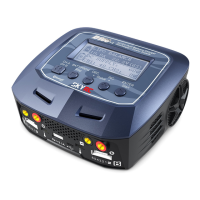
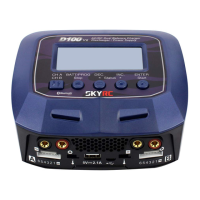
The SkyRC D100neo is an AC/DC multi-function smart charger, an enhanced version of the D100, designed for various RC batteries. It features dual independent ports and can operate as a dual-output digital power supply.

Function Description:

The D100neo is primarily a smart charger for a wide range of RC batteries, including LiPo, Lilon, LiFe, LiHV, NiMH, NiCd, and Pb (Lead-Acid) types. It offers various working modes tailored to each battery chemistry, such as Balance CHG, Charge, Discharge, and Storage for Lithium batteries; Normal, Discharge, Re-Peak, CYCLE_D_C, and CYCLE_C_D for NiMH/NiCd batteries; and Charge, AGM Charge, Cold Charge, and Discharge for Pb batteries.

Beyond its charging capabilities, the D100neo can function as a dual-output digital power supply, providing adjustable voltage (2V-27V) and current (0.2A-10A) per output. It also includes a 20W USB Type-C PD 3.0 charging port, enabling rapid charging for smartphones, tablets, and compatible laptops like the 2020 MacBook Air.

The device can be connected to a PC or Mac via a USB Type-C cable and controlled using the "Charger Master" software. This software provides a visual display of charging and discharging parameters, including charge time, capacity, charge current, and voltage, presented in a curve format.

Important Technical Specifications:

  • Model: D100neo
  • Input Voltage:
    • AC: 100-240V (50/60Hz)
    • DC: 10V-30V
  • Input Current (DC): 18A
  • Charge Power:
    • AC: A: 0-100W B: 0-100W A+B=100W
    • DC: A: 0-100W B: 0-100W A+B=200W
  • Discharge Power:
    • Main Port: 5W
    • Main Port+Balance Port: 30W Max (LiPo/6S)
  • Charge Current: 0.2-10.0A (for LiPo/LiFe/Lilon/LiHV/NiMH/NiCd/Pb)
  • Discharge Current: 0.1-2.0A (for LiPo/LiFe/Lilon/LiHV/NiMH/NiCd/Pb)
  • Balance Current: 1000mA Max (for LiPo/LiFe/Lilon/LiHV)
  • Trickle Charge Current (NiMH/NiCd): 200mA & OFF
  • Battery Types and Cell Counts:
    • LiPo/LiFe/Lilon/LiHV: 1-6S
    • NiMH/NiCd: 1-15S
    • Pb: 3S/6S/12S
  • DC Power Supply Output:
    • Voltage: 5.0-27.0V
    • Current: 1.0-10.0A
    • Power: 100W Max
  • USB Type-C Output:
    • QC3.0: 5V=3A, 9V=2A, 12V=1.5A (18W)
    • PD: 5V=3A, 9V=2.2A, 12V=1.67A (20W)
  • Dimensions (LengthWidthHeight): 11611079mm
  • Net Weight: 470g
  • Working Temperature: 0°C-40°C
  • Working Humidity: 0-80%
  • Storage Temperature: -10°C-60°C
  • Storage Humidity: 20%-70%

Usage Features:

  • LCD Display: Provides clear visual feedback on charging status and parameters.
  • Port Switch Button: Allows switching between Port A, B, C, and D for multi-port operation.
  • Scroll Button: Used for navigating menus, selecting parameters, adjusting values, and confirming selections. A long press (two seconds) accesses the system setting menu.
  • Dual Independent Ports: Enables simultaneous charging or discharging of two different batteries or performing different tasks on each port.
  • Balance Port: Essential for safe and balanced charging of Lithium batteries (LiPo, Lilon, LiFe, LiHV). The manual strongly recommends using Balance CHG mode for these battery types.
  • XT60 Output Socket: Standard output connection for batteries.
  • DC Power Mode: Allows the charger to act as a regulated DC power supply with adjustable voltage and current, suitable for powering other devices like tire warmers.
  • USB Type-C PD/QC3.0 Output: Provides fast charging for external devices.
  • Charger Master Software: Offers advanced control and monitoring capabilities when connected to a computer, including graphical data representation.
  • System Settings: Customizable options such as safety timer, max capacity, trickle charge, Li Volt Hold, language, min. input voltage, LCD backlight, volume, completion signal, and USB port mode (Auto, Data, Charge).
  • Error and Warning Messages: The device displays specific error messages and sounds an alarm in case of faults (e.g., DC Input Low/High, Battery Error, Connection Break, Overcharge, Over Time, Internal Temp. Too High, Over Load, Reversed Polarity, Fully Charged, Outlet Overload, Balance Connection Break, Cell Volt Diff., AC to DC Too Low, Power Setting Error).

Maintenance Features:

  • Firmware Upgrade: The device supports firmware upgrades to ensure optimal performance and access to new features. This process involves connecting the charger to a computer via a USB Type-C cable and using the Charger Master software.
  • Voltage Calibration (Expert User Only): Allows for direct voltage calibration on the charger using a 6S LiPo battery, with support available via email for more information.
  • Factory Settings Reset: The "Factory Settings" option in the system menu allows users to restore the charger to its default settings.
  • Smart Ventilation Fan: Helps manage internal temperature during operation, contributing to device longevity.

Safety Precautions (as highlighted in the manual):

The manual emphasizes critical safety warnings, including never leaving charging batteries unattended, avoiding charging overnight, not charging damaged or wet battery packs, ensuring correct battery type selection, and operating the charger away from flammable materials. Proper connection sequence (charger first, then battery) is crucial to prevent short circuits.

Skyrc D100NEO Specifications

General IconGeneral
BrandSkyrc
ModelD100NEO
CategoryBattery Charger
LanguageEnglish

Related product manuals