09 ·
MC3000
· 08
MC3000
QUICK START GUIDE QUICK START GUIDE
1
2
3
4
# V O L T C U R R m A h
1 . 4 5
3 . 8 5
3 . 8 6
3 . 8 3
- 0 . 8 0
1 . 0 0
1 . 0 0
1 . 0 0
1 0
4 0
4 0
4 0
1
2
3
4
# V O L T C U R R m A h
P r o c e s s i n g . . .
P r o c e s s i n g . . .
P r o c e s s i n g . . .
P r o c e s s i n g . . .
Programs
Starting
The parameters of other available program options can be changed in a similar manner. You
must always assign safe correct programs to the battery. There are 30 programs which can be
made for this charger.
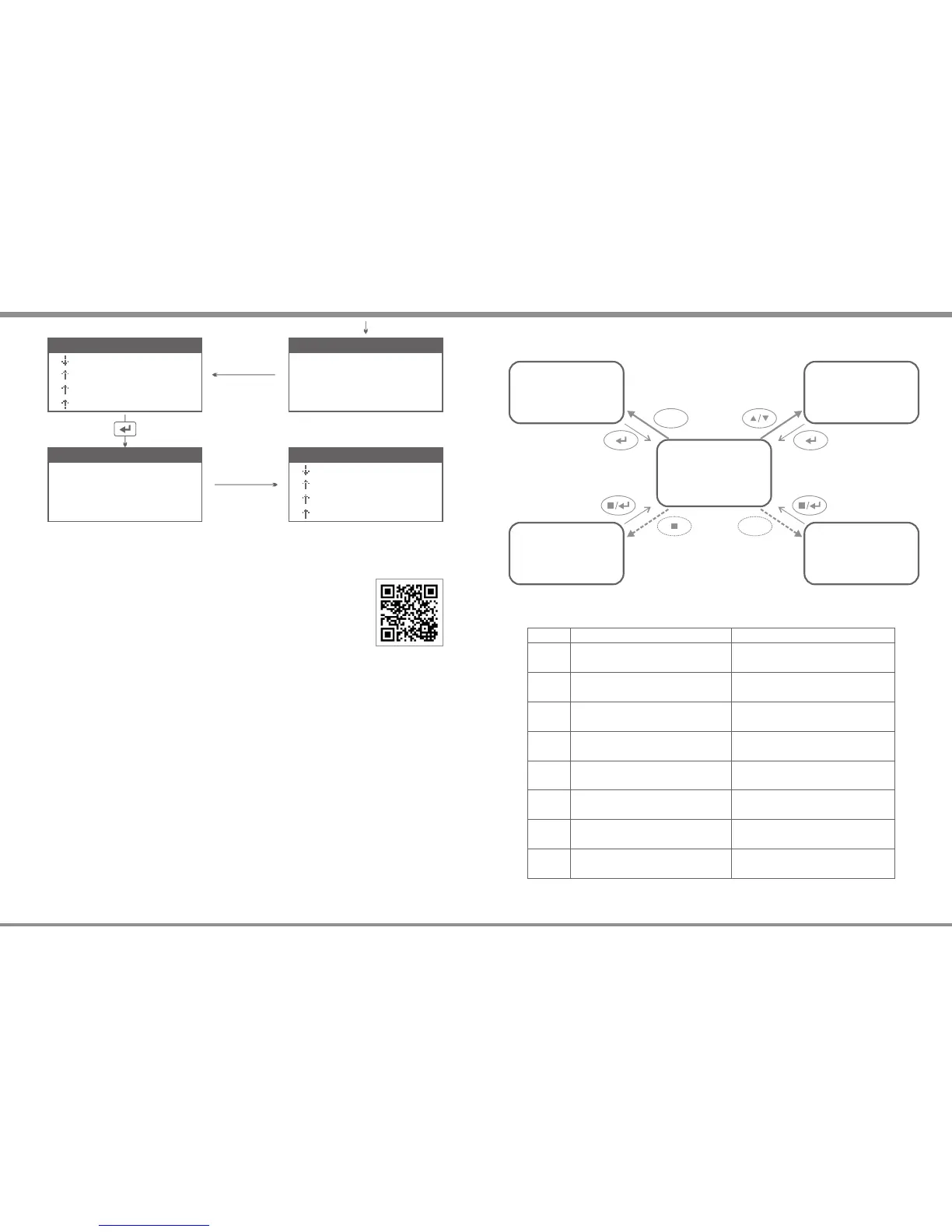
The following table gives you a rough idea of the controls in the user interface:
Inactive Slot Active Slot
SNB#1
click: go to SPV of #1
depress: START #1
click: go to SOV/DDV of #1
depress: STOP #1
click: go to SPV of #2
depress: START #2
click: go to SOV/DDV of #2
depress: STOP #2
SNB#2
SNB#3
click: go to SPV of #3
depress: START #3
click: go to SOV/DDV of #3
depress: STOP #3
SNB#4
click: go to SPV of #4
depress: START #4
click: go to SOV/DDV of #4
depress: STOP #4
STOP
press in SPV/GSV: CANCEL, QUIT
depress in TOV: go to GSV
press in SOV/DDV: FINISH
press in TOV: STOP ALL
UP
press: scroll up thru SPV/GSV press: scroll up thru SOV/DDV
DOWN
press: scroll down thru SPV/GSV press: scroll down thru SOV/DDV
ENTER
click in SPV/GSV: ENTER
depress: SAVE & EXIT
press in SOV/DDV: RETURN to TOV
press in TOV: START ALL
The following illustration shows how the five common views of the user interface are
interconnected:
SOV
Slot Operation View
DDV
Diagram Drawing View
TOV
Total Overview
TOV/IMV
TOV/UCV
GSV
Global Setup View
SPV
Slot Programming View
SNB
SNB
1
2
3
4
# V O L T C U R R m A h
1 . 4 8 P R O G R A M [ 0 2 ]
3 . 8 5 P R O G R A M [ 0 1 ]
3 . 8 6 P R O G R A M [ 0 1 ]
3 . 8 3 P R O G R A M [ 0 1 ]
# 1 :
# 2 :
# 3 :
# 4 :
I N F O M E S S A G E
S a v e t o [ 0 2 ]
P R O G R A M [ 0 1 ]
P R O G R A M [ 0 1 ]
P R O G R A M [ 0 1 ]
Start All
Video Tutorials
Please scan and watch the tutorial video above how to make a program.


 To Next Page