6 7
POWERING ON
When the throttle or sensor is engaged (powering the motor), and the E-Bike is
in motion, the LED display will indicate instantaneous line voltage as measured at the
battery terminals-not the available energy in the available power in the battery pack.
The line voltage will wing out from a dead stop or going up a steep hill, the motor will
be under a high load and may show a reduced number of LED bars.
When the throttle is disengaged (i.e. no power to the motor due to the bicycle being
stationary or coasting) LED bars will indicate the battery pack’s voltage.
The voltage of the battery pack will rise when no load is on the motor. The best
indication of how much battery life is remaining is to check the LED bars, after
reaching cruising speed, on a flat straight road. By doing this, the battery voltage
will stabilize and give a more accurate reading.
Press and Hold to power on/off. When the motor stops working and the E-bike is not
operated for a consecutive 5 minutes (this can be configured), the display will turn off automatically.
TURN ON/OFF HEAD LIGHT
Press and Hold to turn on/off head light, the light icon will be displayed.
CHANGE ASSIST LEVEL
Pressing quickly will increase assist level. Pressing quickly will decrease assist level,
level 1 is the default level.
SWITCH DISPLAY INFORMATION
Press and Hold and switches the display information, real time speed (SPEED) ->
Max speed (MAX SPEED) -> Average speed (AVG SPEED) -> Riding Time
SWITCH ODOMETER/TRIP DISTANCE
Press quickly to switch ODO/TRIP, Trip (Single trip distance) -> ODO (Accumulated distance)
ENTER 6KM/H MODE
When the bike is stopped, Press and Hold to enter 6km/h mode, the speed will be
4.5~7.5km/h according to different road conditions, “WALK” will be displayed on screen,
Press and Hold again will quit this mode.
PARAMETER SETTING MODE:
When the display is on, Press and Hold and . This will enter parameter setting mode,
holding these two buttons again will quit this mode. Waiting 10 seconds without touching any
buttons will also quit this mode automatically.
Under this mode , pressing or will increase or decrease the parameter value,
press quickly, will save current parameter value and switch to next parameter.
P01-BACK-LIGHT BRIGHTNESS
3 levels of brightness, default level is 2.
P02-KMH/MPH SWITCH
Change unit from KMH to MPH.
P04-AUTO POWER OFF TIME
Switch from 0 to 60, will be the time (in minutes) that the display monitor will shut down when not
being used. 0 means never shut down. Default value is 10 minutes.
P06-WHEEL SIZE SETTING
Set wheel size, in inch, step: 0.1 inch
P18-RESET ALL PARAMETERS TO FACTORY SETTINGS
Press and Hold until “SSSS” is displayed on screen, all parameters reset to default values
except for the odometer distance.
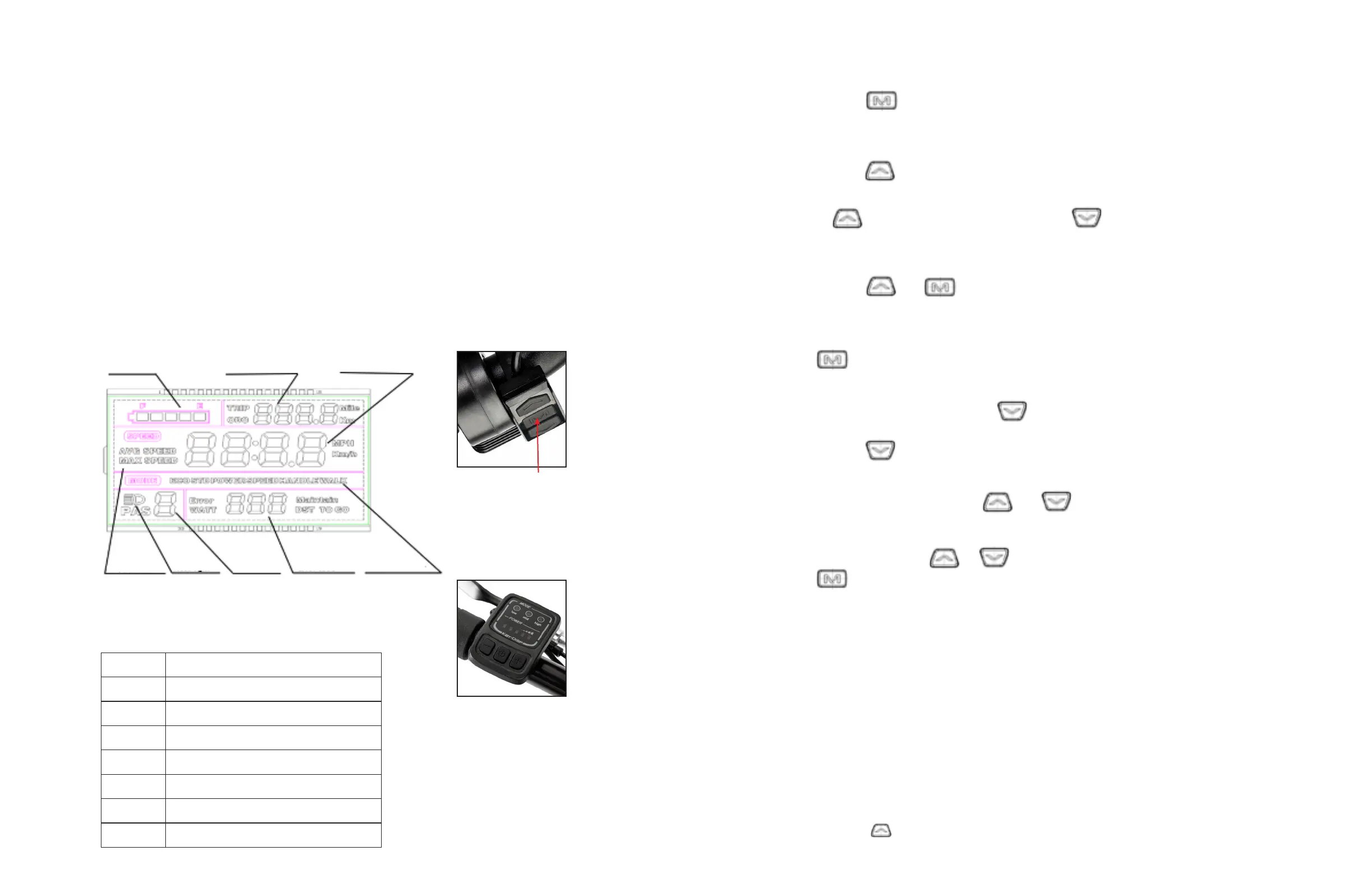
DX-S900 LED DISPLAY/OPERATION
ERROR CODE TABLE
CODE(DECIMAL)
0
Normal
Low battery Level
Motor Error
Throttle Error
Controller Error
UART Receive Error
UART Receive Error
6
7
8
9
10
11
SIGNIFIES
AURORA
• Insert key into the battery case
ignition and turn to “ON”
• Press power on button
LED display to switch on and off.
• Press + and – to increase or
decrease the speed .
• Press + for 2 seconds to turn
on the front light, press + for
another 2 seconds to turn it off.
INSERT KEY INTO THE IGNITION ON THE BATTERY CASE AND TURN TO “ON”
Battery Level Distance Speed
Speed Headlight Assist Level Error Code 6KM Mode
RIDEAU & COLUMBUS
RIDEAU, COLUMBUS
RIDEAU & COLUMBUS
RIDEAU & COLUMBUS
RIDEAU & COLUMBUS
To power on LED display,
press and hold
“M” button
for 3 seconds


 To Next Page