10
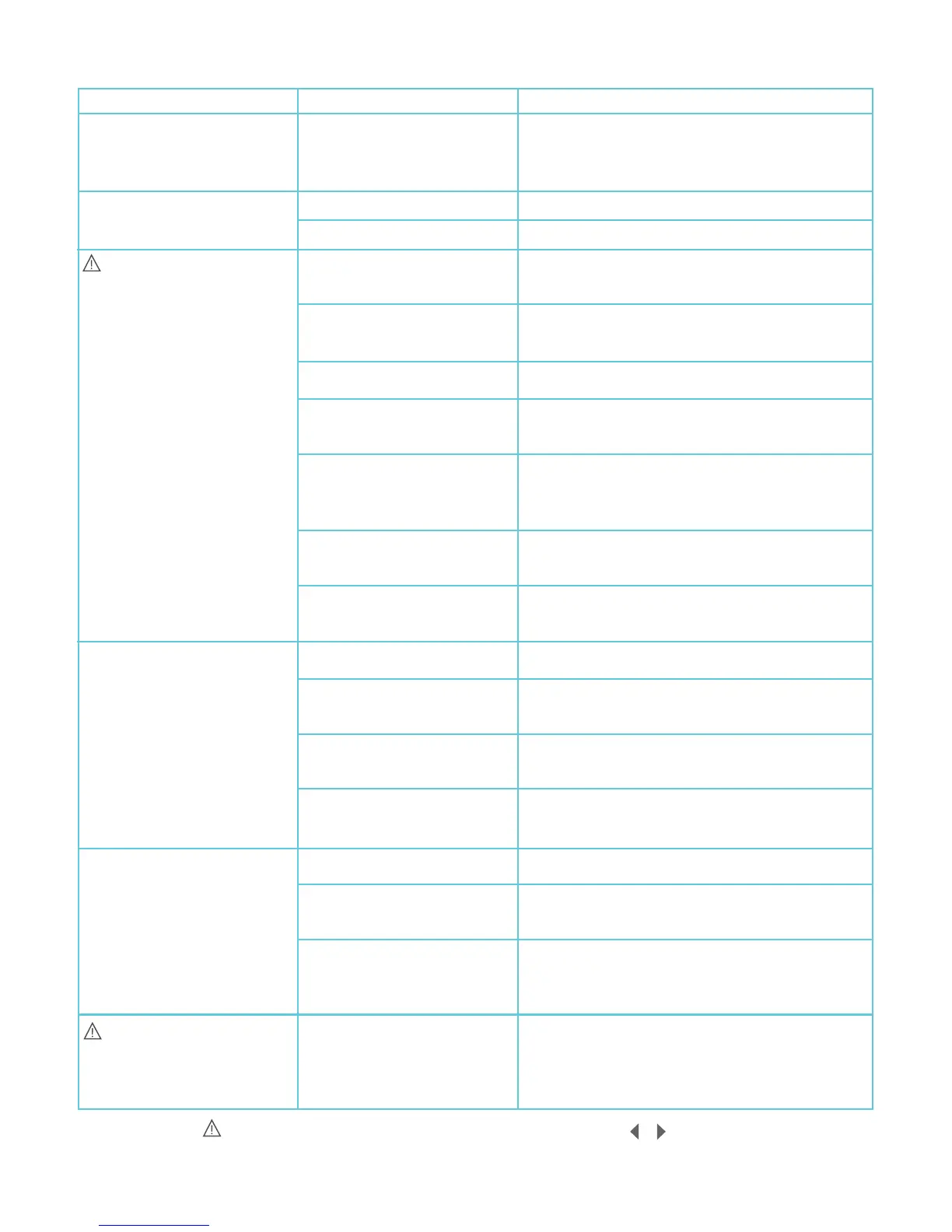
Problem
TROUBLESHOOTING
Possible Cause
Solution
Display doesn’t come on;
No signal from the controller;
The battery symbol is flashing
The display is on but there is
no stimulation
appears on the display*
and/or the controller is
beeping
Unpleasant feeling beneath
the gel pads
The contractions are very
weak even when the toning
intensity is high
and a number appear on
the display
The battery is low
The session may be paused
Intensity not increased
Controller not properly
connected to the belt
The gel pads are on the
wrong way around
The gel pads are worn
The gel pads are not covering
the metal studs
Poor gel pad contact with
skin
Build up of gel on the metal
studs
Plastic covers are still on the
gel pads
The gel pads are worn
The gel pads are not covering
the metal studs
Build-up of gel on the metal
studs
Too many consecutive
sessions
The gel pads are worn
The gel pads are not covering
the metal studs
Poor gel pad positioning
Error message
Recharge the battery
Press the on/off button briefly
Increase the intensity
Ensure the controller and belt are properly
connected
Ensure the black surfaces of the gel pads are
facing up
Replace your gel pads. Visit www.slendertone.com
Ensure each gel pad is covering the metal stud
completely
Press the gel pads firmly against the skin.
Refasten the belt tightly around your waist
(see Quick Start Guide)
Clean the metal studs of any debris with a dry
cloth. Re-attach the gel pads
Remove plastic covers from both sides of the gel
pads
Replace your gel pads. Visit www.slendertone.com
Ensure each gel pad is covering the metal stud
completely
Clean the metal studs of any debris with a dry
cloth. Re-attach the gel pads
Break for the day, allow your muscles and skin
time to settle
Replace your gel pads. Visit www.slendertone.com
Ensure each gel pad is covering the metal stud
completely
Reposition the gel pads according to your
waist size (see Quick Start Guide). Make sure
belt is tightly fastened around your waist
Switch the controller off and on. The controller
should work without any problems. If the error
message persists, call our customer care
helpline (see Quick Start Guide)
* Whenever the symbol appears in conjunction with the left/right arrows ( / ), the left arrow indicates
a problem with the left gel pad. If the right arrow appears, there is a problem with the right gel pad. If both
left and right arrows appear, there is a problem with either the middle gel pad or all three gel pads.


 To Next Page