Home
Smappee
Battery Charger
EV Wall
Page 35
Smappee EV Wall - Page 35
36 pages
Manual
Save Page as PDF
To Next Page
To Next Page
To Previous Page
To Previous Page
Loading...
Smappee EV Wall
–
Installati
on
manual - English
35
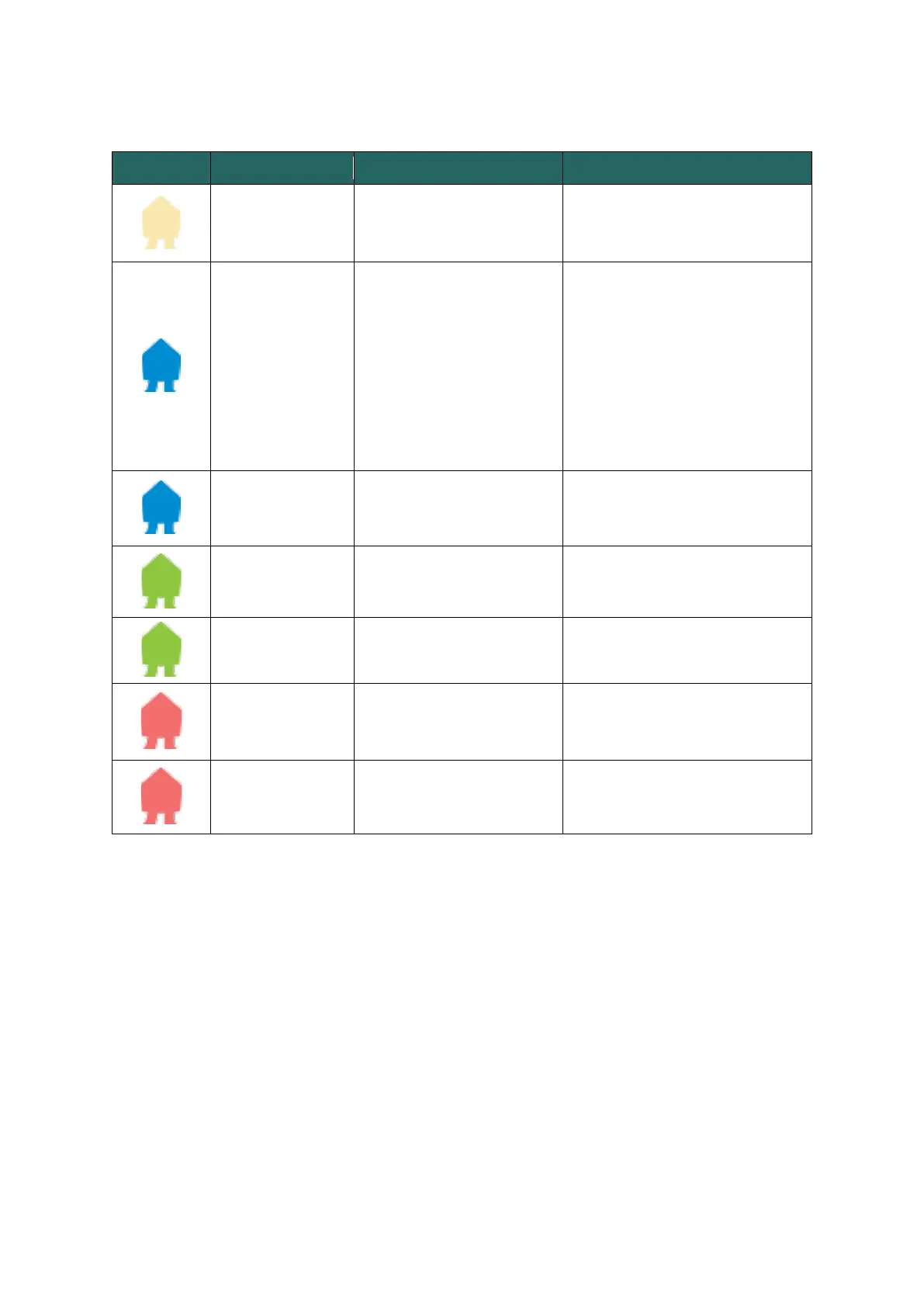
LED status
LED colour
LED status
Meaning
Action of the user
White continuous
The Smappee EV Wall
is
available.
Connect your EV with
the
Smappee EV Wall.
Blue continuous
Your EV is connected wi
th
the Smappee EV Wall,
but
is not yet charging
.
•
If using an RFID, scan y
our
charge card and
wait until th
e
LED turns flashing blu
e
.
•
If using QR codes,
scan the QR
code and wait un
til the LED
is
green pulsing
.
•
If no authorisation is r
equired,
wait until the LED bec
o
mes
green pulsing.
Blue flashing
Your RFID card is bein
g
verified.
Wait until the LED
is
green
pulsing.
Green pulsing
The Smappee EV Wall
is
charging your EV.
Your EV is being charg
ed.
Green continuous
The EV is now fully
charged.
Disconnect the cab
le.
Red continuous
The Smappee EV Wall
is
unavailable.
Check the manual o
r contact
your supplier for m
ore info and
further steps.
Red flashing
Your charge card is
not
authorised.
Contact your charg
e
card
supplier.
34
36
Table of Contents
Main Page
Table of Contents
2
Introduction
3
Safety Instructions
4
Models
6
Components
7
Technical Specifications
10
Preparing the Installation
13
Installation and Activation
16
Using the EV Wall
32
Declaration of Conformity
36
Other manuals for Smappee EV Wall
Quick Starter Guide
13 pages


 To Next Page