USER’S MANUAL PAGE 5WBC-200
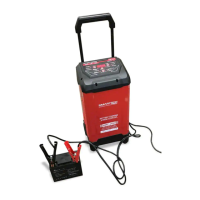
When you take the charger out from the package, the handle is uninstalled.
To install the handle, rst remove the clamp storage panel by pulling up-
wards on it, then use a thin, durable tool (i.e. a screwdriver) to depress the
two buckles at the bottom of the handle. Once depressed, push the handle
down until the buckles click into their groove. Once nished, remember
to put the clamp storage panel back on. If you want to store the charger,
simply press down the buckles once more and push handle downward into
the bottom most position.
How to install the handle? Please follow the instructions.
Length of cord (feet) 25 50 100 150
AWG* size of cord 18 16 14 12
*AWG-American Wire Gauge
Wire size must be large enough for the AC ampere rating of charger, as
specied below:


 To Next Page