EasyManua.ls Logo

smartheart 19-107 - User Manual

smartheart 19-107
20 pages
Print Icon
To Next Page IconTo Next Page
Loading...
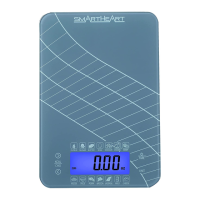
Digital Kitchen Food Scale
Model # 19-107
INSTRUCTION MANUAL
ENGLISH AND SPANISH
Please read this instruction manual
completely before operating this device.

Questions and Answers

  • F
    Frank MayAug 5, 2025
    Why do my smartheart 19-107 Scales turn off immediately?
    • D
      dawnjohnsonAug 5, 2025
      If your smartheart Scales activate but then immediately shut off, the batteries are likely low. Replace them with new, unused batteries to resolve this issue.
  • J
    jmckinneyAug 11, 2025
    What to do if the LCD display is blank on my smartheart 19-107?
    • R
      Ricky HarrisAug 11, 2025
      If the LCD display on your smartheart Scales is blank when powered on, it could be due to several reasons: * The batteries may not be installed. * The batteries might be installed incorrectly. * The batteries could be depleted. To fix this, install 2 AAA batteries if they aren't already installed, ensure the polarity of the batteries is correct, or install a new battery.
  • C
    Carrie CohenAug 18, 2025
    How to fix a low battery on smartheart 19-107?
    • M
      Michael FowlerAug 18, 2025
      If your smartheart Scales display shows 'Low battery', you should replace the batteries with new, unused ones.
  • S
    Stephen KeyAug 23, 2025
    What to do if smartheart 19-107 show low voltage?
    • C
      Carolyn MurphyAug 23, 2025
      If your smartheart Scales display indicates a low voltage, replace the batteries with new, unused batteries.
  • S
    Shawn BrownAug 30, 2025
    What to do if smartheart 19-107 show overload?
    • E
      Eileen ShawAug 30, 2025
      This smartheart Scales are designed for weights up to 5000g / 11 lbs. If you see an overload message or the scale indicates too much weight, stop using the scale immediately, as it is not suitable for the current load.

Summary

Introduction

Care and Safety Information

General Safety Precautions

General safety rules for operating the scale, including handling and usage.

Operating Environment Guidelines

Safety guidelines for the scale's operating temperature and humidity.

Storage Environment Guidelines

Safety guidelines for storing the scale, covering temperature and humidity.

Cleaning Safety Precautions

Safety advice for cleaning the scale, avoiding water immersion and chemicals.

Product Overview

Battery Installation and Replacement

Instructions for installing and replacing the 2 AAA batteries in the digital scale.

Instructions for Use

Direct Item Weighing

How to weigh items directly on the scale using the UNIT and POWER/TARE functions.

Tare Functionality Guide

How to use the tare feature to weigh food in containers accurately.

Convenient Wall Hanger

Description of the scale's retractable wall hanger for convenient storage.

Care and Maintenance

Cleaning and Maintenance Procedures

Proper methods for dusting, wiping, and drying the scale to maintain it.

General Maintenance Precautions

Advice on avoiding water, chemicals, disassembly, and exceeding weight limits.

Device and Label Symbols

Troubleshooting and Error Codes

Error Code Explanations

Explains error codes like 'EEEE' (overload) and 'Lo' (low battery) with solutions.

Common Problem Resolutions

Addresses issues like blank display or immediate shut-off with battery and installation fixes.

FCC Information

FCC Compliance Requirements

Information regarding the device's compliance with FCC rules and potential interference.

Specifications

Two-Year Limited Warranty

smartheart 19-107 Specifications

General IconGeneral
Auto Power OffYes
Unit ConversionYes
MaterialTempered Glass
Unitslb/kg/st
Weight Increment0.1 kg
Power SourceAAA batteries
Platform Size30 x 30 cm

Related product manuals