Preparation
Before installing SwitchLinc, please familiarize yourself with the following and take the neces-
sary precautions listed here:
• Be sure that power to the load being controlled has been disconnected by removing the
fuse or turning the circuit breaker off. Installing SwitchLinc with the power on may expose
you to dangerous voltages and may damage the product.
• Refer to the SwitchLinc Wiring Diagrams on page 5 to determine the wire colors of the con-
nections to SwitchLinc. Note: All SwitchLincs require a neutral connection.
• Wiring for 3-way, 4-way, and up switch circuits follow conventional (standard, non-remote)
wiring practice (plus the requirement for a neutral). Wiring “slave” switches requires the
Line (Black) wire be accessible and be the same 110V leg of the house wiring. The White
wire on the “slave” switch is to be connected to NEUTRAL ONLY. If neutral is not available,
cap the White wire (which simply causes the LED not to function).
• SwitchLinc may feel warm during operation. The amount of heat generated is within U.L.
approved limits and poses no hazards. To minimize heat build-up, ensure that the area
surrounding the rear of the SwitchLinc has adequate ventilation (i.e., clear away
excess insulation).
• Installation should be performed only by a qualified electrician, or by a homeowner who is
familiar and comfortable with electrical circuitry.
Installation
1. Remove the power from the existing switch/device.
2. Remove the faceplate from the existing switch/device.
3. Unscrew and pull the device out of the wallbox.
4. Disconnect the wires from the device.
5. Using a wire tester or voltmeter, identify and mark “Hot,” “Neutral,” “Ground,” and
“Traveler” (if applicable) wires that were connected to the device.
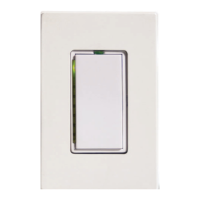
6. Before making any connections to SwitchLinc, gently pull the Status LED/ Set Button on
the SwitchLinc until a click is heard. This will open the “air gap” and isolate the SwitchLinc
from the electricity when the circuit breaker is turned back on.
7. Orient SwitchLinc so the LED is at the top, and make connections according to the
“SwitchLinc Wiring Diagram” below. Wire remote dimmer switches according to the
“SwitchLinc Multi-Way Wiring Diagram”.
8. After all connections have been made, ensure that all wire connectors are firmly attached
and that there is no exposed copper except for the Ground wire.
9. Gently place the wires and switch into the wallbox (with LED at top of device) and screw
into place.
10.Before installing the faceplate, restore power to the circuit, and press in the SwitchLinc
Status LED/Set Button top until it is even with the front plastic trim ring. Once the set but-
ton is pressed in, power will be supplied to the SwitchLinc. After a few seconds the green
Status LED will come on.
11.After testing SwitchLinc for proper operation, install the faceplate (sold separately).
4


 To Next Page
 Loading...