8 9
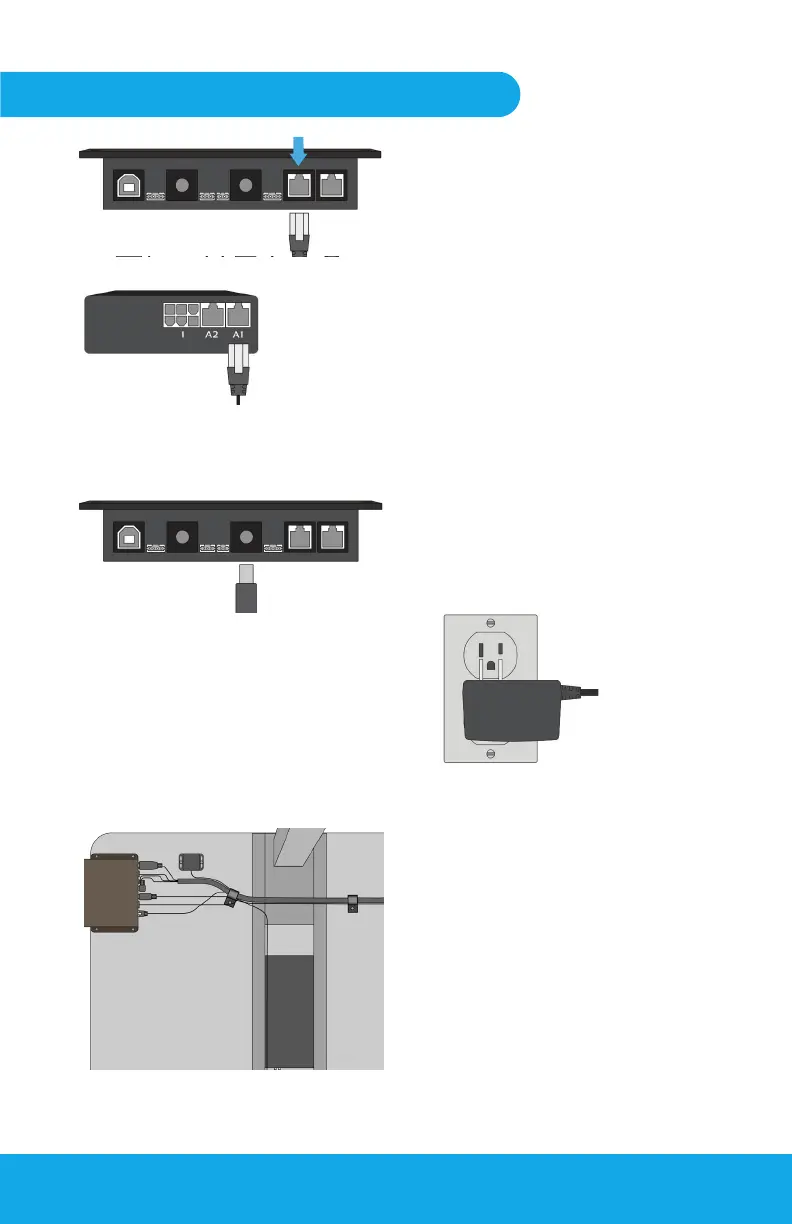
Locate the Pulse Communication
Cable. Plug one end of the cable
into the rear of the Control Box;
plug the other end into the original
desk controller, using the same
port the original handset was
plugged into
NOTE: If Comm cable has a
colored or specialized connector
on one end, plug this end into
the original desk controller.
Remove the two (2) ½” cable
clamps and remaining #10 wood
screws from the installation kit.
Clamp the cables attached to the
Control Box roughly 4-6” behind
the box, ensuring nothing hangs
near or below the Height Sensor.
Place the second clamp near the
rear edge of the desk to ensure no
cables are left hanging.
Using the 12V wall adapter, plug
the circular connector into the
Control Box and the other end into
an available power outlet.
Fig 5-2
Desk Column Box
Height Sensor / COM Cable
Fig 5-1
Securing Cables
Fig 5-4
Fig 5-5
Step Five: Finalizing setup
Bottom View
Powering the Pulse
Fig 5-3
7.
X
8.
9.


 To Next Page