Soft Starter Startup Manual Sprecher + Schuh Hydraulic Installation
January 30, 2021 ©2021 Smartrise Engineering, Inc. All Rights Reserved Page 7
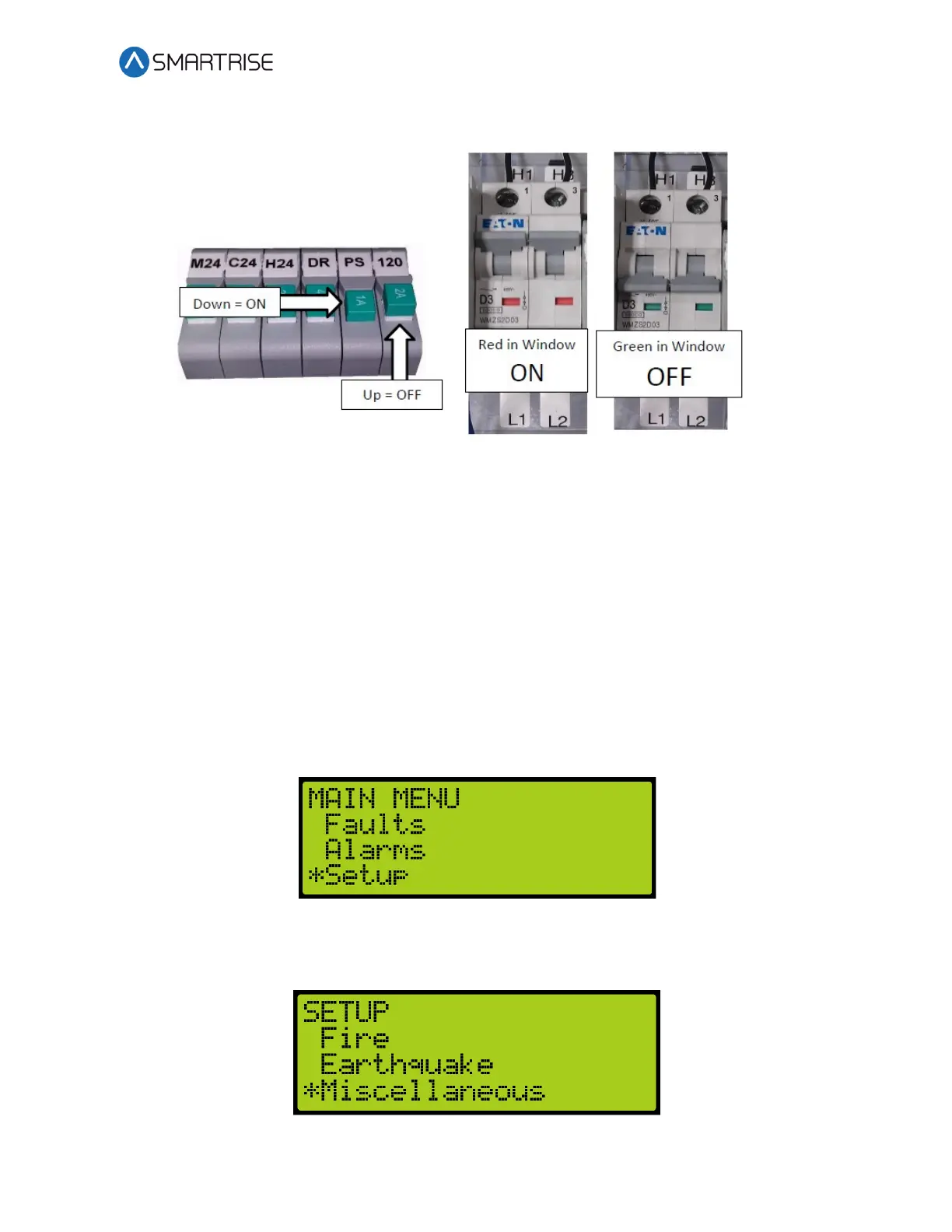
3. Verify the LCD on the Smartrise board and the soft starter power up.
Figure 7: Breakers
Final Setup
Perform the following to set the Bypass Term Limit. Complete the checklist during the
verification process.
NOTE: The selected menu within the menu options is shown with a *.
1. Toggle the Inspection/Normal switch to INSP position.
2. On the MR board, press the left arrow (ESC) button several times to get to the MAIN
SCREEN.
3. Press the right button to access the Main Menu.
4. From the MAIN MENU, scroll and select Setup.
Figure 8: MAIN MENU – Setup
5. From the SETUP menu, scroll and select Miscellaneous.
Figure 9: SETUP Menu – Miscellaneous



 To Next Page