21
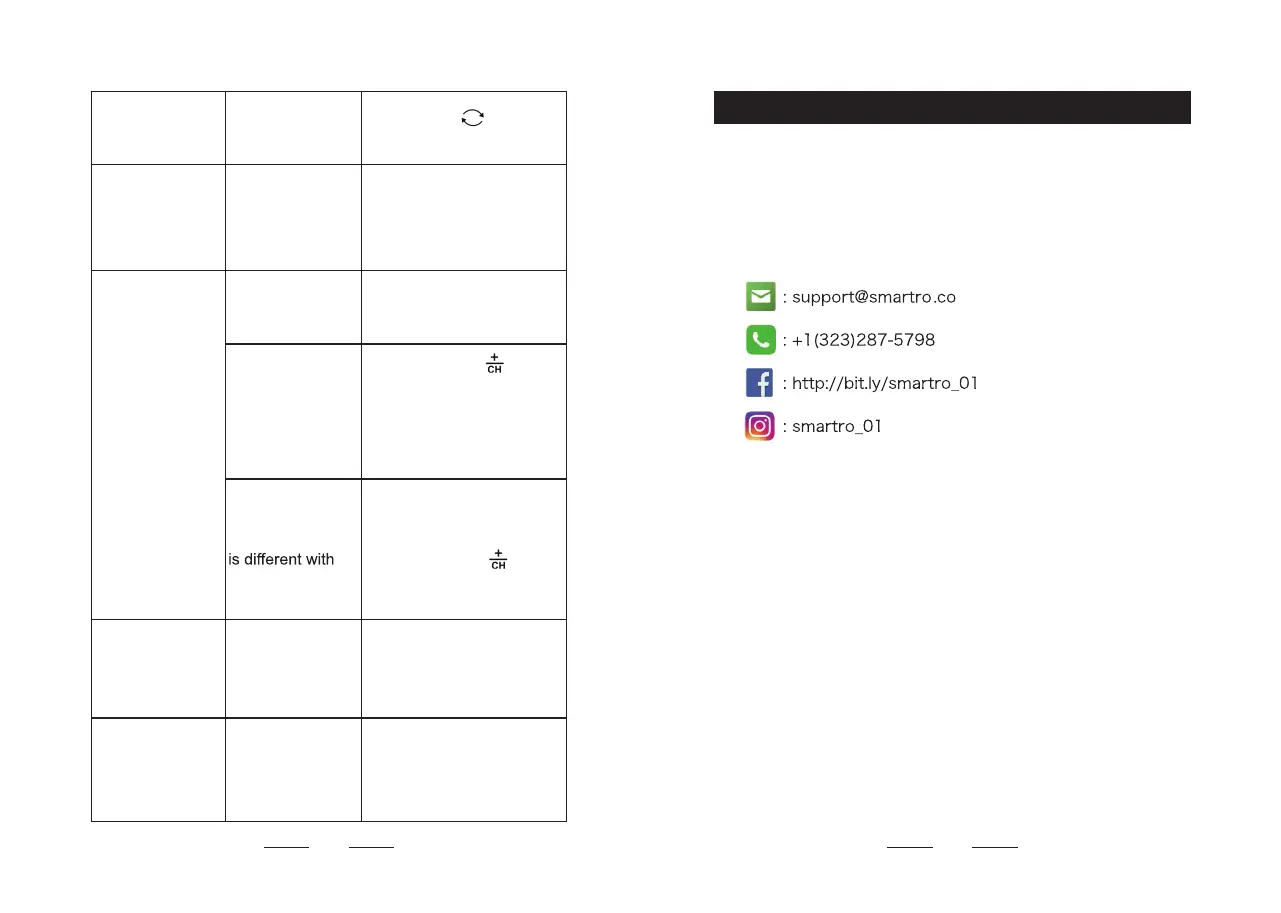
Projection image
upside down.
Short press "
" button to
adjust the angle by 180°.
Backlit is too
bright or too dark.
Press " SET " button to
adjust 4 backlit brightness,
light - medium - low - out.
Can’t display
the outdoor
temperature.
The batteries are
depleted.
Replace new batteries for
outdoor sensor.
The weather
station can’t
receive outdoor
sensor’s signals.
Press and hold "
" button
for 3 seconds to receive
signal manually.
Press " TX " button on the
outdoor sensor to send out
signals manually.
The displayed
channel of the
weather station
the channel of the
outdoor sensor.
Select corresponding
channel through the "1 2
3" knobs for the outdoor
sensor or press "
"
button to switch the weather
station displayed channel.
Display an
inaccurate
outdoor
temperature.
The outdoor
sensor is exposed
to direct sunlight
or rain.
Avoid the outdoor sensor
with direct sunlight and rain.
Fuzzy projection/
Missing pixels
projection image/
Have trouble with
manual setting.
Contact after-sales service.
16. After-sales Support
Please contact us if your device fails to work despite these
.yawyna ni tcefrep naht ssel si su htiw ecneirepxe ruoy ro serusaem
Or Join our Instagram or Facebook group for more support and
discount information.
22


 To Next Page