Use
53
EN
12. Pressing the control knob again will go
back to point 2 of the change sequence.
You must press the return knob to save
the recipe. The appliance will ask you to
set a name for the recipe you have just
created.
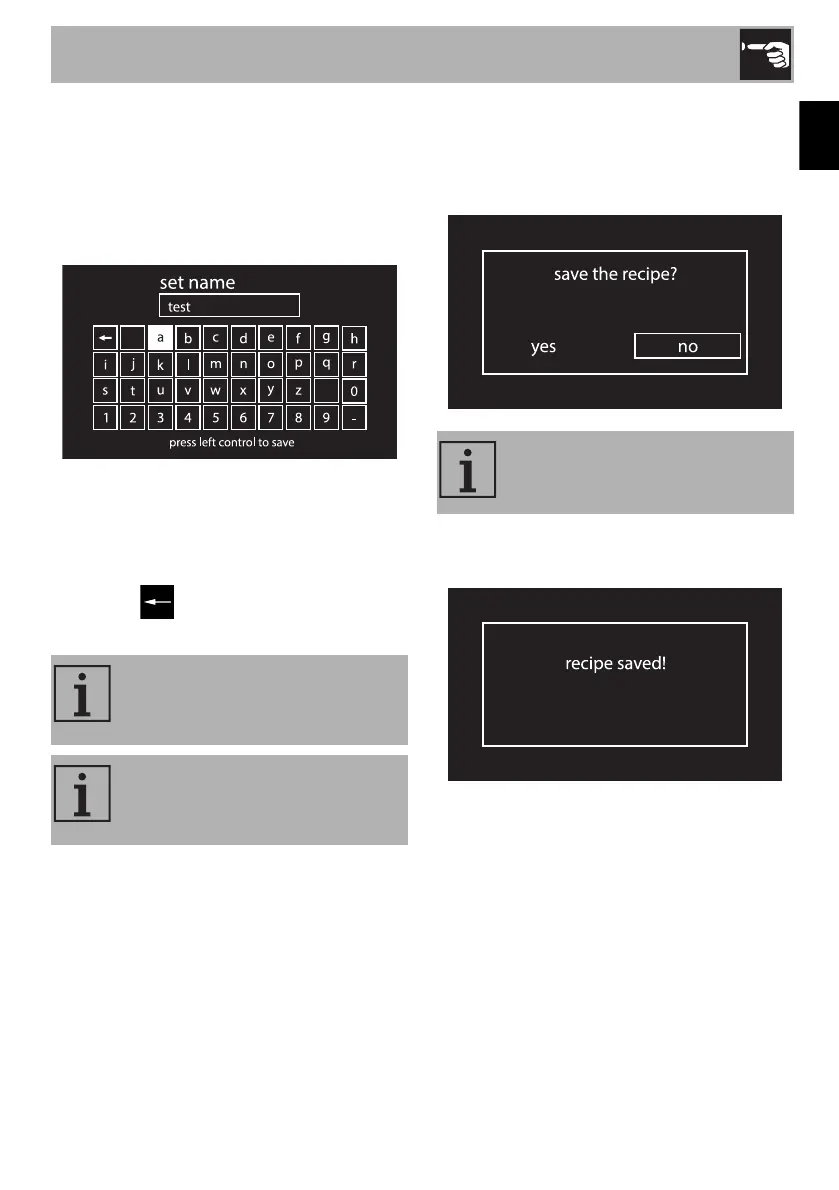
13. Set the name of the recipe. Turn the
control knob to select the characters to
set. Each time the control knob is
pressed, a character of the name will be
set. The character deletes the
previous letter.
14. After setting the name of your recipe,
press the return knob to confirm or cancel
the information you have entered. Select
yes if you wish to save the recipe.
15. If the change is confirmed the display
will show “recipe saved”.
The name of the recipe can
contain max. 10 characters,
spaces included.
The name must contain at least one
character in order to save the
recipe.
If you select “no”, you will lose all
modifications made.


 To Next Page