Cleaning and maintenance
32
4.7 Extraordinary maintenance
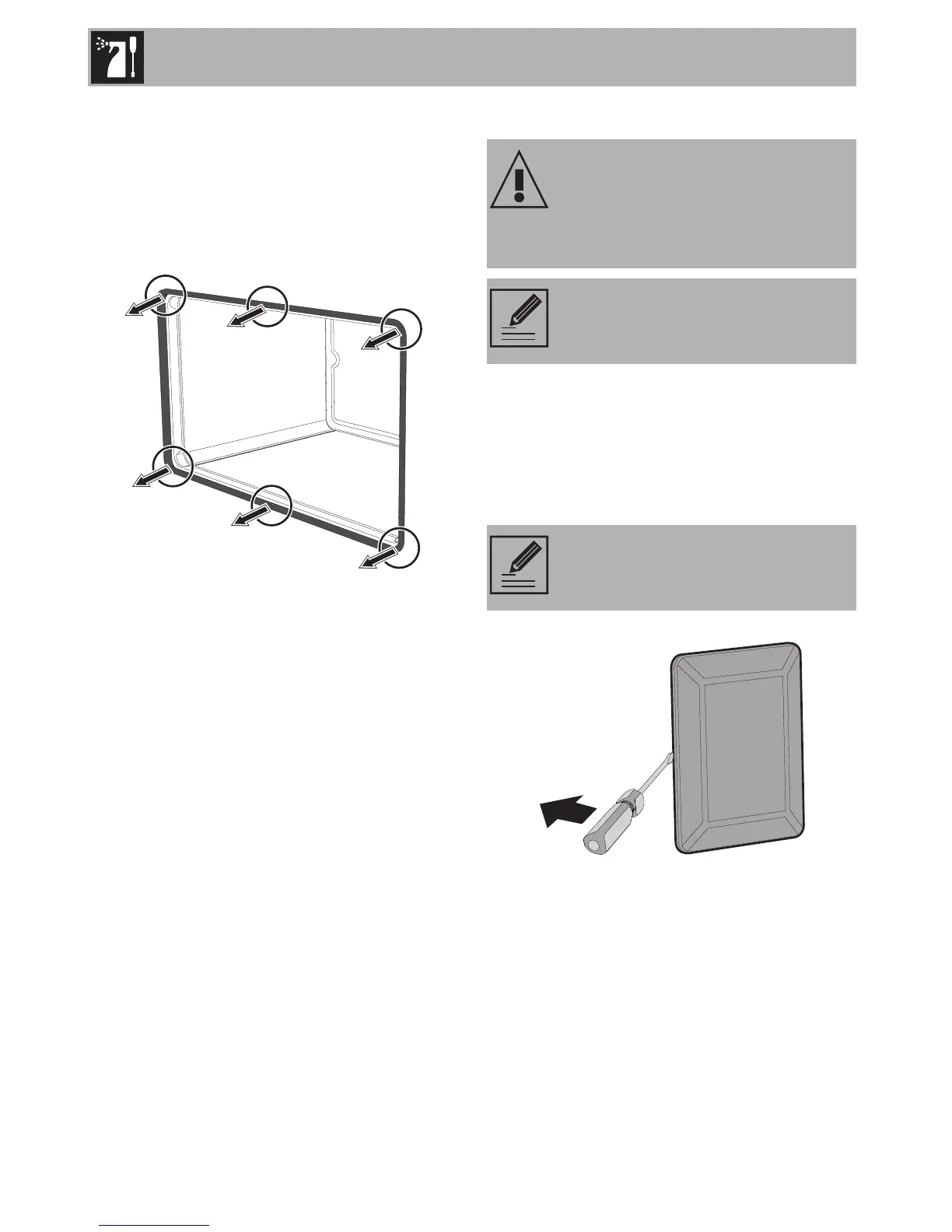
Removing and installing the oven seal
To remove the oven seal:
• Unhook the clips in the 4 corners and in
the centre, then pull the oven seal.
To install the oven seal:
• Hook the clips in the 4 corners and in the
centre onto the oven seal.
Oven seal maintenance tips
The seal should be soft and elastic.
To keep the oven seal clean, use a non-
abrasive sponge and lukewarm water to
wash it.
Replacing the oven light bulb
1. Completely remove all accessories from
inside the oven.
2. Remove the racks/trays support frames.
3. Remove the bulb cover using a tool (e.g.
a screwdriver).
Live parts
Danger of electrocution
• Unplug the appliance.
The oven is fitted with a 40W light
bulb.
Pay attention not to scratch the oven
cavity enamel.


 To Next Page